FERNSTEUERUNG REMOTE CONTROL ÉMETTEUR EMISORA
STATUS LED
• LED leuchtet nicht - Sender ist ausgeschaltet.
• LED blinkt rot - Sender hat (noch) keine Verbindung zum
Gravit aufgebaut
• LED leuchtet rot - Der Sender ist eingeschaltet und be-
triebsbereit.
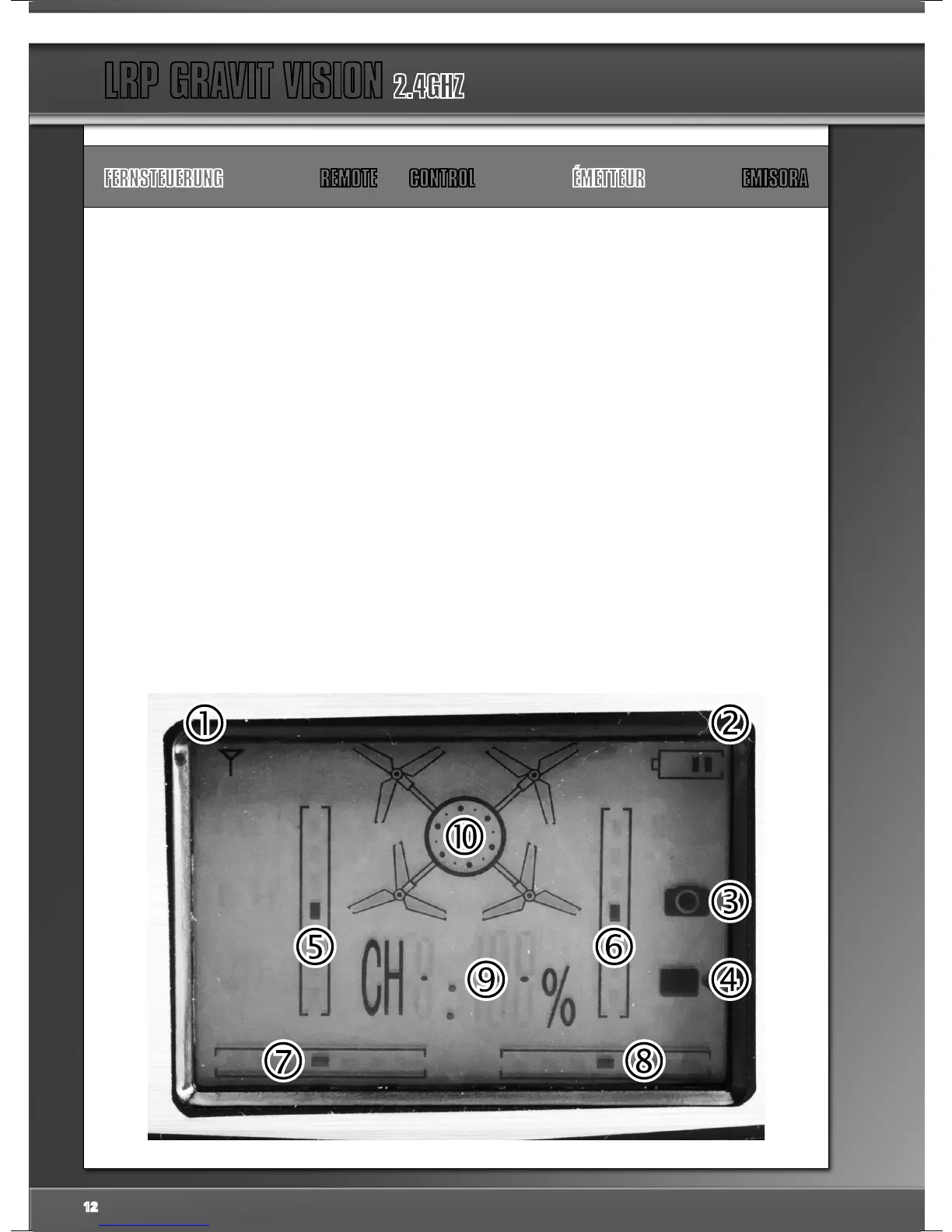
LCD - DISPLAY
Verbindungsanzeige - Hier können Sie ablesen, ob Ihre
Fernsteuerung eine Verbindung mit der Gravit aufgebaut
hat oder nicht. Ist eine Verbindung vorhanden, sehen Sie
mehrere Balken rechts vom Antennensymbol.
Batterie - Anzeige - Hier sehen Sie, ob die Batterien Ihrer
Fernsteuerung noch voll genug sind. Ersetzen Sie die
Batterien, wenn nur noch ein Balken angezeigt wird.
Photo - Anzeige: Das Photo - Symbol leuchtet kurz auf,
wenn Sie mit der Videocamera ein Photo machen
Video - Anzeige: Solange das Video - Symbol im LCD an-
gezeigt wird, nimmt die optional erhältliche Videocamera
Ihrer Gravit auf.
Schub-Trimmungs-Anzeige
Nick-Trimmungs-Anzeige
Gier - Trimmungs - Anzeige
Roll-Trimmungs-Anzeige
Visuelle Power-Anzeige
Schub-Anzeige für alle Kanäle
STATUS LED
• LED does not glow - Transmitter is switched off.
• LED is blinking red - Transmitter has not yet established a
connection to Gravit - please wait.
• LED glows red - Transmitter is switched-on and operatio-
nal.
LCD - DISPLAY
Connection Indicator - Here you can see, wether your
transmitter could establish a connection with your Gravit
or not. When a connection is established, you can see
several bars to the right of the antenna symbol.
Battery status - display: Here you can see wether your
transmitter batteries are still good or not. Please replace
the batteries when there is only one bar left.
Battery status - display: Here you can see wether your
transmitter batteries are still good or not. Please replace
the batteries when there is only one bar left.
Elevator trim display
Throttle trim display
Elevator trim display
Yaw trim display
Aileron trim display
Visual power indicator
Visual power indicator
12


 To Next Page
 Loading...