EasyManua.ls Logo

Lucky Duck Super Revolt 20021-6 - User Manual

Lucky Duck Super Revolt 20021-6
4 pages
Print Icon
To Next Page IconTo Next Page
Loading...
Super Revolt #20021-6
Thank you for purchasing the Super Revolt electornic call. To see more Lucky Duck™ products please visit your local
Sporting Goods dealer or online at www.luckyduck.com.
Directions for use: Unpack the box and make sure all parts are present.
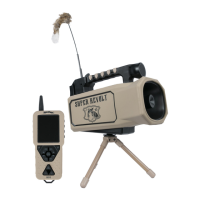
1 Super Revolt Electronic Call
1 LD3X Super Revolt Remote Control
1 SD Card (installed)
1 Tripod, Decoy and Antenna
1 Rechargeable Battery and Charger
Battery Installation: The call includes a 12 volt 3,700 mAH lithium ion battery and charger. The battery compartment is
located on the back of the call. Simply remove the battery cover, plug the battery into the call, set the battery in the battery
compartment and replace the battery cover. The remote control uses 3AA batteries (not included). Remove the battery
cover on the back of the remote control and install the batteries.
Antenna: The antenna will either be in the box or installed on the call. If the antenna is in the box, simply locate the
antenna port on the back left of the caller and screw the antenna onto the caller.
Decoy: The decoy will either be in the box or stored on the side of the call. Insert the decoy into the hole on the top of the
handle. Make sure to aling the groove on the decoy with the slot on the decoy joint located in the handle. A strong magnet
holds the decoy in place. The decoy can be stored on the left side of the call.
Tripod Base: Install the tripod base on the bottom of the Super Revolt. The tripod base allows the caller to rotate to
broadcast sound. Make sure to aling the groove on the bottom of the Super Revolt with the slot on the tripod stand. A
strong magnet holds the tripod to the caller. The tripod base can be disassembled to adapt to most standard camera
tripods or any other base system that utilizes a ¼ 20 thread. This may be helpful if you want to elevate the call depending
on the hunting terrain.
Electronic Call Operation: Slide the power switch on the electronic call to the “on” position. A red LED light on the back
of the call will illuminate when the power is on. Hold down the power button on the remote control. The remote will turn on.
The remote screen will display “Finding Caller”, “Waiting”, “Communication OK” while it searches for the caller. Once
connected to the caller the remote screen will be displayed. On the second line of the home screen it should have an SD
icon confirming the remote and caller are connected and in sync. DO NOT PRESS ANY BUTTONS WHEN REMOTE IS
SEARCHING FOR THE CALLER.
Reboot: A reboot function is available to resync the remote and call if the connection between the two is lost while
hunting or the sound files are not displayed correctly. Simply press and hold the “auxillarary” button to reboot the remote
and resync. The remote screen should turn blue and go through the “Finding Caller”, “Waiting”, “Communication OK”
proces as described in the Electronic Call Operation section above. DO NOT PRESS ANY BUTTONS WHEN REMOTE
IS SEARCHING FOR THE CALLER.
Remote Control Operation:
Sound Selection Use the up/down arrows to highlight the folder you want to select. Press the play/pause button to select
the folder. Use the up/down arrows to highlight the sound you want to play. Press the play/pause button to play the sound.
Holding the up/down arrows down for 1 second will cycle through the folders/sounds faster.
Play Two Sounds At Once Pressing the S button on the bottom of the remote will cycle between Sound 1 (S1) channel
and Sound 2 (S2) channel. S1 or S2 will be displayed on the second line from the top of the remote screen. This indicates
which sound channel is being controlled when using the remote buttons. To play two sounds at once, first select a sound
to play. Once a sound is playing press the S button and S2 will be displayed. Then select a different sound to play. Now
two sounds are playing at once. There are two speaker icons on the second line from the top of the remote screen that
indicate which channels are playing sounds. Note sounds using different sampling rates cannot be played together.

Question and Answer IconNeed help?

Do you have a question about the Lucky Duck Super Revolt 20021-6 and is the answer not in the manual?

Summary

Product Overview and Initial Setup

Directions for Use

Unpack and verify all included parts for the Super Revolt electronic call.

Battery Installation

Instructions for installing batteries in both the call and remote control units.

Antenna and Decoy Setup

Guidance on attaching the antenna and inserting the decoy accessory.

Tripod Base Attachment

How to connect the tripod base for sound broadcasting stability.

Electronic Call and Remote Operation

Powering On and Syncing

Steps to turn on the electronic call and establish remote connection.

Remote Control Functions

Overview of remote buttons like Volume, Back, Recall, and Stop All.

Display Screen and Brightness

Explains remote display icons and how to adjust screen brightness.

Remote Control Distance

Information on the operational range between remote and caller.

Advanced Features and Sound Management

Scan Operation Modes

Utilizing scan buttons to rotate the call for broad sound coverage.

Favorite Buttons Programming

Storing and accessing preferred sounds using F1-F3 buttons.

Gain Control Adjustment

Modifying gain levels to optimize sound output for various conditions.

Auxiliary Function Control

Operating an external decoy using the auxiliary port and button.

Add;Remove Sounds

Managing and adding custom sound files via SD card.

Charging, Maintenance, and Troubleshooting

Battery Recharging Methods

Instructions for recharging the lithium-ion battery via caller port or directly.

Care and Maintenance Tips

Guidelines for protecting the device from elements and extending battery life.

Troubleshooting Common Issues

Solutions for connectivity, sync, and display problems.

Overview

The Lucky Duck Super Revolt is an electronic call designed for hunting, featuring a range of functionalities for sound broadcasting, remote control, and decoy operation. It comes with a remote control, an SD card (pre-installed), a tripod, a decoy, an antenna, and a rechargeable battery with a charger.

Function Description

The primary function of the Super Revolt is to broadcast animal sounds to attract game. It comes preloaded with 200 live animal sounds, professionally recorded and organized into 19 folders for easy access. These sounds are in .LD format and are exclusive to Lucky Duck electronic calls. The device supports up to 2,000 sounds and 32 folders, with file names up to 20 characters long. It can play both .LD and .mp3 files.

The device features a powerful 30-watt/30-amp speaker system, designed to extend sound over long distances and in multiple directions. This is enhanced by a scanning function that allows the call to rotate, broadcasting sound over a large area and calling in predators from greater distances than most other calls.

An auxiliary function allows for remote control of a separate, compatible decoy (not included). This is achieved by connecting the decoy to the auxiliary port on the back of the caller using a 3.5mm cord.

Usage Features

Setup and Power:

To begin, unpack the device and ensure all parts are present. The 12-volt, 3,700 mAH lithium-ion battery is installed in the battery compartment on the back of the call. The remote control requires 3 AA batteries (not included). The antenna can be screwed onto the antenna port on the back left of the caller. The decoy is inserted into a hole on top of the handle, aligning a groove with a slot for a secure magnetic hold. The tripod base is installed on the bottom of the Super Revolt, allowing the caller to rotate. It can be disassembled to adapt to standard camera tripods.

To operate, slide the power switch on the electronic call to "on." A red LED light on the back of the call will illuminate. Hold down the power button on the remote control to turn it on. The remote screen will display "Finding Caller," "Waiting," and "Communication OK" as it connects to the caller. Once connected, an SD icon will appear on the second line of the home screen, confirming the connection. It's crucial not to press any buttons while the remote is searching for the caller.

Sound Selection and Playback:

Use the up/down arrows on the remote to highlight and select folders and sounds. Press the play/pause button to select a folder or play a sound. Holding the up/down arrows for 1 second will cycle through folders/sounds faster.

The "S" button on the remote allows you to cycle between Sound 1 (S1) and Sound 2 (S2) channels, enabling the playback of two sounds simultaneously. Select the first sound, press "S" to switch to S2, then select a different sound. Two speaker icons on the remote screen indicate which channels are playing. Note that sounds with different sampling rates cannot be played together.
Volume and Gain Control:

The vol- and vol+ buttons adjust the volume level from 1 to 32. Holding these buttons for 1 second changes the volume quickly. The Super Revolt features a four-stage gain control (1-4), with 1 being the lowest and 4 the highest. The default gain level is 3. Adjusting the gain controls the power running through the amplifier, affecting sound volume and quality. Different sound frequencies may sound better at different gain levels. The "G" key cycles through the gain levels, which are displayed on the screen.

Remote Screen and Brightness:

The remote display screen shows information on the top two lines and the bottom line. The top line displays a stand timer, volume level (1-32), and remote control battery level. The second line highlights icons for auxiliary function (AUX), sound channel (S1/S2), SD card status (SD), signal strength, and speaker activity. The bottom line shows the selected brightness mode.

The remote has three screen brightness modes: "Day," "Dawn/Dusk," and "Night." These are selected by pressing and holding one of the three scan buttons. To adjust brightness, hold the "Back" button for 3 seconds, then use the volume +/- buttons.

Remote Control Distance:

The Super Revolt uses advanced remote technology that does not require a line of sight between the remote and the caller, operating effectively up to at least 100 yards, and potentially greater distances depending on conditions.

Scan Operation:

The top/bottom scan buttons rotate the call left or right. Pressing the button again stops the rotation. The middle scan button covers 180 degrees, rotating the call 90 degrees left, 180 degrees right, and back 90 degrees left to return to the approximate starting position. Pressing the scan button again stops the call during rotation.

Favorite Sounds:

The F1-F3 buttons are designed to store three favorite sounds for quick access. To program a favorite, highlight the desired sound, adjust the volume, then hold down the corresponding F1-F3 button. The highlighted sound will flash on the display, confirming programming. If F1 doesn't program, try F2 or F3 first, then F1.

Reboot Function:

If the connection between the remote and call is lost or sound files are not displayed correctly, a reboot function is available. Press and hold the "auxiliary" button to reboot and resync. The remote screen will turn blue and go through the "Finding Caller," "Waiting," and "Communication OK" process. Do not press any buttons during this process.

Add/Remove Sounds:

To add or remove sounds, locate the SD card on the back of the call under the black cover. Press the SD card to eject it. Connect the SD card to a computer (Windows Operating System recommended) and manage files as you would with a standard camera SD card. Reinstall the SD card into the caller (top side or label side facing left). Turn on the caller (red light will flash) to transfer sounds to internal memory. This sync process takes 8-10 minutes for 200 sounds; more sounds may take longer. Once the red light stops flashing, turn on the remote control. The remote will take 1-2 minutes to find, update, and resync, with the screen turning blue, then black, displaying folders and sounds. Do not press any buttons during this update.

Maintenance Features

Charging:

The Super Revolt uses a 12-volt, 3,700 mAH lithium-ion battery pack. Only use the provided charging system; using other battery packs or chargers voids all warranties.

There are two methods to recharge the battery:

  1. Caller Port: Plug the charger into the charging port on the back of the call (middle port under the black cover), then plug it into an 110V wall outlet. The charger's LED will be red while charging and green when fully charged. A full recharge takes approximately 3 hours.
  2. Battery Directly: Remove the battery from the caller, unplug its connector, and use the adapter to connect the charger to the battery. Plug the charger into an 110V wall outlet. The LED will be red while charging and green when fully charged. This also takes approximately 3 hours.

Care and Storage:

The Super Revolt is not waterproof; protect it from rain and snow. If it gets wet, dry it thoroughly. A small battery drain occurs even when the power is off. To extend battery life, remove batteries from the remote and disconnect the battery pack from the caller between hunts. The caller has a remote control storage adapter on its back. Insert the remote clip into the adapter for storage, but do not transport the remote in the adapter as it may detach.

Troubleshooting:

  • Operating/Sync Issues: If the caller or remote isn't operating properly or syncing after SD card changes, turn both units off, remove and reinstall batteries, then turn them back on as described in the operations section.
  • Lost Connection/Incorrect Sound Files: If connection is lost or sound files are not displayed correctly, use the reboot function: press and hold the "auxiliary" button to resync. Do not press any buttons while the remote is searching.
  • Folders/Sound Files Not Displaying: If folders and sound files from the SD card are not displaying correctly on the remote, press and hold the "Gain" button for 3 seconds. This forces the caller to copy the SD card contents to its internal memory and the remote. This process can take 8-10 minutes. Do not press any buttons during this time.

Lucky Duck Super Revolt 20021-6 Specifications

General IconGeneral
CategorySports & Outdoors
TypeElectronic Call
Remote Range300 feet
MaterialPlastic
Weight1.5 lbs
Dimensions8 x 4 inches
