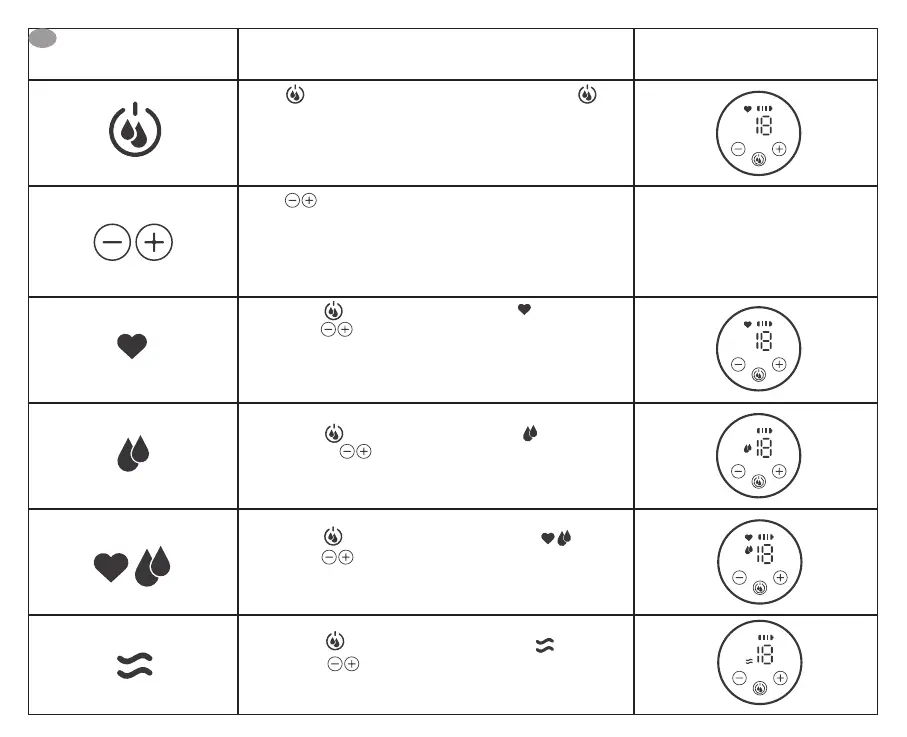
Button Operation instruction Display
Press for 2 seconds to turn the device on / o. Press
briey to select the working mode.
The default function after startup is massage, the most recent
intensity used is remembered for the next use.
Press to increase or decrease the compression.
The massage mode contains 5 operating levels. The pump mode
contains 10 operating levels. The stimulation mode contains 10
operating levels.
Briey press to switch to Massage mode
Then adjust to increase or decrease the levels depending
on your personal preference.
After 2 minutes of massage, it automatically switches to pump
mode.
Briey press to change to Pumping Mode ;
Then adjust to increase or decrease the compression
depending on your personal preference.
Briey press to change to Stimulation Mode ;
Then adjust to increase or decrease the levels depending
on your personal preference.
Briey press to change to Retraction Mode ;
Then adjust to increase or decrease the vacuum
strength depending on your personal preference.
EN


 To Next Page
 Loading...