4
EN
Flashing: the drum is playing or waiting to play with the LOOP b.
synchronously, the flashing speed is the speed of the DRUM.
status indicator is fixed to yellow.
speed of the DRUM c
. Red: The DRUM is in the edit state, the
can be changed.
Green: The DRUM is in the saved state, the speed of the DRUM d
.
can’t be changed.
3
. Left and right buttons
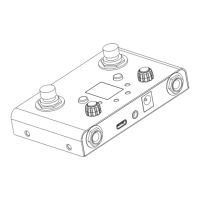
●Tap the left/right button to select drums, a total of 30 drums.
●In the LOOP mode, press and hold the left/right button for 1
second to select a loop, a total of 4 loops.
●In the LOOP mode, tap the left and right buttons at the same time
to turn on the synchronous recording (SYNC) mode, the
corresponding LED will be flashing fast,and the LOOP recording
will automatically start after playing.
●In the LOOP mode, press and hold the left and right buttons at
the same time for 1 second to turn on the single DRUM mode,
and in the same way to exit the single DRUM mode.
●Press and hold the left and right buttons at the same time for 3
seconds to enter the TUNER mode.
4
. The display screen
●When the LOOP is stopped, the number of DRUM type is
displayed: 1-30.
In the state of the LOOP playback, recording, and overdub,
●
the progress of the LOOP will be displaying, when the progress
bar has gone a round, the audio has been played once.
●In TUNER mode, the note name is displayed.
5
.4 LED
●In the LOOP mode,4 LED represent 4 loops.
When the first beat of each DRUM playing circulation,


 To Next Page
 Loading...