hi
F
ace
192
k
H
z
/24bit digital audio interface
REVISION 1.o – NOVEMBER 2010
Copyright © 2010, M2Tech Snc di Manunta & Marino
20
M2Tech
www.m2tech.biz
6. Configuring the player for WASAPI: an example
6.1. FooBar
To use FooBar with WASAPI under Windows 7 it is necessary to download the DLL for
WASAPI from the FooBar2000 website and install it in the Components sub-folder inside
FooBar2000 main folder in your hard disk. The DLL can be found at
http://www.foobar2000.org/components/view/foo_out_wasapi (click on Download). It is a
zip folder which contains the DLL. Extract it from the zip and copy to the Components
folder.
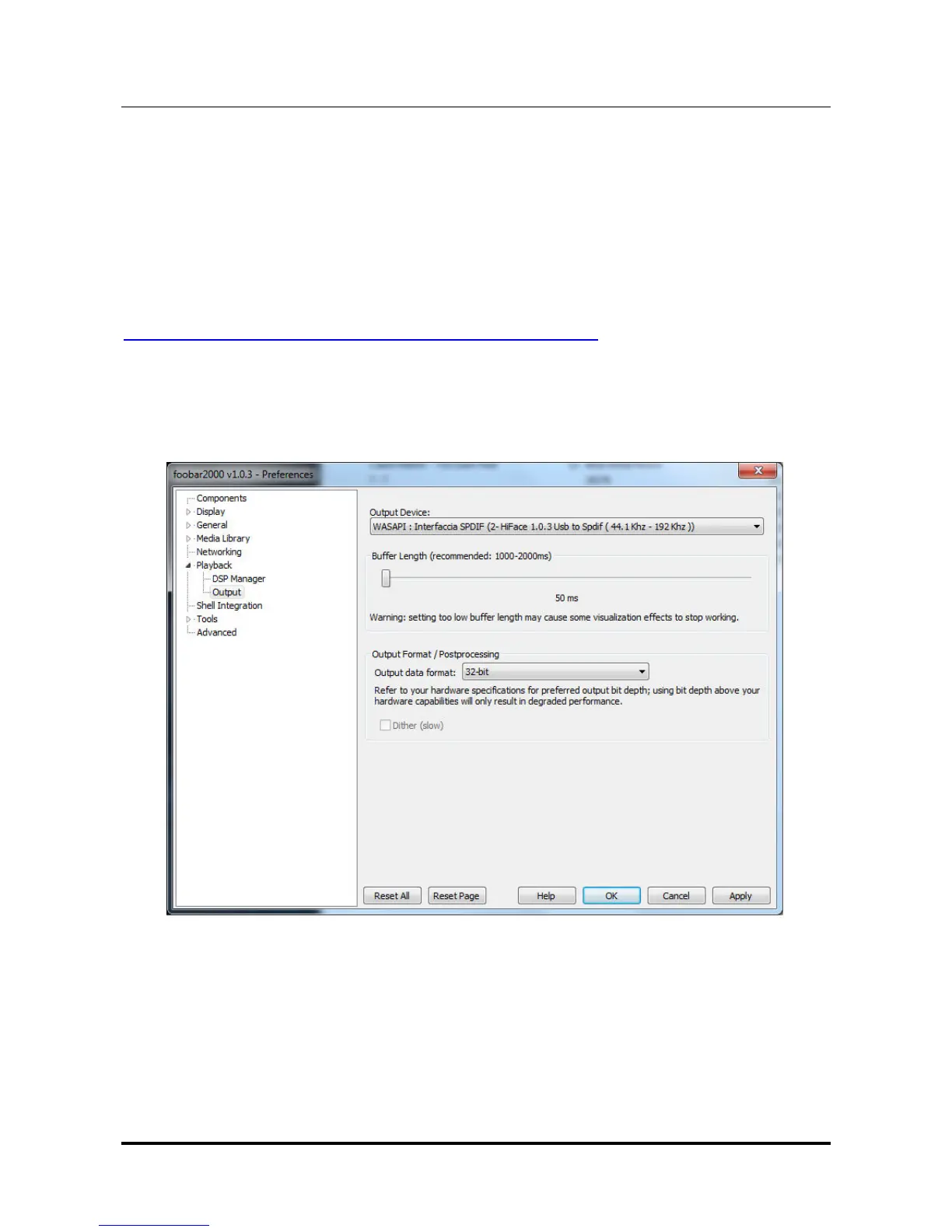
Then, restart FooBar, go to the File/Preferences/Playback/Output window and set
parameters as in figure 17.
Figure 17



 To Next Page