EasyManua.ls Logo

MACAP M2E DOMUS - Page 35

Default Icon
Print Icon
To Next Page IconTo Next Page
To Previous Page IconTo Previous Page
Loading...
35
M2 SERIES
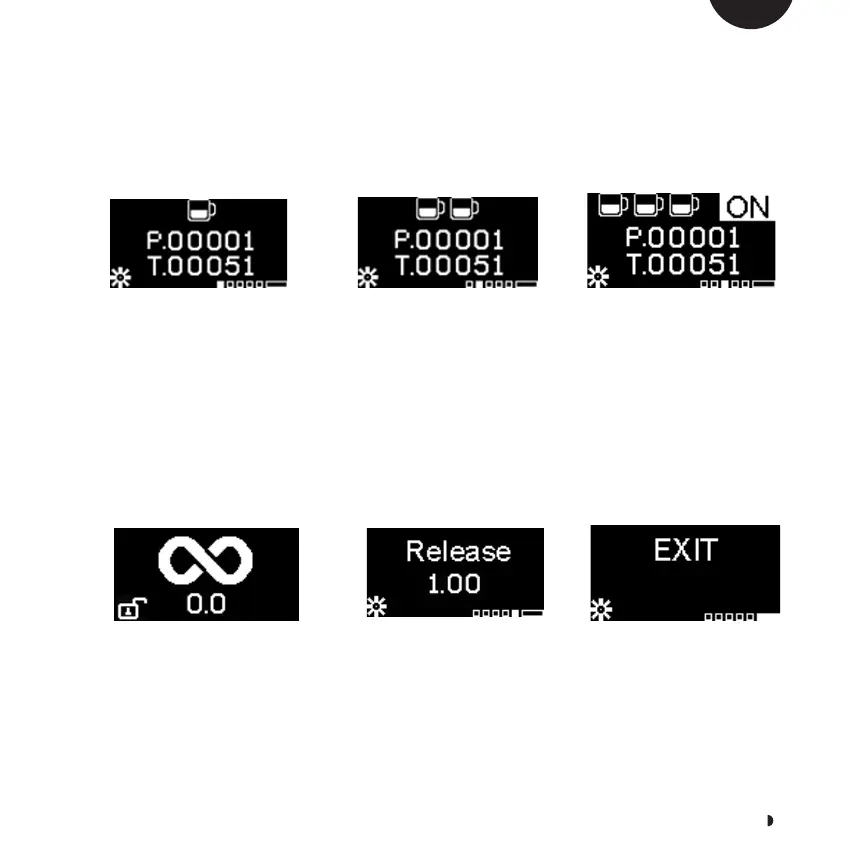
To enter the programming menu, press the DOSE button
for 8 seconds.
To scroll through the menu, press the “+” or “-“ symbols.
DISPLAY AND FUNCTION
Single dose counter (P:
partial, T: total)
To reset partial doses,
press the DOSE button for 5
seconds
Double dose counter (P:
partial, T: total)
To reset partial doses,
press the DOSE button for
5 seconds
Triple dose counter (P:
partial, T: total)
To reset partial doses,
press the DOSE button for 5
seconds
Triple dose programming
Triple dosing can be
activated (ON) or
deactivated (OFF).
See section 9.7.2
Continuous dose
programming
Continuous dosing can
be activated (ON) or
deactivated (OFF).
See section 9.7.3
Software version EXIT
EN

Related product manuals