Continuous Dose
Continuous Prog.
Continuous Prog.
Yes
Release 1.7
Dose-Counter
Exit
Double Dose
Double Prog.
Language
Single Dose
Single Prog.
Single Prog.
3,0 Sec
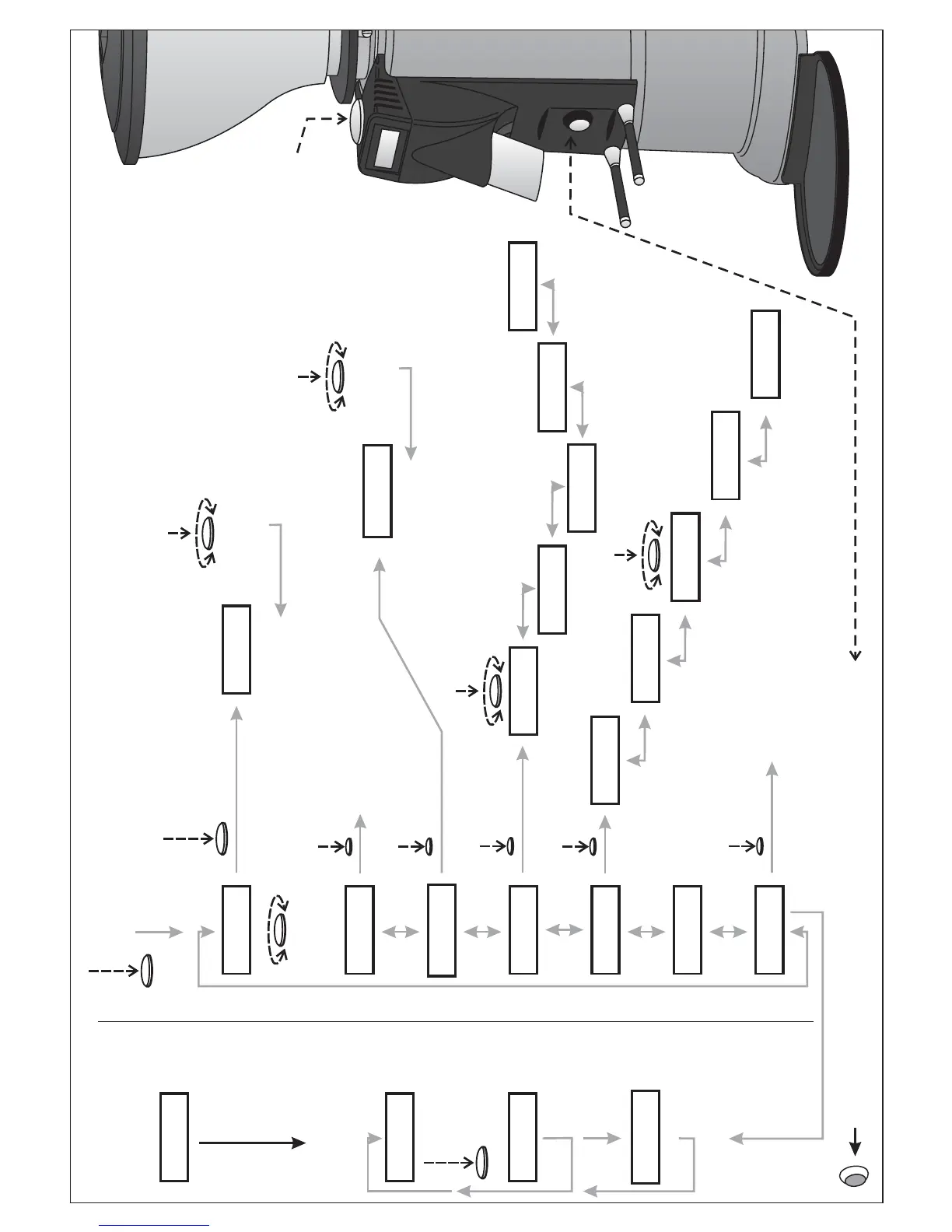
Press the control disc
to switch function
(1 sec.)
Turn the control disc
to change function
Turn the control disc
to set up the grinding time (+/- 0,1)
then press again to confirm
Turn the control disc
to activate or not the function
then press to confirm
Control Disc
Operate in the same way
as done for the Single prog.
Manufacturer information
Press to quit the main menu
5 second
welcome note
Press the control disc
for 10 sec. to enter the
main menu
Press the control disc
to select the needed
option
Language
ENGLISH
Sprache
DEUTSCH
Langue
FRANCAIS
Lingua
ITALIANO
Idioma
ESPANOL
Turn the control disc to select the language
then press again to confirm
Double Partial
0
Double Total
0
Single Total
0
Single Partial
0
Exit
Turn the control disc to check the counter then press Exit to leave.
Press the control disc for 15 sec. on the partial prog. to reset the counter.
Do the same for Single and for Double.
If activeIf active
Press the red button ( for 1 sec. ) with the filter holder to start grinding
Release x.x



 To Next Page