Need help?
Do you have a question about the Mackie DL Series and is the answer not in the manual?
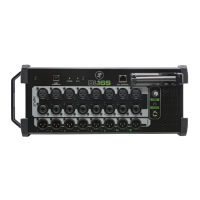
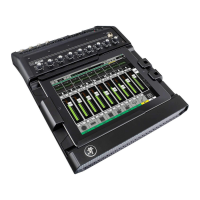
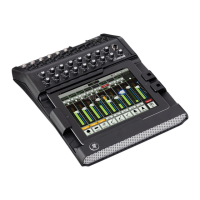
The Mackie DL Series mixer is a professional audio mixing console designed for live sound applications, offering a unique blend of powerful digital signal processing and intuitive iPad control. At its core, the mixer handles all the heavy lifting of audio processing. It features Mackie's renowned Onyx mic preamps, which amplify incoming signals with pristine clarity. High-end AD converters then transform these analog signals into digital data, which is subsequently processed and mixed by a powerful DSP chip through a low-latency mix engine. The magic of the DL Series lies in its innovative control scheme: the iPad serves as the sole control surface, allowing users to wirelessly adjust all DSP and mixer parameters. Crucially, no audio processing occurs on the iPad itself; all the heavy lifting and sound quality generation happen within the mixer hardware, ensuring professional-grade audio performance.
The DL Series mixers offer broad compatibility with various iPad models for wireless control via the Master Fader app. This includes the iPad (1st generation), iPad 2, iPad (3rd generation), iPad (4th generation), and iPad mini. To accommodate different iPad models, the DL1608 and DL806 are available in both 30-Pin and Lightning versions. The mixers feature a patented tray design that utilizes tray inserts and a modular design to adapt to changing iPad form factors. For 30-Pin versions, docked control is supported for iPad (1st generation), iPad 2, and iPad (3rd generation). An included tray insert perfectly fits the iPad (3rd generation) and iPad 2, while the original iPad fits without an insert. Lightning versions support docked control for iPad (4th generation) with an included tray insert, and an optional accessory tray is available for iPad mini. It's worth noting that the iPad (1st generation) has a slower processor and less RAM, which may result in less responsive meters and commands compared to newer models. Additionally, some features added in future Master Fader app releases might not be compatible with the first-generation iPad due to its iOS6/7 incompatibility. For optimal performance and access to all features, an iPad 2 or newer is recommended.
Beyond iPad control, the DL Series also supports wireless control from various iPhone and iPod touch models via the My Fader app. This app is compatible with iPod touch (4th and 5th generation), iPhone 4, iPhone 4S, iPhone 5, iPhone 5C, and iPhone 5S, requiring iOS6. My Fader is ideal for on-stage performers who need to control their own monitor mixes or for FOH engineers seeking a pocketable wireless control solution.
Setting up the DL Series for wireless operation is straightforward. Users simply connect a Wi-Fi router to the Ethernet port on the back of the mixer and then connect their iPad wirelessly to that network. While almost any off-the-shelf router will work, Mackie recommends the AirPort Extreme or AirPort Express due to their easy setup from the iPad and detailed configuration options via the free AirPort Utility app. Mackie also provides a list of officially approved and tested access points on the DL Series website to ensure reliable performance.
The DL Series mixers integrate seamlessly with iPad applications for both playback and recording. Stereo audio can be played back to the mixer over the dock connector via a dedicated "iPad" channel within the Master Fader control application. Conversely, the main L/R signal from the mixer hardware can be sent to the iPad for recording. While the built-in Music app can be used for playback and the Master Fader app for recording, many users prefer third-party applications like Garage Band, Auria, and Multitrack DAW. Any application that supports background audio playback/recording can be used, allowing users to switch back to the Master Fader app for mixing while audio continues to play or record.
For users seeking a more permanent installation, the DL Series mixers are rack-mountable with an optional Rackmount Kit accessory available through Mackie dealers. Installation requires only a Phillips screwdriver, and the finished hardware occupies nine spaces in a standard 19" rack. The design also ensures that a racked DL Series mixer fits perfectly into most flip-top racks, leaving ample room for cabling.
A key operational feature of the DL Series is the ability to remove the iPad from its tray while audio is passing and the unit is powered on. Since all audio processing occurs within the mixer hardware, the iPad solely functions as a control interface. If the iPad is removed, the mixer automatically switches to wireless control, with audio continuing to pass during the brief transition (typically one to two seconds). If wireless control is not configured, the mixer will continue to pass audio until another iPad connects to control it. Upon power cycling, the mixer reverts to its previous state. However, it's important to note that iPad playback and recording functions are only active when the iPad is docked and will gracefully end if the iPad is removed from the tray.
The DL Series offers extensive flexibility in auxiliary send configuration. All six auxiliary sends can be independently configured for pre DSP, pre fader, or post fader operation on a per-aux-send basis, directly from the Mackie Master Fader control app. This allows for tailored monitoring and effects routing to suit various live sound scenarios.
The mixer's software updates are managed through the iOS App Store. When a user downloads and installs an update to the Mackie Master Fader app, the next time they launch the app and connect to a mixer, the app will detect older firmware and prompt the user to update the mixer with a single button press. This process ensures the mixer hardware stays current with the latest features and bug fixes. Conversely, if a mixer with newer firmware is connected to an older version of the app, the user will be prompted to update the Master Fader app from the App Store.
All outputs on the DL Series mixer are line-level balanced outputs. The aux sends are impedance balanced on 1/4-inch TRS connectors, while the main L/R outputs are balanced XLR. Mackie recommends using balanced cables for all connections to other equipment to maintain optimal signal integrity. The DL Series mixers are powered by an external lump-in-line universal switching power supply, which connects to the console via a locking barrel connector. To adapt to different regions, users simply need to supply the correct IEC cable.
All 16 XLR inputs on the DL Series mixers are equipped with +48V phantom power, which is controlled by a global phantom power switch located on the rear panel. This allows for the use of condenser microphones and other phantom-powered devices.
For quick adjustments and resets, every processor on the DL Series has a "Default" factory preset. Users can recall these presets to reset individual processors (EQ, compressor, channel settings) to their default state. There are also "Default" snapshots available to quickly zero out the entire console.
When using an iPad with 3G or LTE, disabling these cellular data functionalities is generally not necessary. These high-performance cellular networks do not typically interfere with audio signals or electronics in the DL Series mixer or other audio gear. However, in areas with poor 3G or LTE coverage, the iPad might fall back to a slower, older network called GSM. GSM communication uses data bursts that can cause interference, manifesting as low-level digital beeps (TDMA noise) in the audio. While the DL Series is designed to reject this noise effectively, in rare situations where interference persists, turning off cellular data functionality on the iPad for the duration of the show is recommended. This issue is less common in large metropolitan areas with good 3G or LTE signals.
The Wi-Fi range of the DL Series depends on the router hardware and the environment. Mackie recommends using a trusted brand name and, if possible, an 802.11n router operating over 5 GHz, though 802.11g also works. Obstructions like walls and large crowds with multiple wireless devices can reduce signal strength. Wi-Fi repeaters can be added to extend wireless range for larger venues, and many routers (like the Airport Extreme) have built-in features to facilitate the use of multiple routers for extended coverage.
For protection and transport, an optional DL Series nylon bag is available. This bag features a firm EVA cover to protect the iPad during transport, a fully padded interior, a section for the external power supply, and a shoulder strap and handle. A nylon cover also protects the mixer from dust and debris when not in use and includes a rear section that flips open for cable connections.
While not explicitly designed for true linking, creative audio engineers can link two DL Series mixers (e.g., two DL1608s or a DL1608 and a DL806) to create a larger mixing system. This involves combining the audio outputs of one mixer into the inputs of the second mixer using balanced audio cables. The channel routing on the second mixer is then configured appropriately. For control, each mixer can have its own iPad connected via the dock connector. While a single iPad cannot control both mixers simultaneously, multiple iPad devices can control each mixer wirelessly by switching between them using the Device setting in Master Fader. The system supports up to 10 iPad devices in total when using multiple mixers.
The Master Fader app also allows for offline editing. Users can create snapshots, shows (groups of snapshots), and presets offline. Presets are stored on the iPad and can be recalled to a channel as needed. Snapshots and Shows are loaded onto the mixer hardware, which then synchronizes them to all connected iPads, allowing them to be recalled from the hardware by any connected iPad.
 General
| A/D Resolution | 24-bit/48kHz |
|---|---|
| USB Audio Interface | Yes |
| Type | Digital |
| Channels | 16 |
| Inputs | Varies with model |
| Outputs - Aux | 6 |
| EQ Bands | 4-band |
| Connectivity | Ethernet |
| Wireless Control | Yes |
| Power Supply | Internal |

 To Next Page