12
userêïõæóçâäæ userêïõæóçâäæ
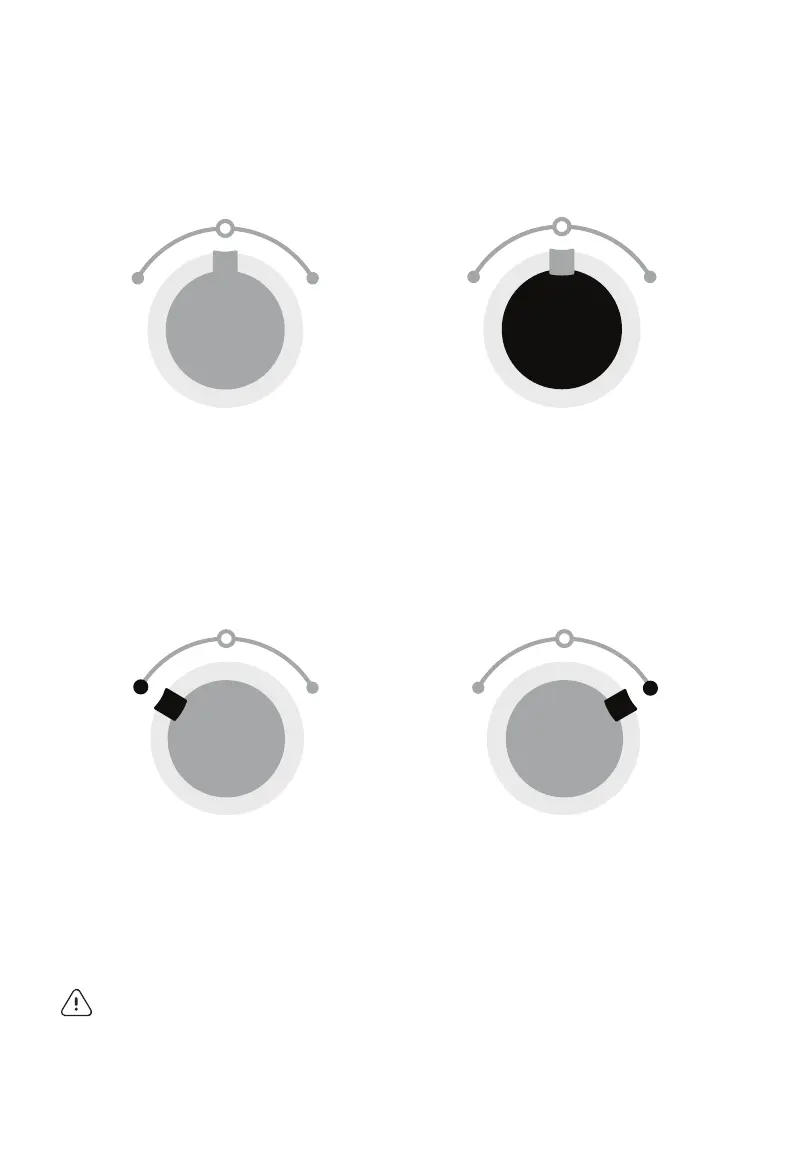
home
The dial is in the center
position. The blender is
not running.
low
Turn the dial to the left to start
a preset 1 minute low-speed
blend cycle. Turn the dial back
to HOME when finished.
pulse
With the dial in the center
position, press and hold the
PULSE button. To stop blending,
release the PULSE button.
high
Turn the dial to the right to start
a preset 1 minute high-speed
blend cycle. Turn the dial back
to HOME when finished.
PULSE
LOW HIGH
Home - The dial is in the center position. The blender is not running
PULSE
LOW HIGH
Low - Turn the dial to the left to start a preset low-speed blend cycle.
Turn the dial back to HOME when finished
PULSE
LOW HIGH
High - Turn the dial to the right to start a preset high-speed blend cycle.
Turn the dial back to HOME when finished
PULSE
LOW HIGH
Pulse - With the dial in center position, press and hold the PULSE button.
To stop blending, release the PULSE button
warning! NEVER blend hot, warm, or carbonated ingredients in the magic
bullet
®
Cup! When using a Cup attachment, after two consecutive blends cycles
wait 10 minutes before blending another cycle. Never attempt to open the Cup if it
is warm to the touch, allow the Cup and its content to cool at least 15 minutes
before attempting to open.
MBFXX100_Blender_UG_F240118.indd 12 1/18/24 11:02 AM



 To Next Page