
 Need help?
Do you have a question about the Magic Leap 2 and is the answer not in the manual?
Ensure the device is fully charged for the best experience every time you use it.
Instructions for cleaning the headset, compute pack, and controller using specific materials.
Safely store the device in its case, avoiding direct sunlight to prevent damage.
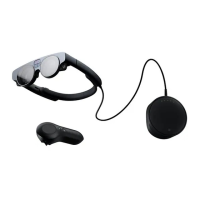
The Magic Leap 2 is an advanced augmented reality (AR) device designed for enterprise use, offering an immersive visual experience and interactive control. This quick start guide outlines the essential components, setup procedures, and maintenance instructions to ensure optimal performance and user comfort.
The Magic Leap 2 is a comprehensive AR system that projects digital content onto the real world, allowing users to interact with virtual objects and information within their physical environment. It consists of a Headset, a Compute Pack, and a Controller, all working in conjunction to deliver a seamless augmented reality experience. The Headset is worn on the head, providing the visual display, while the Compute Pack processes the AR content and powers the system. The Controller allows for precise interaction with the virtual environment, enabling users to navigate menus, select items, and manipulate digital objects. This integrated system is designed to enhance productivity and collaboration in various enterprise settings by overlaying relevant digital information onto real-world tasks.
The Magic Leap 2 system is designed with user comfort and ease of use in mind, offering several features to optimize the AR experience:
Headset Comfort and Fit: The Headset is designed to be worn comfortably for extended periods. Users can gently stretch the back of the headband to adjust it to their head size. For the best visual experience and comfort, the Headset should rest around the widest part of the head. A Fit Kit is included, containing nose pads and forehead pads, allowing users to customize the fit for individual comfort and to ensure the optimal optical alignment. The Headset also accommodates prescription inserts, which can be ordered separately, by allowing users to pull away the magnetic frame and replace it with their custom lenses. This feature ensures that users who wear glasses can still experience clear and comfortable AR visuals without needing to wear their traditional eyewear underneath the Headset.
Compute Pack Portability and Attachment: The Compute Pack, which powers the Headset and processes AR content, is designed for portability. It can be easily attached to a user's pocket by sliding it on until it clips securely. This allows for hands-free operation and mobility. Alternatively, an included Shoulder Strap can be used to carry the Compute Pack. Carabiners on the strap clip to corresponding fasteners on the Compute Pack, and the strap length can be adjusted for comfort. It is crucial to avoid placing the Compute Pack in a pouch or pocket that blocks its vents during use, as proper ventilation is essential for maintaining performance and preventing overheating.
Controller Interaction: The Magic Leap 2 Controller provides intuitive control over the AR environment. It features a touchpad for navigation, a laser for pointing, and a bumper/trigger for selection and interaction. A Home button and a Menu button offer quick access to system functions. An included controller lanyard can be attached to the user's wrist to prevent accidental drops during active use. The Controller connects to the Compute Pack via a USB-C to USB-C cable, ensuring a reliable connection for interaction.
System Power and Connectivity: To turn on the Magic Leap 2, users simply press the button on the front of the Compute Pack. Five indicator lights on the Compute Pack illuminate to show that the device is fully powered. Initial setup involves connecting the Controller to the Compute Pack (if not already paired from the factory) and then connecting the device to Wi-Fi. The Wi-Fi connection process is straightforward: users navigate to the "Settings" app, select "Network & internet," then "Wi-Fi," and choose their preferred network from the list using the touchpad. For secure networks, a virtual keyboard appears, allowing users to enter their password using the Controller before connecting.
Cord Management: To ensure safety and prevent interruptions during use, it is important to prevent the Headset cord from getting tangled or wrapped around the headband or other accessories. Users should be mindful of the cord's placement to maintain a clear and unobstructed experience.
Proper maintenance of the Magic Leap 2 device ensures its longevity and continued optimal performance.
Charging: For the best user experience, it is recommended to fully charge the device every time before use. This ensures that the system has sufficient power for extended AR sessions.
Cleaning: Regular cleaning is essential to maintain hygiene and optical clarity. Before cleaning, the device must be turned off. The Forehead Pad, Nose Pad, and Lens Insert should be removed to allow for thorough cleaning. A damp, but not wet, isopropyl alcohol wipe or a sterile, lint-free cloth should be used to gently clean the Headset, Compute Pack, and Controller. After cleaning with the alcohol wipe, a damp, sterile, lint-free cloth should be used to rinse the surfaces, followed by a dry, sterile, lint-free cloth to finish and ensure no moisture remains. This process helps to remove smudges, oils, and debris without damaging the sensitive components.
Storage: When not in use, the Magic Leap 2 device should be safely stored in the provided Carry Case or its original box. This protects the components from physical damage and environmental factors. It is particularly important to always keep the device out of direct sunlight, as prolonged exposure to sunlight can cause damage to the optics and other sensitive parts of the device.
For comprehensive safety guidelines and detailed instructions on all aspects of device usage and maintenance, users are directed to consult the full Safety User Guide. The manufacturer also advises users to check the official website for the latest updates to the quick start guide and other relevant information.
 General
| Resolution | 1440 x 1760 pixels per eye |
|---|---|
| Refresh Rate | 120 Hz |
| RAM | 16 GB |
| Storage | 256 GB |
| Field of View | 70° |
| Weight | 260 grams |
| Tracking | 6DoF |
| Connectivity | Wi-Fi 6, Bluetooth 5.1 |
| Release Date | September 2022 |
| Battery Life | 3.5 hours |
| Sensors | Eye tracking, ambient light sensor |
| Audio | Built-in speakers, 3.5mm headphone jack |
| Operating System | Android-based Lumin OS |

 To Next Page
