Questions? Call our customer service department at 1-855-995-5578, 8:30 a.m. - 5 p.m., EST, Monday - Friday
or e-mail: support@magickwoods.com.
PACKAGE CONTENTS
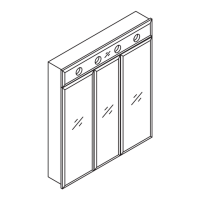
TRILOGY MEDICINE CABINET
INSTALLATION INSTRUCTIONS
Model: 49767
PREPARATION
WARNINGS & CAUTIONS
WARNING:
Two people are required for safe installation. Take extra precautionary
measures to ensure a secure grip on the cabinet when lifting.
CAUTION:
cabinet.
CARE & MAINTENANCE
Cabinet (x 1)
29-5/8”W x 33-7/8”H x 5”D
INSTALLATION
Shelf support
(x 24)
Washer
(x 4)
2” screw
(x 4)
Adjustable shelf
(x 3)
Adjustable shelf
(x 3)
• Dust frequently with a clean, soft and dry cloth.
• Wipe away any water or liquid spills on the cabinet
immediately with a clean, soft and dry cloth.
• Do not use strong detergents or abrasive cleaners as
they may damage the surface of this product.
Figure 1
A
B
Tools required for assembly (not included):
• tape measure
• electric drill with #2 drill bit (A)
• level
• (x 4) wall anchors - if the cabinet will not be
screwed to wall studs (B)
• Note:
sockets E26 and 60w-G25 bulb
Estimated installation time: 1/2 hour
B
1: Using a level, locate any uneven wall areas where the cabinet will be
installed. Unevenness can cause the cabinet to become misaligned
resulting in twisting of the cabinet. Repair any uneven areas.
2: Determine the desired location of the cabinet. It is recommended that the
cabinet be installed to at least 1 wall stud. In order to locate wall studs,
sounds solid. If you are unable to locate a wall stud, it is recommended
that you use wall anchors (B - not included) to secure your cabinet.
3:
Secure the cabinet to the wall by inserting (x 4) 2” screws with (x 4)
washers through the backrails of the cabinet and into the wall. Figure1.
4: Insert each shelf support (x 24) into the pre-drilled holes in the cabinet
then insert each shelf (x 6). Figure 2.
5:

 Need help?
 General

 To Next Page