EasyManua.ls Logo

Magnavox MBH542 - User Manual

Magnavox MBH542
7 pages
Print Icon
To Next Page IconTo Next Page
Loading...
Reduce the volume level by press
Increase the volume by
3 4 5 61 2
1
1. Button
2. Micro USB Port (For Charging Only)
3. LED Indicators
4. AUX (In) Jack
5. Microphone
6. Button
7. Button
The unit has a built-in Li-ion rechargeable battery, charge it before first time use or when it is
drained as follows:
1. Connect the small plug from the supplied USB Connection Cable to the Micro USB Port.
2. Connect the full size USB Plug from the supplied USB Connection Cable to the USB Port
on the Personal Computer or USB Charger (Computer and USB Charger not included).
3. When charging, the Red Charging Indicator on the unit will illuminate.When charging is
complete, the indicator will turn off.
NOTES:
Your battery will last longer if you following these simple guidelines for caring and storing:
A. Before first time use, recharge the unit approximately 4 hours until the unit is fully charged.
B. Charge and store the unit within the temperature range of 5°C - 35°C (40°F - 95°F).
C. Do not overcharge (longer than 24 hours). Excessive charging or running the unit until
battery fully drains will damage battery. Battery life will be extended if you keep the battery
fully charged.
D. Battery life naturally shortens slowly over time.
E. The rechargeable battery incorporated in this product is not user replaceable.
For first time use or re-pairing the unit to a new BT Device, pairing it as
below:
1. Press and holding the Button approximately 3 seconds to power on the unit. The
Blue & Red Indicators will illuminate & blink.
2. Power on the external BT Device and enter to BT searching mode. Start pairing following
the on screen instructions from the external BT Device. When paired, the Blue LED
Indicator will stop blinking and Red LED Indicator will turn off.
3. If pairing is complete you may now play music and answer the phone with your external
BT Device.
4. During playback:
The Blue LED Indicator will start blinking.
Press the Button to pause; press again to resume normal playback.
Press and holding the or Buttons to adjust volume level as desired.
Press and release the or Buttons repeatedly to skip tracks.
5. If the unit is paired to a Cell Phone and a call is incoming during an active music session:
Press the Button then speak to the Microphone to answer the call. When your call
is complete, press the Button to disconnect or end the call and resume to music
playback.
Or, press and holding the Button approximately 1 second to decline the incoming
call then resume to music playback.
6. When finish listening,press and holding the Button approximately 3 seconds until the
Blue Indicator not light.
Notes:
When the external BT Device searched the unit, our model number “MBH542” will
appear on the display of external BT Device.
If while pairing you are asked for a code please try "0000" or "1234".
Normal operation after paired:
1. Power on the external BT Device and enter to BT mode.
2. Press and holding the Button approximately 3 seconds to power on the unit. The
Blue & Red Indicators will illuminate & blink.
3. Wait a few seconds until the unit automatically pair to the BT Device. When paired, the
Blue LED Indicator will stop blinking and Red LED Indicator will turn off.
4. If pairing is complete you may now play music and answer the phone with your external
BT Device.
AUX (In):
Listen music through the Aux Out; Line Out or Phone Jack from external
audio player:
1. In power off mode, connect one end of the supplied Audio Connection Cable to the
AUX (In) Jack on the unit.
2. Connect the other end to the Aux Out; Line Out or Phone Jack on external audio player.
3. Play the music on the external audio player as usual.
4. Use theVolume controls on the external audio player to adjust volume level as desired.
Note: If the Audio Connection Cable is inserted into the AUX (In) Jack, BT
will be automatically shut off. Unplug the cable from the jack before use BT.
TROUBLESHOOTING
Check the following before requesting service:
SYMPTOM POSSIBLE CAUSE POSSIBLE SOLUTION
Can't power on Built-in battery drained Recharge the battery as page 3
No sound or
sound weak
Volume of the unit was set to minimum
position
press and
holding the Button on the unit
Volume level of paired/connected device is
in low level
Rise the volume level of the
paired/connected device
Sound
distortion
Volume level too high
and holding the Button on the
Volume level of the
paired/connecteddevice too high
Reduce the volume level of the
paired/connected device
BT not
functioning
The external BT device had NOT paired to
the unit
Pair the external BT device to the
unit as page 3-4
The external BT device too far from the
unit
Place the external BT device close
to the unit
Audio Connection Cable was inserted into
the AUX (In) Jack
Unplug the Audio Connection Cable
from the AUX (In) Jac
k before use
BT
unit
GENERAL SPECIFICATIONS:
Power source: Built-in DC 3.7V, 450 mAh (1.665 WH) rechargeable Li-ion
Battery, Recharge by DC 5V through the Micro USB Port
Impedance of the Earbuds: 32 per Channel
Audio power: 15 mW per Channel (Total 30mW)
BT Version: V4.1+EDR
BT Operation Distance: 32 Feet in open area
PACKAGE INCLUDES:
1 x Owners Manual
1 x USB Connection Cable (For Charging only)
1 x Audio Connection Cable with 3.5 mm plugs
SPECIFICATIONS AND ACCESSORIES ARE SUBJECT TO CHANGE WITHOUT
NOTICE

Question and Answer IconNeed help?

Do you have a question about the Magnavox MBH542 and is the answer not in the manual?

Summary

FCC Compliance Information

Location of Controls

Power Source and Charging

Bluetooth Pairing Procedure

Playback and Call Functions

Normal Bluetooth Operation

AUX Input Usage

Troubleshooting Guide

General Specifications

Package Contents

Overview

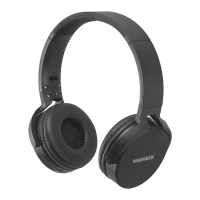
The Magnavox MBH542 Blend Wireless Folding Studio Headphones are a versatile audio device designed for both wireless and wired listening, as well as hands-free calling. These headphones feature a built-in rechargeable Li-ion battery, offering portability and convenience for on-the-go use.

Function Description:

The primary function of the MBH542 headphones is to provide high-quality audio playback from external Bluetooth (BT) devices or through a wired connection. They support wireless audio streaming via Bluetooth 4.1+EDR, allowing users to connect to smartphones, tablets, and other BT-enabled devices. In addition to wireless connectivity, the headphones include an AUX (In) Jack, enabling a wired connection to audio sources that may not have Bluetooth capabilities, or when the battery is depleted. A built-in microphone facilitates hands-free calling when paired with a cell phone, allowing users to answer, decline, and end calls directly from the headphones. The folding design enhances portability, making them easy to store and carry.

Important Technical Specifications:

  • Model: MBH542
  • Power Source: Built-in DC 3.7V, 450 mAh (1.665 WH) rechargeable Li-ion Battery.
  • Recharge: DC 5V through the Micro USB Port.
  • Impedance of the Earbuds: 32Ω per Channel.
  • Audio Power: 15 mW per Channel (Total 30mW).
  • BT Version: V4.1+EDR.
  • BT Operation Distance: 32 Feet in open area.
  • Included Accessories: 1 x Owner's Manual, 1 x USB Connection Cable (For Charging only), 1 x Audio Connection Cable with 3.5 mm plugs.

Usage Features:

The MBH542 headphones offer intuitive controls for various functions:

  • Power On/Off/Pairing: A multi-function button (labeled ◄II) is used to power the unit on or off by pressing and holding for approximately 3 seconds. This button also initiates the pairing process, indicated by blinking Blue & Red LED Indicators.
  • Bluetooth Pairing: For first-time use or re-pairing with a new BT device, users power on the headphones and then enable BT searching mode on their external device. Once paired, the Blue LED Indicator stops blinking, and the Red LED Indicator turns off. The model number "MBH542" will appear on the external BT device's display. If a code is requested during pairing, "0000" or "1234" can be tried.
  • Music Playback Controls:
    • During playback, the Blue LED Indicator blinks.
    • Pressing the ◄II button pauses and resumes normal playback.
    • Pressing and holding the +V◄ or ►V- Buttons adjusts the volume level.
    • Pressing and releasing the +V◄ or ►V- Buttons repeatedly skips tracks.
  • Call Management: When paired with a cell phone and a call is incoming during music playback:
    • Pressing the ◄II button answers the call.
    • Pressing the ◄II button again disconnects or ends the call and resumes music playback.
    • Pressing and holding the ◄II button for approximately 1 second declines an incoming call and resumes music playback.
  • Wired Connection (AUX In):
    • In power-off mode, connect one end of the supplied Audio Connection Cable to the AUX (In) Jack on the headphones.
    • Connect the other end to the Aux Out, Line Out, or Phone Jack of an external audio player.
    • Music can then be played from the external audio player, with volume adjusted via the external device's controls.
    • Important Note: Inserting the Audio Connection Cable into the AUX (In) Jack automatically shuts off Bluetooth functionality. To use Bluetooth, the cable must be unplugged.
  • LED Indicators: The headphones feature LED indicators (Blue & Red) to show power status, charging status, and pairing status.

Maintenance Features:

  • Battery Charging: The headphones are charged via a Micro USB Port using the supplied USB Connection Cable. Connect the small plug to the headphones and the full-size USB Plug to a Personal Computer or USB Charger (not included). A Red Charging Indicator illuminates during charging and turns off when charging is complete.
  • Battery Care Guidelines:
    • For first-time use, recharge for approximately 4 hours until fully charged.
    • Charge and store the unit within a temperature range of 5°C - 35°C (40°F - 95°F).
    • Avoid overcharging (longer than 24 hours) or completely draining the battery, as this can damage it. Keeping the battery fully charged extends its life.
    • Battery life naturally shortens over time.
    • The rechargeable battery is not user-replaceable.
  • FCC Compliance: The device complies with FCC rules for Class B digital devices (Part 15). Users are advised to reorient or relocate the receiving antenna, increase separation between equipment and receiver, connect to a different circuit outlet, or consult a technician if interference occurs. Only shielded cables should be used for connections to other devices to assure continued compliance. Unauthorized modifications may void the user's authority to operate the device.

The Magnavox MBH542 headphones are designed for ease of use, offering a flexible audio experience whether you prefer wireless freedom or a reliable wired connection, all within a portable and foldable design.

Magnavox MBH542 Specifications

General IconGeneral
BrandMagnavox
ModelMBH542
CategoryHeadphone
LanguageEnglish

Related product manuals