This document describes the Magnavox MMA3336 FM Transmitter with Bluetooth® Wireless Technology, a versatile device designed to allow users to play audio from various sources through their car's FM radio system.
Function Description:
The MMA3336 serves as an FM transmitter, converting audio signals from connected devices into FM radio waves that can be picked up by a car radio. Its primary function is to enable wireless audio streaming from Bluetooth-enabled devices (like smartphones or tablets) to a car's sound system. Additionally, it supports audio playback from Micro SD cards and external audio players via an AUX-in connection. The device also includes a built-in USB charger for external devices.
Important Technical Specifications:
- Power Source: DC 12 or 24 V, 1300 mAh (Max.) from a car cigarette lighter socket. This broad compatibility ensures it can be used in most vehicles.
- Output from Built-in USB Charger: DC 5 V, 2.1 A (Max.). This provides a standard charging output suitable for many portable electronic devices.
- FM Transmitting Frequency: 87.5-108 MHz. This covers the standard FM radio band, allowing users to find a clear frequency for transmission.
- FM Transmitting Power: 87 dBuv/107 dBuv. This indicates the strength of the FM signal.
- BT Version: 3.0. This specifies the Bluetooth standard supported by the device.
- BT Operation Distance: 32 Feet in open area. This provides a reasonable range for maintaining a Bluetooth connection within a vehicle.
- Micro SD Card Support: Up to a maximum of 32 GB capacity. This allows for a significant library of MP3 music to be stored and played directly from the device.
Usage Features:
The MMA3336 offers multiple ways to play audio and interact with calls:
-
Bluetooth Connectivity:
- Pairing: The device automatically powers on when connected to the car's cigarette lighter socket. Users then select a blank FM channel on their car radio and match the frequency on the MMA3336 using the CH- or CH+ buttons. Once the FM connection is established, the device automatically enters Bluetooth pairing mode. The Bluetooth logo on the LCD and a red indicator on the Volume Control Knob will blink during pairing. After successful pairing with an external Bluetooth device (e.g., "MMA3336" will appear on the external device's display), the indicators will stop blinking.
- Music Playback: After pairing, music from the Bluetooth device can be played through the car radio.
- Call Handling: When a call comes in during music playback, users can press and release the Volume Control Knob to answer, or press and hold for approximately 1 second to reject the call. Pressing the knob again disconnects or ends the call and resumes music.
- Volume Control: Audio volume can be adjusted using the Volume Control Knob on the unit, or via the car radio's volume controls or the paired Bluetooth device.
- Track Navigation: The K or Buttons allow users to skip tracks during playback.
- Pause/Resume: Pressing the Volume Control Knob pauses playback; pressing it again resumes.
-
Micro SD Card Playback:
- Insertion: Micro SD cards (up to 32 GB, MP3 format) can be inserted into the dedicated slot.
- Automatic Playback: Once the unit is powered via the car cigarette lighter, playback from the Micro SD card will start automatically.
- Controls: Volume adjustment, track skipping, and pause/resume functions are available, similar to Bluetooth playback.
- Note: When a Micro SD card is inserted, Bluetooth functionality is automatically shut off. The card must be unplugged to use Bluetooth.
-
AUX (In) Connection:
- Connection: An external audio player (MP3 player, Discman, etc.) can be connected to the MMA3336's AUX (In) Jack using the supplied 3.5mm audio connection cable.
- Playback: Audio from the external player will be transmitted via FM to the car radio.
- Volume Control: Ensure the external audio player's volume is set to a high level for optimal sound.
-
AUX (Out) Connection:
- Alternative Output: If the car radio has an AUX IN Jack, the MMA3336 can be connected directly to it using the supplied audio connection cable. This bypasses FM transmission, potentially offering better audio quality.
- Source Selection: The car radio must be set to AUX IN mode.
- Playback: Music from a paired Bluetooth device or a Micro SD card can then be played through the car's AUX IN.
- Note: When the Audio Connection Cable is inserted into the AUX Jack, Bluetooth is automatically cut off.
-
Built-in USB Charger:
- Functionality: The unit includes a USB port for charging external USB devices.
- Operation: Connect the unit to the car cigarette lighter, then plug the external USB device's charging cable into the MMA3336's USB port. Charging will begin automatically.
- Protection: The charger features a built-in overload/overheat protector. If an overload or short circuit occurs, the charger will shut off and auto-reset once the external USB device is unplugged.
Maintenance Features:
- Troubleshooting Guide: The manual includes a troubleshooting section to help users diagnose common issues such as no sound, weak sound, sound distortion, or Bluetooth not functioning. It provides possible causes and solutions, like adjusting frequencies, checking volume levels, ensuring proper pairing, or verifying Micro SD card insertion.
- Proper Insertion: Emphasizes the importance of inserting Micro SD cards correctly and gently to avoid damage.
- Power Off: To shut off the unit, simply unplug it from the car cigar lighter socket.
The MMA3336 is designed for user-friendliness, with clear controls and an LCD display that shows important information like battery voltage, FM frequency, and connection status. Its robust feature set makes it a practical accessory for enhancing in-car audio and connectivity.

 Need help?
 General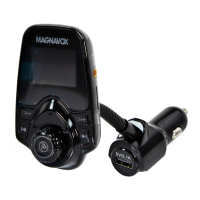

 To Next Page