The next parts can be set according to your preference.
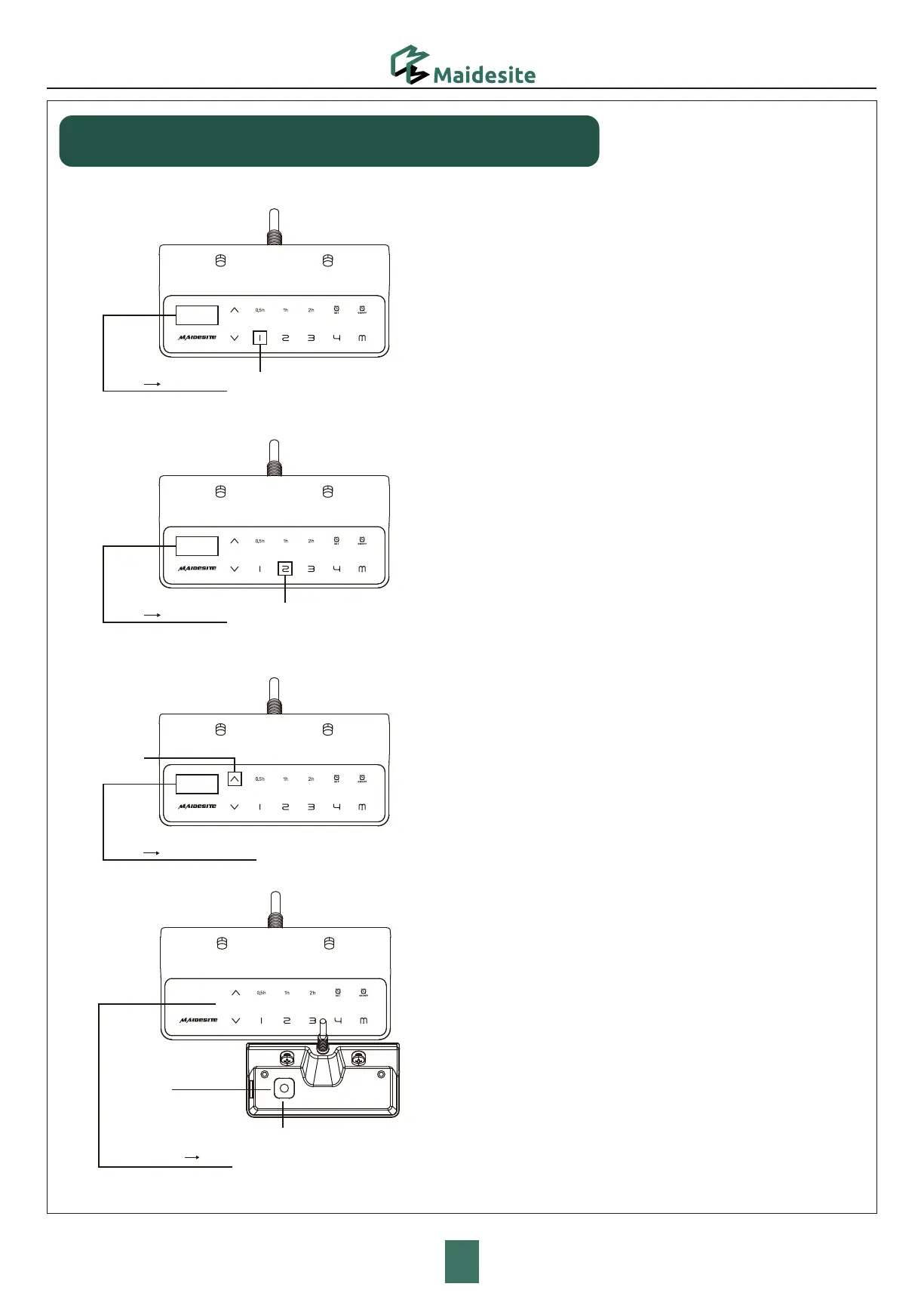
Switch the movement mode of the memory height:
Enter the RST mode (see instruction above).
Touch and hold the '1' key for 5s, the display shows one of the following:
'10.1': One-touch movement (Default)
'10.2': Constant-touch movement.
Change height unit(cm/inch):
Enter the RST mode (see instruction above).
Touch and hold the '2' key for 5s, the display shows one of
the following:
'10.3': height display in cm (Default),
'10.4': height display in inch
Change the anti-collision sensitivity:
Enter the RST mode (see instruction above).
Touch and hold the 'UP' key for 5s, the display shows one of
the following:
'10.5' : Detect 10kg force (Default, most sensitive)
'10.6' : Detect 15kg force
'10.7' : Detect 20kg force.
Child Lock
“RST” “10.1/10.2”
“RST” “10.3/10.4”
“RST” “10.5/10.6/10.7”
Hold for 5s
Hold for 5s
Hold for 4s
Hold for 5s
5
Height setting
Child Lock
-0$
Touch and hold the Child Lock key for 4s: the displays shows 'LOC',
and all keys at front are locked.
Touch and hold the Child Lock key again for 4s to unlock.
P14


 To Next Page