Need help?
Do you have a question about the Majestic BT 8480 MP4 and is the answer not in the manual?
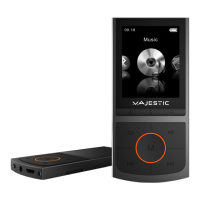
Controls volume increase on the MP3 player.
Controls volume decrease on the MP3 player.
Exits menus or displays options when pressed and held.
Navigates to previous track or scrolls menus; rewinds during playback.
Navigates to next track or scrolls menus; fast forwards during playback.
Plays, pauses audio, or turns the device on/off.
Connection port for charging and data transfer via USB cable.
Built-in microphone for recording audio notes.
3.5mm jack for connecting earphones or headphones.
Slot for expandable storage using microSD cards.
Shows information like bitrate, time, track name, and battery status.
Sets the maximum allowable volume level for the device.
Adjusts screen brightness and auto-off timer for the display.
Configures automatic power-off based on inactivity or a set timer.
Selects the device language and displays system information.
Options to format the microSD card or restore factory settings.
Solutions for the player not turning on or audio output problems.
Troubleshooting for file transfer errors and rapid battery discharge.
 General
| Bluetooth | Yes |
|---|---|
| Supported Audio Formats | MP3, WMA |
| FM Radio | Yes |
| Voice Recording | Yes |
| Storage | 8 GB |
| Memory Card Slot | Micro SD |
| Power Source | Battery |
| USB | Yes, USB 2.0 |


 To Next Page