Need help?
Do you have a question about the Makeblock Laserbox Pro and is the answer not in the manual?
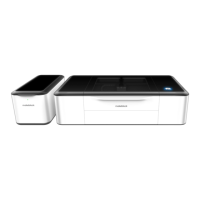
The MakeBlock Laserbox Pro is a sophisticated laser cutting and engraving machine designed for makers, offering a blend of advanced functionality and user-friendly operation. This device is engineered to empower users with precision and creativity, enabling them to bring their designs to life across a variety of materials.
At its core, the MakeBlock Laserbox Pro is a desktop laser cutter and engraver that utilizes a laser beam to precisely cut, engrave, and mark materials. It is designed for both hobbyists and professionals who require a reliable tool for rapid prototyping, artistic creation, educational projects, and small-scale manufacturing. The machine is capable of processing a wide range of materials, including but not limited to wood, cardboard, acrylic, leather, and certain fabrics, making it a versatile asset for diverse applications.
The primary function of the Laserbox Pro is to execute designs created in digital software. Users can import their designs, which are then translated into laser paths by the machine's internal system. The laser head moves along these paths, emitting a focused beam that either cuts through the material or engraves its surface by ablating a thin layer. The intensity and speed of the laser can be adjusted to achieve different effects, from deep cuts to delicate engravings and surface markings.
A key feature contributing to its functionality is the integrated Smart Smoke Purifier. This external unit is essential for maintaining a clean and safe working environment. As the laser interacts with materials, it often produces smoke, fumes, and particulate matter. The Smart Smoke Purifier actively filters these byproducts, ensuring that the air remains free of harmful substances and odors. This not only protects the user's health but also prevents the accumulation of residue within the machine, which could otherwise affect its performance and longevity. The purifier connects directly to the Laserbox Pro, creating a closed system for efficient fume extraction.
The device also comes with a selection of materials to get users started immediately. These include 3mm basswood sheets and 3.5mm cardboard sheets, which are ideal for initial projects and for familiarizing oneself with the machine's capabilities. This thoughtful inclusion underscores the "ready-to-use" philosophy of the Laserbox Pro, allowing users to jump straight into creation without the immediate need to source materials.
The MakeBlock Laserbox Pro is designed with ease of use in mind, incorporating several features that streamline the user experience from setup to operation.
Quick and Simple Setup: The installation process is straightforward, beginning with connecting the Smart Smoke Purifier to the main Laserbox unit. This is followed by starting the Laserbox itself, downloading and installing the necessary software, and finally connecting the computer to the Laserbox. The manual provides detailed instructions for each step, ensuring a smooth initial setup.
Intuitive Software Integration: The operation of the Laserbox Pro is heavily reliant on its dedicated software. This software acts as the bridge between the user's digital designs and the physical output of the machine. It typically offers a user-friendly interface where designs can be loaded, adjusted, and sent to the laser cutter. The software is designed to be intuitive, allowing users to easily control laser parameters such as power, speed, and passes, which are crucial for achieving desired results on different materials.
Material Compatibility: The Laserbox Pro supports a wide array of materials, making it highly adaptable for various projects. The ability to work with wood, cardboard, acrylic, and leather means it can be used for everything from crafting intricate models and personalized gifts to producing functional prototypes and educational aids. The machine's precision allows for fine details and clean cuts, enhancing the quality of the final product.
Safety and Environmental Considerations: The integration of the Smart Smoke Purifier is a significant usage feature, emphasizing safety and environmental responsibility. By effectively managing smoke and fumes, the Laserbox Pro can be used in various settings, including homes, schools, and workshops, without significant concerns about air quality. This makes it more accessible to a broader range of users who might not have access to industrial ventilation systems.
User Manual and Support: A comprehensive User Manual is provided, both in hardcopy and accessible via a QR code for a softcopy. This manual serves as an invaluable resource, guiding users through detailed operational procedures, troubleshooting, and advanced techniques. Specific sections of the manual are highlighted for quick reference, such as pages dedicated to initial setup and operation, ensuring users can quickly find the information they need.
To ensure the MakeBlock Laserbox Pro continues to perform optimally and deliver high-quality results over its lifespan, several maintenance features and recommendations are integrated into its design and operational guidelines.
Water Tank Refilling: A critical maintenance step, especially before the first operation, is refilling the water tank. The water tank is located below the left panel of the machine and is essential for the cooling system of the laser. The water is typically removed for transportation safety, so refilling it is a mandatory initial step. The manual provides clear instructions and a QR code for more information on the water tank refilling process.
Recommended Liquid Type: For the water tank, the manual specifically recommends using tap water or distilled water. It explicitly states that anti-freeze or coolant liquid is not necessary, simplifying the maintenance process and reducing the need for specialized fluids. This guidance helps users maintain the cooling system effectively without introducing potentially harmful or unnecessary chemicals.
No Special Tools for Initial Refill: For the first-time refill, the manual clarifies that a heat gun or hot air gun is not required. This detail is important as some laser systems might require such tools for de-airing or preparing the cooling system, but the Laserbox Pro simplifies this initial setup.
Scheduled Maintenance: The manual emphasizes the importance of performing scheduled maintenance to ensure the production of good quality products. This highlights that regular upkeep is crucial for the machine's performance and longevity. While specific maintenance schedules are likely detailed in the full User Manual, the quick guide points users to the official website for more information on maintenance and support. This indicates that Autobotic provides resources to help users keep their machines in top condition.
Accessibility of Maintenance Information: Information regarding maintenance and support is made easily accessible through QR codes that link to the official website. This modern approach allows users to quickly access up-to-date information, guides, and troubleshooting tips directly from their mobile devices, ensuring they have the resources needed to maintain their Laserbox Pro effectively. This proactive approach to support helps users address potential issues before they escalate, thereby extending the life and efficiency of the device.
In summary, the MakeBlock Laserbox Pro is a comprehensive laser cutting and engraving solution that combines powerful functionality with user-centric design. Its robust capabilities, ease of use, and emphasis on safety and maintenance make it an excellent tool for a wide range of creative and practical applications, empowering makers to innovate and produce high-quality results.
 General
| Connectivity | USB, Wi-Fi |
|---|---|
| Positioning Accuracy | 0.1 mm |
| Operating System | Windows, macOS |
| Cooling System | Water cooling |
| Exhaust System | Built-in exhaust fan |
| Maximum Material Thickness | 10 mm |
| Laser Type | CO2 Laser |
| Working Area | 400 x 600 mm |
| Supported Materials | Wood, Acrylic, Leather, Fabric, Paper |
| Software | Laserbox Software |
| Supported File Formats | SVG, DXF, JPG, PNG |
| Safety Features | Emergency stop |


 To Next Page