29
7
5
4
*
3
4
5
6
CAUTION: To prevent eye injury, always wear eye protection
when cleaning the Þ lter with compressed air!
Do not use fuel to clean the air Þ lter.
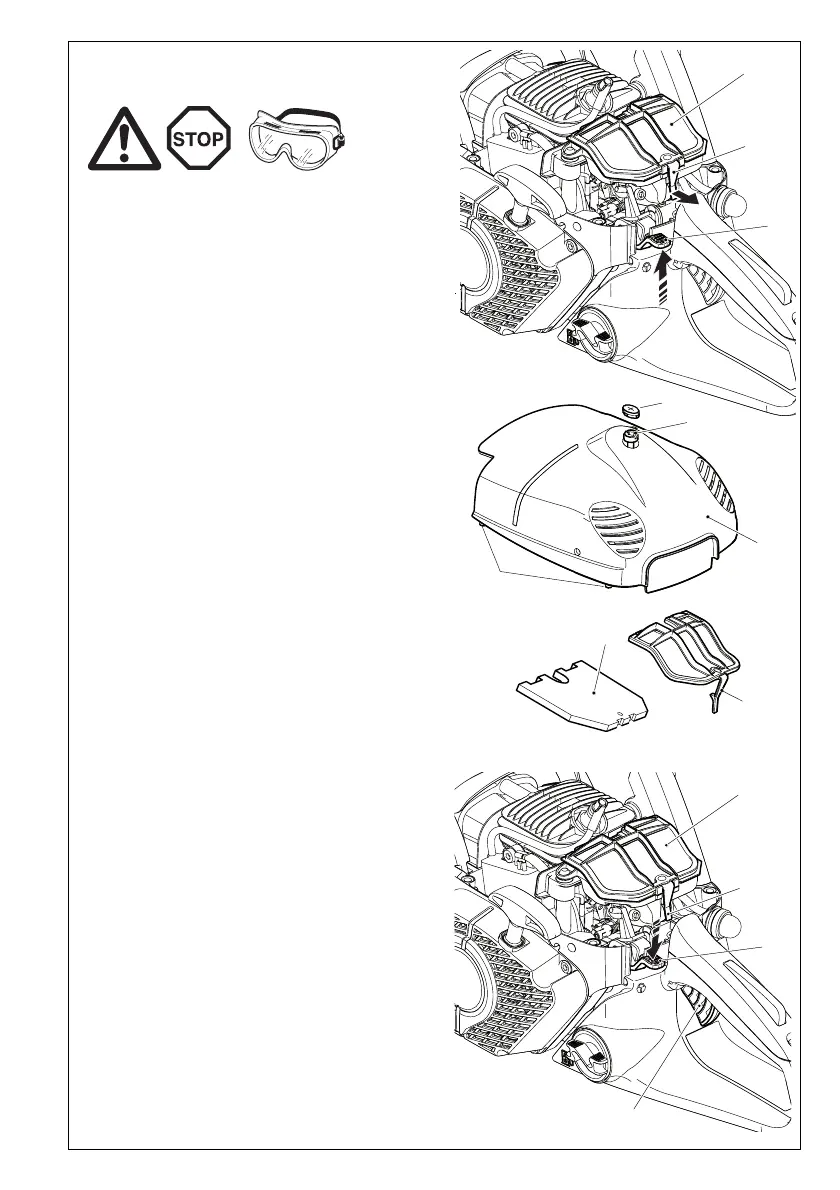
Insert the universal wrench vertically through the slotted plug
(*).
Loosen the scew (1) counter-clockwise and remove the hood
(2).
Push up the combination switch (3) (Choke position) to prevent
dirt particles from falling into the carburetor.
Pull the air Þ lter cover tab (4) slightly in the direction of the arrow,
and remove the air Þ lter cover.
Remove the air Þ lter (5).
IMPORTANT: Cover the intake opening with a clean cloth to
prevent dirt particles from getting into the carburetor.
If the Þ lter is very dirty, clean it in lukewarm water with dish-
washing detergent.
Let the air Þ lter dry completely.
If the Þ lter is very dirty, clean it frequently (several times a day),
because only a clean air Þ lter provides full engine power.
CAUTION:
Replace damaged air Þ lters immediately.
Pieces of cloth or large dirt particles can destroy the en-
gine!
Insert the air Þ lter (5).
Put on the air Þ lter cover.
Note: The air Þ lter cover tab (4) will engage automatically if the
air Þ lter cover is properly positioned.
Push down the combination switch (3) and press the throttle
(6) all the way down one time in order to deactivate the throt-
tle lock.
Put on the hood (2). When doing so make sure that the lower
pins (7) on both sides of the hood engage properly (when cor-
rectly assembled, the pins should not be visible).
Tighten screw (1) clockwise.
Cleaning the air Þ lter


 To Next Page
 Loading...