04.A 13-05-03
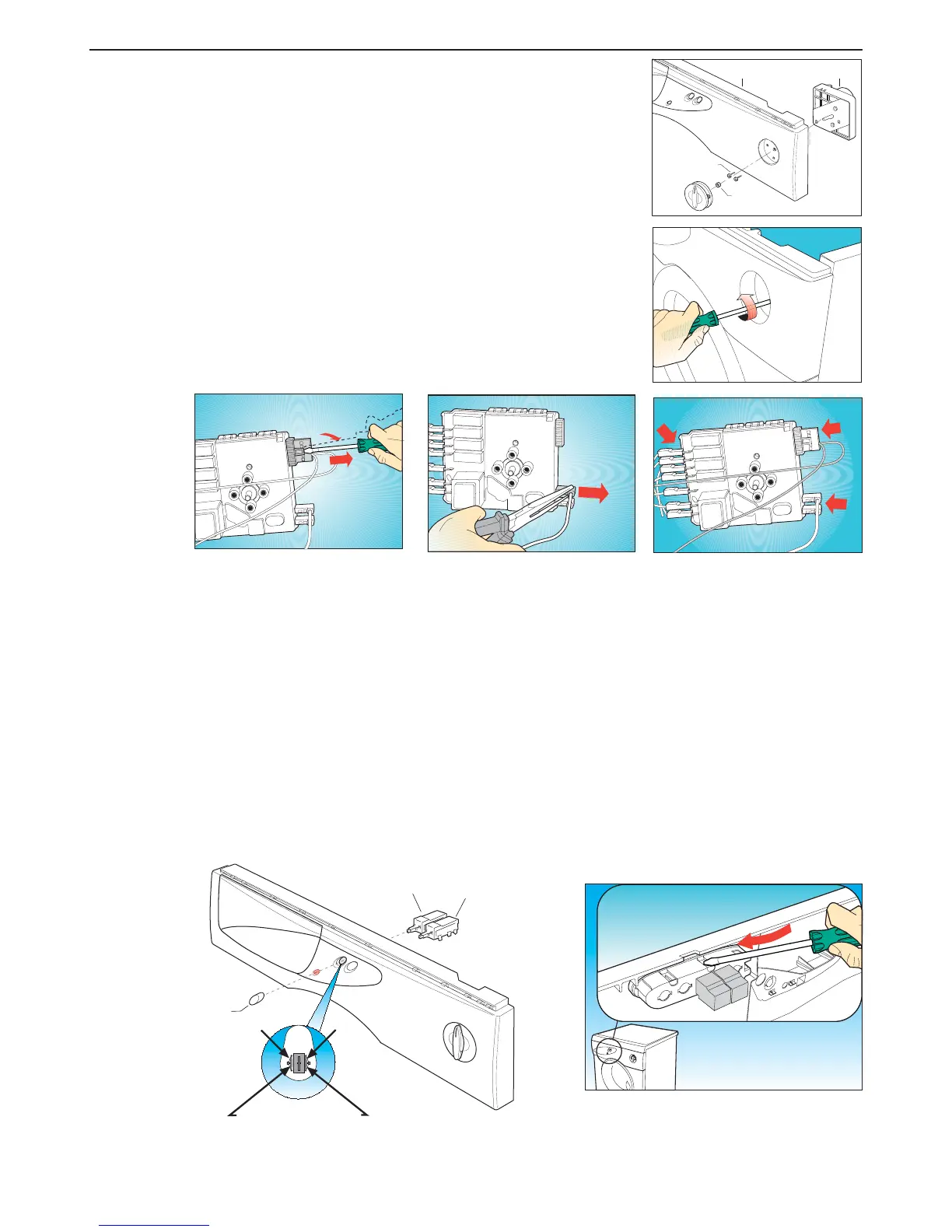
Step 3 Removing and/or replacing the programmer (B290) from the
control panel (B270):
(a) Remove the top cover (Step 1).
(b) Remove the programmer knob by grasping it gently and
pulling (Step 2).
(c) Use a crosshead screwdriver to remove the two screws (B250)
fixing the programmer (B290) to the control panel (B270).
(d) To remove the electrical connections from the programmer,
proceed as follows:
- Use a flat screwdriver as a lever on the connector clip and remove
the connector.
- Use the pliers to remove the other electric wires,
noting their positions.
(e) To re-assemble, follow the same procedure in reverse order, taking
care to check that the wire colours and markings correspond to
the appliances wiring diagram.
Step 4 Removing and/or replacing the buttons (B210) and switches (B330-B340) from the control panel:
(a) Remove the top cover (Step 1).
(b) To remove the buttons (B210), insert the point of a screwdriver in the button mounting slot on the
inside of the control panel and then push the button outwards.
(c) To remove the switches (B330-B340) from the front of the control panel, use a screwdriver
as a lever on the retaining lugs and then remove the switches.
(d) Disconnect the wiring noting the positions of the wires.
(e) To re-assemble, follow the same procedure in reverse order.
MAINTENANCE PROCEDURES
B067
B250
B290B270
B210
B340
B330
Retaining lugs


 To Next Page