Product Features
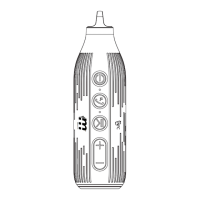
1.On / Off button: Press and hold for 3 seconds,
speaker beeps and the blue indicator LED flashes,
bluetooth is ready for connection. Use your bluetooth
device to search for the device name: Rocket, and then
click to connect. Once bluetooth has paired and
connected successfully, the blue LED indicator will be
on and the speaker is ready for playing music .
Press and hold the button for 3 seconds to switch off the
speaker.
2.Phone Answer and Reject Key: Under Bluetooth
connected status, when the call comes in, the Rocket
will beep, press button quickly to answer the call, press
and hold to reject incoming call.
3.Pause and Play button : When playing music, press
the button to pause or play.
*Press and hold to disconnect Bluetooth connection*
4.Volume up / Next Song : Press quickly for next song,
press and hold to increase the volume, when volume
reaches the maximum limit, speaker will beep.


 To Next Page