2-75
IT
EN
648870 IT-EN-ES (04/05/2015)
17 - ACCENSIONE E REGOLAZIONE RISCALDAMENTO
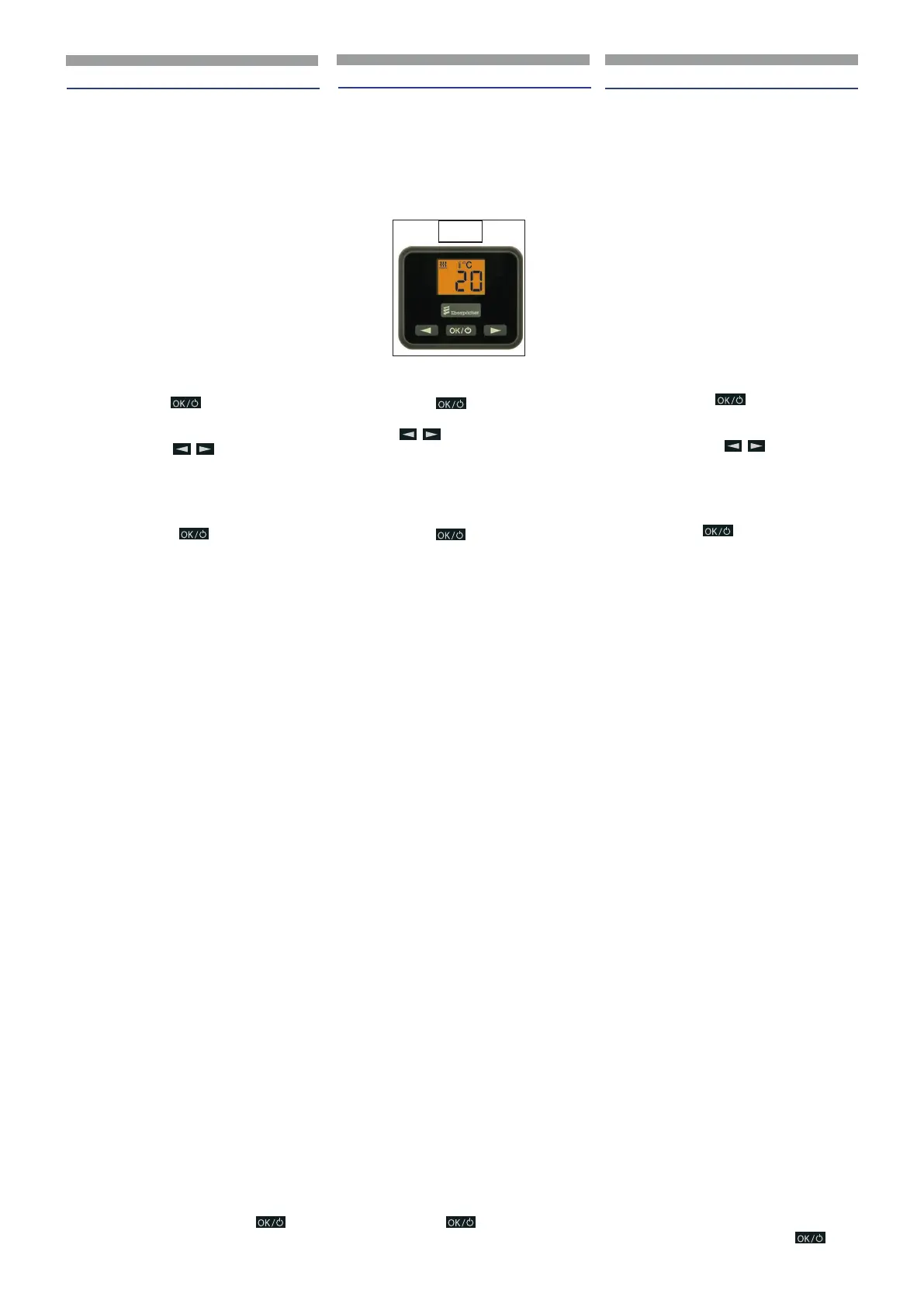
IMMAGINE COMPLESSIVA (16)
EasyStart Select
Con EasyStart Select si possono eseguire
le impostazioni necessarie per il funziona-
mento del riscaldatore.
Funzioni base dei tasti
Premendo il tasto
si accende o si speg-
ne il riscaldatore e si confermano le opera-
zioni.
Premendo i tasti
si selezionano le
opzioni del menu e si eettuano le impos-
tazioni.
Longpress - la via diretta
Premere longpress
per più di 2 secon-
di – il riscaldamento viene avviato immedia-
tamente.
COMANDO E IMPOSTAZIONE
AVVERTENZE SULL’IMPIEGO E LA REGOLA
ZIONE
Attivare Easystart Select
Se il display non è illumina to, si deve atti-
vare EasyStart Select (non in Riscaldamento
ON con Longpress).
Shortpress (per meno di 2 secondi) su uno
dei tre tasti, sul display viene visualizzata la
videata iniziale, quindi si continua con l’im -
piego o la regolazione.
Attivare l’opzione del menu
Il simbolo dell’opzione del menu da attivare
viene visualizzato lampeggiante sul display.
Display
Il display è illuminato:
• durante l’uso di EasyStart Select.
• quando si collega il morsetto 58, se è
attivata l’illuminazione del veicolo.
• in Riscaldatore ON.
Il display si spegne
Se l’illuminazione del veicolo è disinserita,
nessun riscaldatore è attivato o non viene
eseguita nessuna regolazione o nessun
azionamento, il display si spegne entro 10
secondi, vale a dire, EasyStart Select va in
standby.
Per poter reinserire dati si deve premere
prima uno dei tre tasti (non in Riscaldamen-
to ON con Longpress).
Simbolo lampeggiante
Si può attivare un simbolo lampeggiante
nella barra del menu con il tasto
.
17 - SWITCHING ON AND REGULATING HEATING
OVERVIEW (16)
EasyStart Select
The EasyStart Select can be used to make
the necessary settings for operation of the
heater.
Basic button functions
Press the button
to switch the heater
on or o and to conrm actions.
Press the
buttons to select menu
items and make settings.
Longpress - the direct way
Longpress Press
for longer than 2 se-
conds – Heating mode is started immedia-
tely.
OPERAT ION AND SE TTING ADJUST
MENT
NOTES ON OPERATION AND SETTING
Activat ing the EasyStart Select
If the display is not lit the EasyStart Select
must be activated (not if heating On with
Longpress).
Short press (less than 2 seconds) on one of
the three buttons, the Start display appears
in the display, then continue with the opera
tion or setting.
Activat ing a menu item
The symbol of the menu item to be activa-
ted appears in the display and is ashing.
Display
The display is lit:
• during use of the EasyStart Select.
• if terminal 58 is connected, with
switched on vehicle lighting.
• if the heater is On.
Display disappears
If the vehicle lighting is switched o, no
heater is switched on or if no setting or ac-
tuation is made, the display goes out within
10 seconds, i.e. the EasyStart Select swit-
ches to standby.
For renewed input, one of the three buttons
must be pressed rst (not in hea ting On
with Longpress).
Flashing symbol
A ashing symbol in the Menu bar can be
activated with the
button.
16
17 - ENCENDIDO Y REGULACIÓN CALEFACCIÓN
IMAGEN GENERAL (
16)
EasyStart Select
Con EasyStart Select se pueden llevar a
cabo las conguraciones necesarias para el
funcionamiento del calefactor.
Funciones básicas de las teclas
Pulsando la tecla
se enciende o se
apaga el calefactor y se conrman las ope-
raciones.
Pulsando las teclas
se seleccionan
las opciones del menú y se llevan a cabo las
conguraciones.
Longpress - modo directo
Pulsar longpress
durante más de 2se-
gundos – la calefacción se enciende de for-
ma inmediata.
MANDO Y CONFIGURACIÓN
ADVERTENCIAS SOBRE EL USO Y LA REGU
LACIÓN
Activar Easystart Select
Si la pantalla no se enciende, se debe activar
EasyStart Select (no en Calefacción ON con
Longpress).
Shortpress (durante menos de 2 segundos)
en una de las tres teclas, en la pantalla se vi-
sualiza la pantalla inicial, luego se continúa
con el uso y la regulación.
Activar la opción del menú
El símbolo de la opción del menú por acti-
var se visualiza parpadeante en la pantalla.
Pantalla
La pantalla está iluminada:
• durante el uso de EasyStart Select.
• cuando se conecta el borne 58, si
está activada la iluminación del
vehículo.
• en Calefactor ON.
La pantalla se apaga
Si la iluminación del vehículo es desactiva-
da, ningún calefactor está activado o no se
lleva a cabo ninguna regulación o ningún
accionamiento, la pantalla se apaga en
10segundos, es decir, EasyStart Select entra
en modo standby.
Para poder introducir nuevamente los datos
primero se debe pulsar una las tres teclas
(no en Calefacción ON con Longpress).
Símbolo parpadeante
Se puede activar un símbolo parpadeante
en la barra del menú con la tecla
.
ES


 To Next Page
 Loading...