2-99
IT
EN
648870 IT-EN-ES (04/05/2015)
Disattivare memoria programmi
Selezionare l’impostazione “O” con il tasto
. (72)
Confermare l’impostazione “O” con il tasto
.
p
Avvertenza! Le impostazio-
ni rimangono memorizzate.
Al termine dell’elaborazione
del programma, tornare con
il tasto
all’opzione Pro-
gramma / Preselezione del
menu oppure attendere nché
- in Illuminazione veicolo On
viene visualizzata l’opzione Pro-
gramma/ Preselezione del menu,
- in Illuminazione veicolo O si
spegne l’illuminazione del display.
Non premere il tasto
, poiché
altrimenti si commuta l’imposta-
zione “On” in “O” e viceversa.
Rielaborare memoria programmi
Selezionare il simbolo
con il tasto
.
(
73)
Confermare l’impostazione con il tasto
e proseguire.
Impostazioni
Impostare l’ora
Display On, viene visualizzata la videata ini-
ziale.
Selezionare dalla barra del menu il simbolo
con il tasto .
(
74)
Confermare l’opzione Impostazioni del
menu con il tasto
.
Deactivat ing the program memory
Use the
button to select the “O”
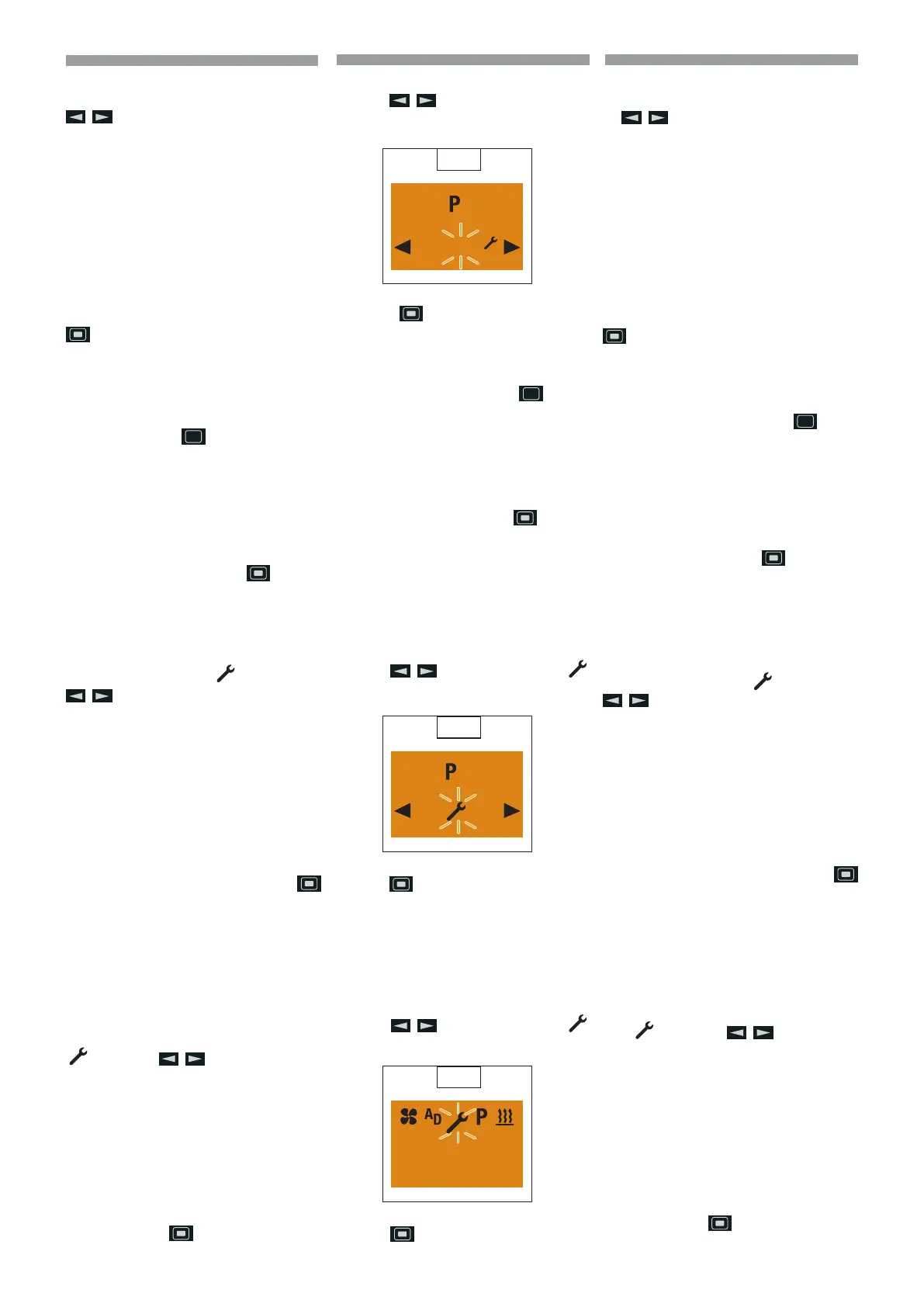
setting. (
72)
Press the button to conrm the “O”
setting.
p
Please note! The settings re-
main saved. After editing the
program, press the
button
to return to the Program / Pre-
selection menu item or wail until
- if the vehicle lighting is
On the Program / Preselec-
tion menu item is displayed,
- if the vehicle lighting is O
the display lighting goes out.
Do not press the
button,
as otherwise the “On” setting
switches to “O” and vice versa.
Edit the program memory again
Use the
button to select the
symbol. (
73)
Use the
button to conrm the setting
and continue.
Settings
Setting the time
Display On, the Start display appears.
Use the
button to select the
symbol in the Menu bar. (
74)
Conrm the Settings menu item by pres-
sing the
button.
72
2
O
On
73
2
O
On
74
10:30
Mo.
Desactivar memoria programas
Seleccionar la conguración “O” con la te-
cla . (72)
Conrmar la conguración “O” con la tecla
.
p
¡Advertencia! Las conguracio-
nes permanecen memorizadas.
Al nalizar el procesamiento del
programa, con la tecla
volver
a la opción Programa / Preselec-
ción del menú o bien esperar a que
- en Iluminación vehículo On
se visualice la opción Progra-
ma / Preselección del menú,
- en Iluminac ión vehículo O se apa-
gue la iluminación de la pantalla.
No pulsar la tecla
, puesto que
de lo contrario se conmuta la con-
guración “On” en “O” y vicever-
sa.
Procesar nuevamente la memoria progra-
mas
Seleccionar el símbolo
con la tecla
.
(73)
Conrmar la conguración con la tecla
y continuar.
Conguraciones
Congurar la hora
Pantalla On, se visualiza la pantalla inicial.
Desde la barra de menú seleccionar el sím-
bolo
con la tecla .
(
74)
Conrmar la opción Conguraciones del
menú con la tecla
.
ES








 To Next Page