4 5
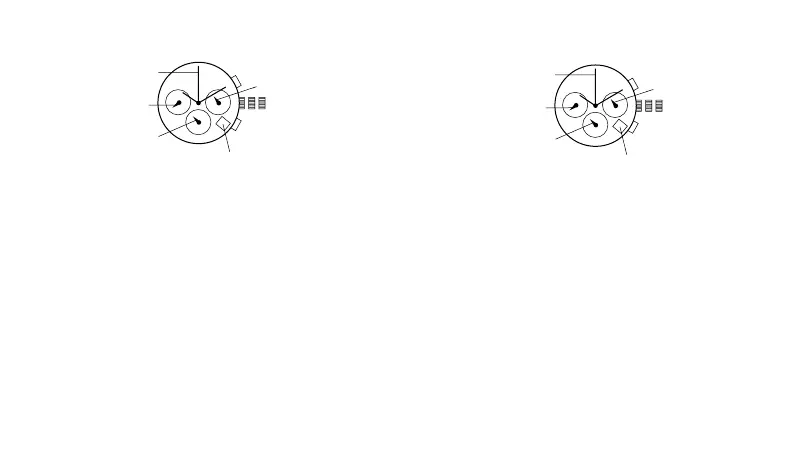
chronograph with date fs20
(1 crown/2 pushers)
time setting
1. pull crown out to position 3.
2. turn to set hour, minute and 24 hour hands.
3. return crown to position 1.
date setting
1. pull crown out to position 2.
2. turn clockwise to set the date.
3. return crown to position 1.
chronograph operation
1. push a to start/stop the chronograph.
2. push b to reset the chronograph.
chronograph zero reset
1. pull crown out to position 3.
2. press a to set the chronograph second hand to 12:00
(zero) position. each press advances the chronograph
second hand one mark. if a is held down for over 2
seconds, the chronograph second hand advances
continuously.
3. press b to set the chronograph minute hand to zero
position.
4. return crown to position 1.
321
a
b
chronograph
second hand
chronograph
minute hand
24-hour hand
date
second hand
クロノグラフ&日付モデル FS20
(リューズ1/プッシュボタン2)
時刻の設定
1. リューズを3の位置まで引き出します。
2. リューズを回して時針、分針、24時針を合わせます。
3. リューズを1の位置まで戻します。
日付の設定
1. リューズを2の位置まで引き出します。
2. リューズを奥(時計回り)に回して日付を合わせます。
3. リューズを1の位置まで押し戻します
クロノグラフの 使 用 法
1 . A ボタンを押すとクロノグラフが スタート/ ストップします。
2 . B ボタンを 押 すとクロノグラフがリセットされます。
クロノグ ラフ ゼ ロリセット
1. リューズを3の位置まで引き出します。
2. Aボタンを押すとクロノグラフ秒針がゼロ位置に戻ります。長押しすると早送りで針は
進みます。
3. Bボタンを押すとクロノグラフ分針がゼロ位置に戻ります。
4. クロノ秒針がゼロ位置に戻ったら、リューズを1の位置に戻します。
321
a
b
クロノ秒 針
クロノ分 針
24時針
日付
秒針



 To Next Page
 Loading...