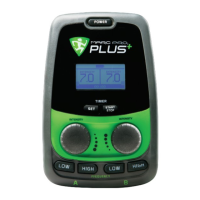
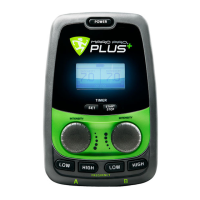
channel. The device is delivered in pre-set mode,
which we highly recommend. Selecting “LOW” will
put that channel at 2 Hz. Selecting “HIGH” will put
that channel at 60Hz.
How to Toggle between Manual
Mode and Pre-Set Mode:
To switch modes, simply hold down the two inner
frequency buttons while powering on the device.
Repeating this process will toggle between the two
modes. The LCD screen will identify which mode
you are in.
In manual mode, the frequency selection buttons
at the bottom of the interface can be used to select
any frequency from 1Hz to 70Hz.
In pre-set mode, the “LOW” button defaults to
a recommended 2Hz and the “HIGH” button
defaults to recommended 60Hz. However, if
experimentation with manual mode results in your
preference for particular frequencies, you can
choose any frequency to be your pre-set.
Setting the Frequency for Pre-Set Mode:
Holding down the two frequency buttons on the left
side of the device while powering up will put the
device into set mode. Use the channel A frequency
selection buttons to choose the pre-set frequency
that you would like for the “LOW” button and use
the channel B frequency selection buttons to choose
the pre-set frequency that you would like for the
“HIGH” button (default is 2Hz for “LOW” button
and 60Hz for “HIGH” button). Once you have
chosen your pre-sets; power off the device. The
device will remember these pre-sets until they are
changed following the same procedure.
TREATMENT MODES |
Pre-Set Mode - Default:
The Marc Pro Plus comes in a simple to use and
recommended “pre-set mode”. The low frequency
button will deliver the rhythmic non-fatiguing muscle
contractions used for conditioning and recovery.
The high frequency button will deliver a very
strong, but soothing buzzing sensation. This can
provide additional pain control sometimes needed
in trouble spots like the back and joints.
Manual Mode - Advanced Users Only:
Advanced users can put the Marc Pro Plus device
into “manual mode” and choose between over 70
frequency options and experiment with the results.
If you fi nd a frequency you like best, you can even
program those to be your personalized pre-sets.
This gives the advanced user or experimenter total
fl exibility and control over the stimulation they
receive.
When the Marc Pro Plus device is powered on the
LCD prompts the user to select a frequency for each
16
MPRO_19-003_MPP_MANUAL_FINAL_IMAGES_C8.5.indd 16MPRO_19-003_MPP_MANUAL_FINAL_IMAGES_C8.5.indd 16 9/1/20 5:43 AM9/1/20 5:43 AM


 To Next Page
 Loading...