EasyManua.ls Logo

Marconi Instruments 2955 - Page 26

Marconi Instruments 2955
84 pages
Print Icon
To Next Page IconTo Next Page
To Previous Page IconTo Previous Page
Loading...
I
OPERATION
When
the
operation
of a control
appears
to
cause
an
unusual response
or a lack
of
it,
the reason
may
be
found
by checking
through the
manual
for other
references
to that
control.
For example,
the
AC
DC
key sometimes
does not select DC.
Checking
through
the manual
reveals
that this key
is
disabled
for both
SINAD
and
distonion
measurements.
In this case,
selecting
DIST’N
OFF re-enables
the key for other measurements,
FRONT
PANEL
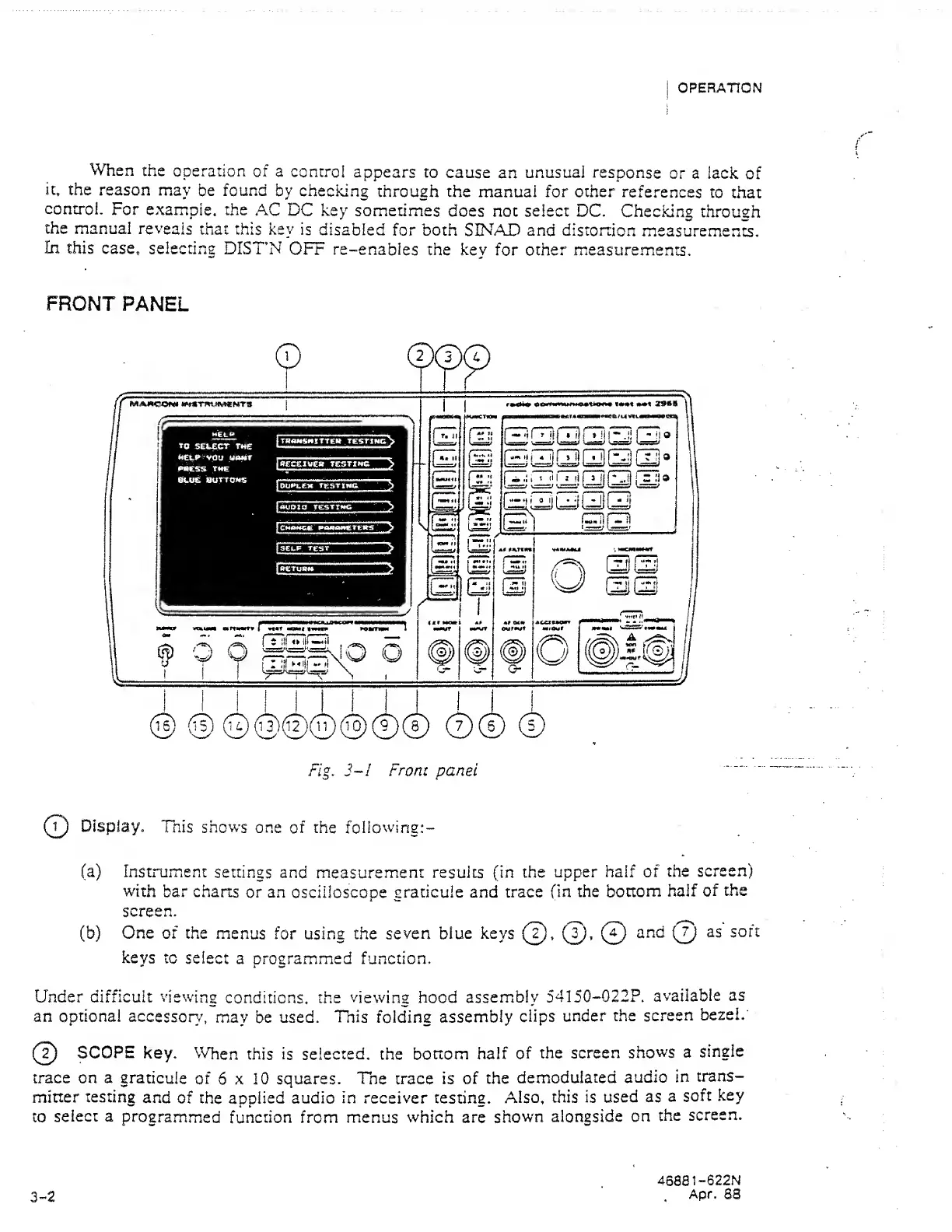
Fig.
3~I From panel
Q
Display,
This shows
one
of
the following:-
(a) Instrument
settings and
measurement
results (in the
upper half of
the
screen)
with
bar charts
or
an
oscilloscope
graticule and trace fin
the bottom
half
of
the
screen.
(b) One of the
menus
for using the
seven blue
keys
(
2
).
(f}
Cl)
keys
to select
a programmed function.
Under
difficult viewing
conditions, the
viewing
hood
assembly
54150-022P.
available
as
an optional
accessory,
may
be
used.
This
folding
assembly
clips
under
the screen
bezel.
SCOPE
key,
\Vhen
this
is selected,
the
bottom
half
of
the
screen
shows
a
single
trace on a
graticule
of
6
x 10 squares.
The trace is of
the
demodulated
audio
in
trans-
mitter
testing
and
of the applied audio
in receiver
testing.
Also, this
is used
as
a
soft
key
to
select a
programmed
function from menus
which
are
shown
alongside
on
the
screen.
3-2
46881-622N
Apr.
83