EasyManua.ls Logo

Marconi Instruments 2955 - Page 31

Marconi Instruments 2955
84 pages
Print Icon
To Next Page IconTo Next Page
To Previous Page IconTo Previous Page
Loading...
OPERATION
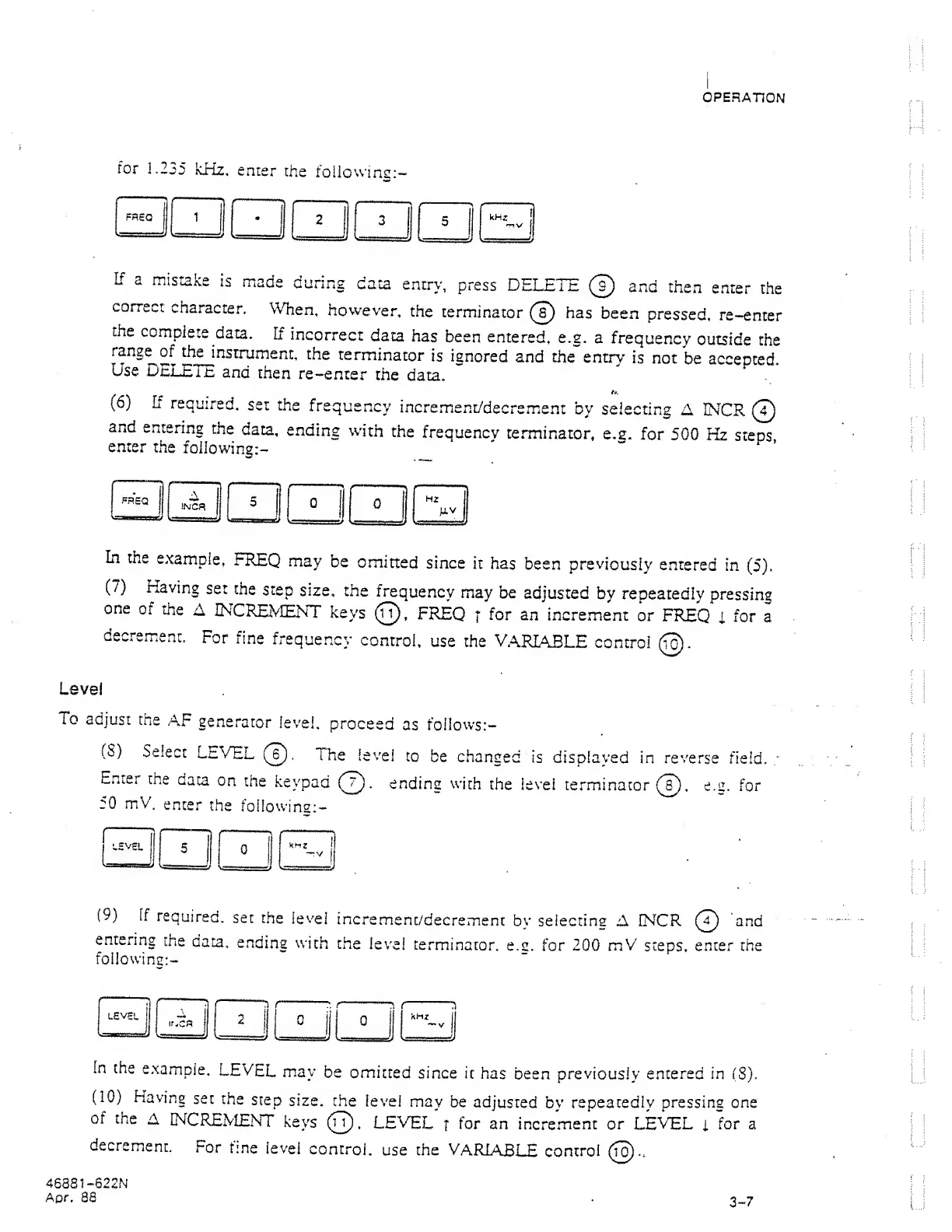
for
1.235
kHz,
enter
the
followine;-
If a
mistake
is
made
during
data
entry,
press
DELETE
0
and
then
enter
the
correct
character.
When,
however,
the
terminator
0
has
been
pressed,
re-enter
the
complete
data.
If
incorrect
data
has
been
entered,
e.g,
a
frequency
outside
the
instrument,
the
terminator
is
ignored
and the
entry
is
not
be
accented,
use
DELETE
and
then
re-enter
the
data.
(6)
If
required,
set
the
frequency
incremient/decrement
by
selecting
A
IMCR
(T)
and
entering
the
data,
ending
with
the
frequency
terminator,
e.g.
for
500
Hz
steps
enter
the
following:-
^
In
the
example,
FREQ
may
be
omitted
since
it has
been
previously
entered
in
(5).
(7)
Having
set
the
step
size,
the
frequency
may be
adjusted
by
repeatedly
pressing
one
of
the
A
INCREVIENT
keys
(0,
FREQ
]
for
an
increment
or
FREQ
i
for
a
decrem.ent.
For
fine
frequency
control,
use the
VARIABLE
control
0.
Level
To
adjust
the
AF
generator
level,
proceed
as follows:-
(S)
Select
LnVEL
0).
The
level
to
be
changed
is
displayed
in reverse
field.
Enter
the
data
on
the
keypad
(0).
ending
with
the level
term.inator
0),
e.a.
for
50
mV,
enter
the
foilowing:-
1
5
KHZ
t
-V
1
'
•«=a====s:J
(9)
If
required,
set
the
level
incremenc/decrement
by
selecting
A INCR
0
)
and
entering
the
data,
ending
with
the
level
terminator,
e.a.
for 200
mV
steps,
enter the
following:-
fn the
example.
LEVEL
may
be
omitted
since
it
has
been previously
entered in
(S),
(10)
Having
set
the
step
size,
the
level
may
be
adjusted
bv
repeatedly
pressinc
one
of the
A
mCKEMENT
keys
0
.
LEVEL
t
for
an
increment or LEVEL
i
for a
decremienL
For
fine
level
control,
use
the
VARIABLE
control
0.,
46881
-622N
Apr,
88
.
3^7