EasyManua.ls Logo

Marconi Instruments 2955 - Page 33

Marconi Instruments 2955
84 pages
Print Icon
To Next Page IconTo Next Page
To Previous Page IconTo Previous Page
Loading...
OPERATION
RF
POWER
METER
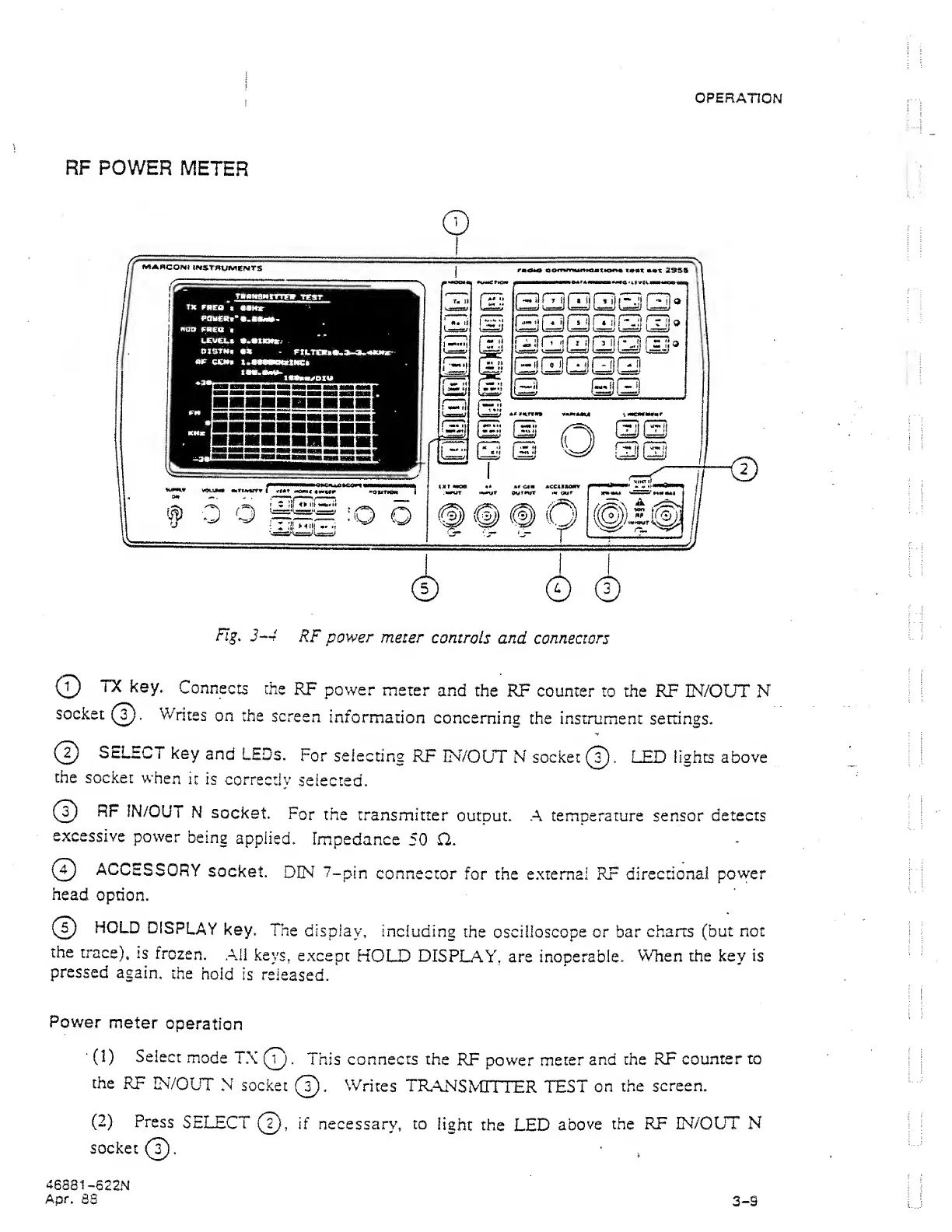
Fig.
3-4
RF
power
meter
controls
and
connectors
©
TX
key.
Connects
the
RF
power
meter
and
the
RF counter
to
the RF
IN/OUT
N
socket
©).
Writes
on the
screen
information
concerning
the instrument settings.
©
SELECT
key
and
LEDs.
For
selecting
RF
IN/OUT
N socket©. LED lights above
the
socket
when
it
is
correctly
selected.
©
RF
IN/OUT
N
socket
For
the
transmitter
output. A temperature sensor
detects
excessive
power
being
applied.
Impedance
50
O.
(T)
ACCESSORY
socket.
DIN 7-ptn
connector
for the external RF directional
power
head
option.
©
HOLD
DISPLAY
key.
The
display,
including
the oscilloscope or bar
charts
(but
not
the
trace),
is
frozen.
All keys,
except
HOLD DISPLAY,
are inoperable.
When the key
is
pressed
again,
the
hold
is
released.
Power
meter
operation
(1)
Select
mode
TX
©
. This
connects
the
RF
power
meter
and
the RF
counter to
the
RF
IN/OLT
N socket
©.
Writes
TRANSMITTER
TEST
on
the
screen.
(2)
Press
SELECT
©,
if necessary, to
light
the
LED
above
the
RF IN/OUT N
socket
©
. ,
46881
-622N
Apr.
88
3-9