EasyManua.ls Logo

Marconi Instruments 2955 - Page 45

Marconi Instruments 2955
84 pages
Print Icon
To Next Page IconTo Next Page
To Previous Page IconTo Previous Page
Loading...
OPERATION
AF
VOLTMETER
©@
©
^
0
(s)
0
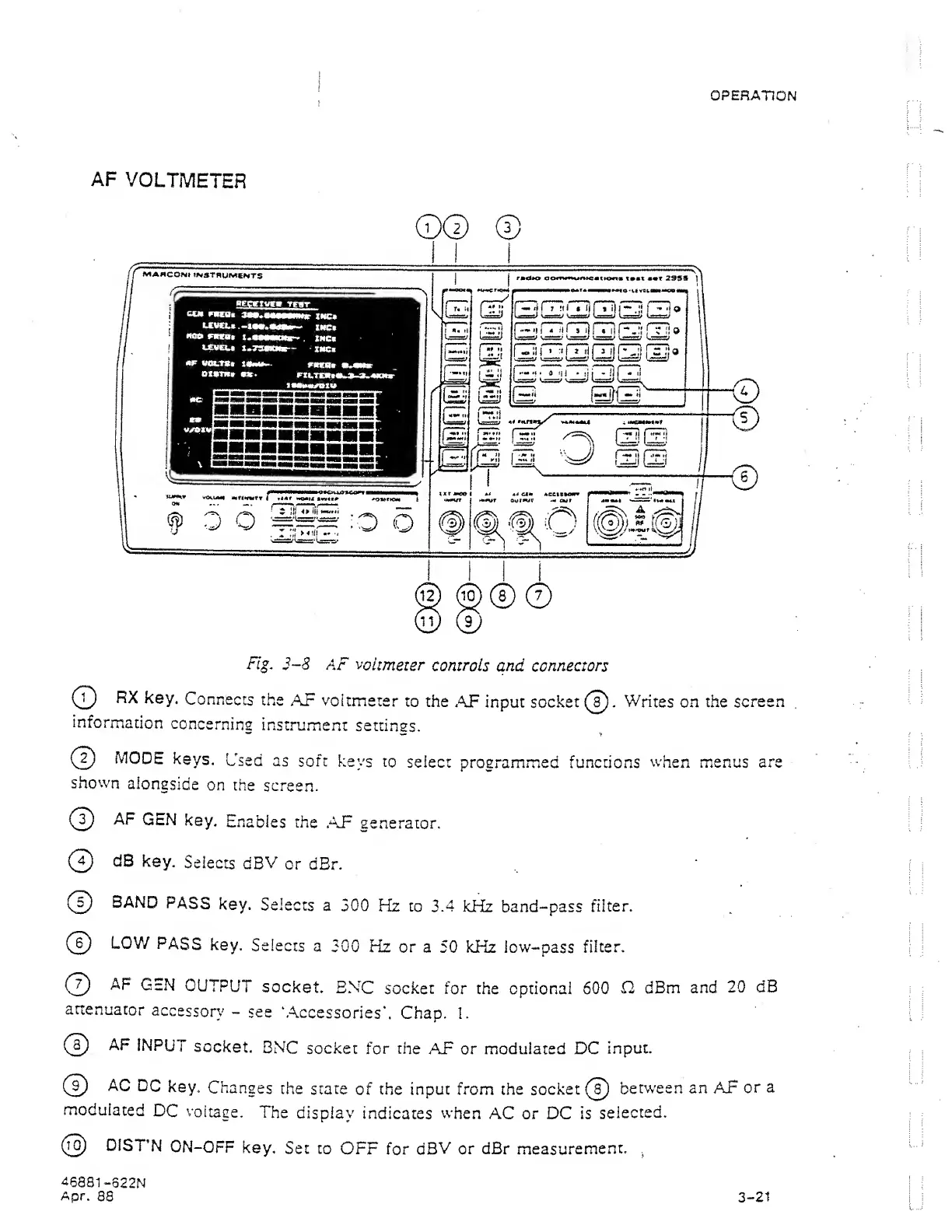
Fig,
3-8
AF
voltmeter
controls
and connectors
(T)
RX
key.
Connects
the
AP
voltmeter
to the
,AF input socket(s)-
Writes
on the
screen
information
concerning
instrument
settinss.
(?)
MODE
keys.
Used
as
soft
keys
to
select
programmed functions
when menus are
shown
alongside
on the
screen.
{(^
AF
GEN
key.
Enables the
,AP
generator.
(?)
clB
key.
Selects
dBV
or
dBr.
(0
BAND
PASS
key.
Selects
a
300
Hz
to 3.4
kHz band-pass
filter.
(?)
LOW
PASS
key.
Selects
a
300 Hz
or
a 50 kHz low-pass
filter.
(
7
)
AF
GEN
OUTPUT
socket.
BNC
socket for
the optional 600
H dBm
and
20 dB
attenuator
accessory
-
see
‘Accessories*.
Chap.
1.
(0
AF
INPUT
socket.
BNC
socket for the
AF
or
modulated DC
Inpuc.
0
AC
DC
key.
Changes
the
state
of the input from the socket
@
betw'een an AF
or
a
modulated
DC
voltage.
The
display
indicates
when
AC or
DC is
selected.
@
DISTN
ON-OFF
key.
Set to
OFF
for
dBV or
dBr
m.easurement.
,
46881
-822N
Apr.
88 3-21