EasyManua.ls Logo

Marconi Instruments 2955 - Page 66

Marconi Instruments 2955
84 pages
Print Icon
To Next Page IconTo Next Page
To Previous Page IconTo Previous Page
Loading...
GPIB
OPERATION
OPERATION
GENERAL
PURPOSE
INTERFACE
BUS
(GPIB)
Functions
The GPrB*
interface unit
allows
the
instrument to
be
coupled to
a
controller.
The essen-
tial
purpose
of the GPIB
functions
is
described
below.
Further
information
on the general
features and
applications of
the GPIB
system can be
obtained
from the
separate
GPIB
Manual
offered as
an opdonal
accessory
(see Chap.
1,
Accessories).
Setting
the
GPIB address
The
instrument's
talk and listen
addresses
can
be
selected
on
the
rocker
switch
bank
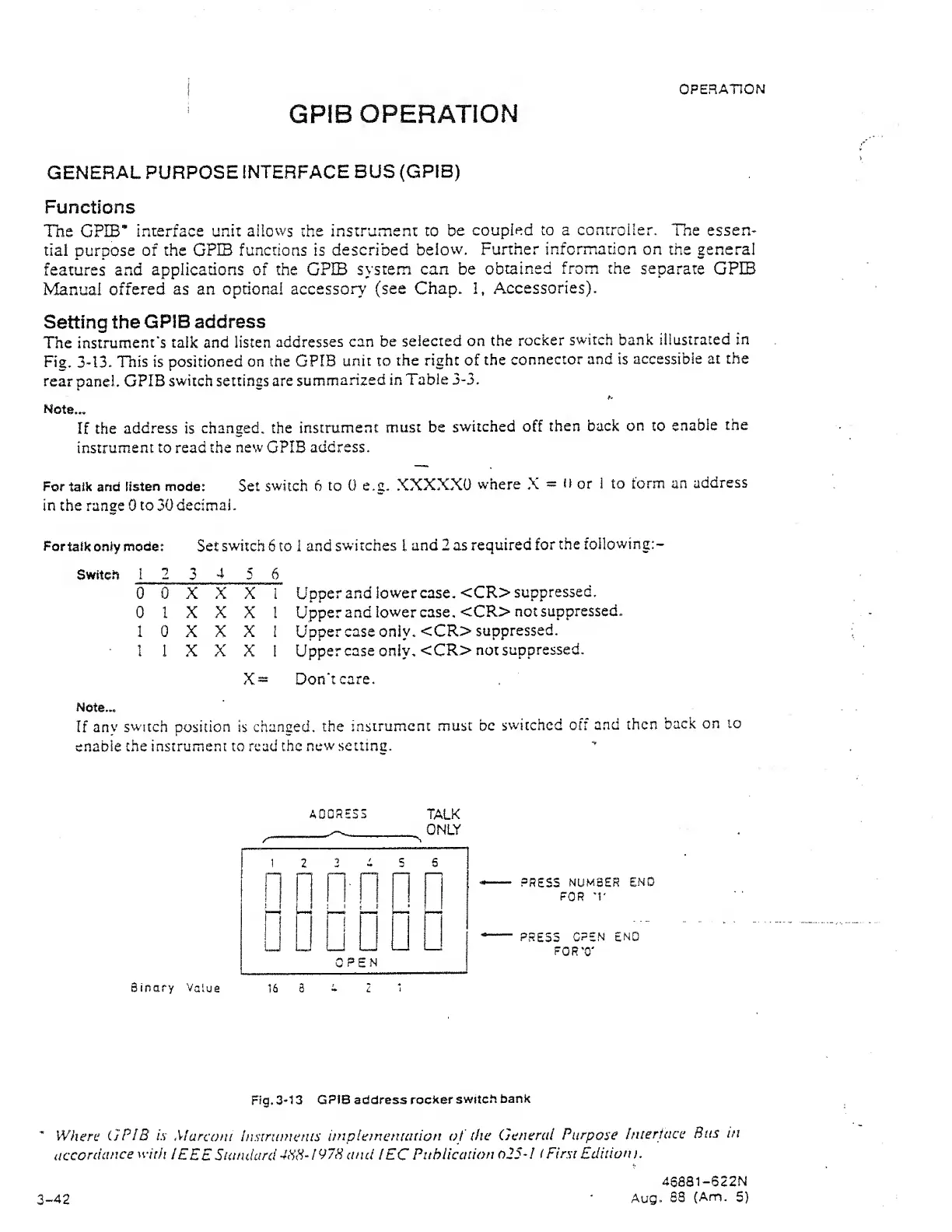
illustrated in
Fig.
3-13.
This is
positioned
on the GPIB
unit to
the right of
the
connector and is
accessible
at the
rear panel.
GPIB
switch
settings
are
summarized
in
Table
3-3.
Note...
If
the
address is
changed, the
instrument
must
be
switched off
then back
on
to
enable
the
instrument to read the
new
GPIB
address.
For
talk and
listen mode:
Set
switch 6
to
0 e.g,
XXXXXO
where
X
=
il
or 1 to
torm
an
address
in the range 0 to 30 decimal.
Fortaikoniymode:
Set
switch
6
to
1
and
switches
I
and 2 as
required
for
the
foilowing:-
Switch
12
3
4
5 6
0 0 X X X i
0 1
X
X
X
1
1 0
X X
X I
I 1 X X X 1
X
=
Upper
and
lowercase, <CR>
suppressed.
Upper and
lowercase. <CR>
not
suppressed.
Uppercase only.
<CR>
suppressed.
Uppercase
only.
<CR>
not
suppressed.
Don't
care.
Note...
If
anv switch position
is
changed,
the
instrument
must be
switched oft
and
then
back
on
lo
enable
the instrument to read
the
new setting.
Binary
Value
A00SS33
TALK
ONLY
16 a
PRESS
NUMBER
END
FOR
'r
PRESS
OPEN END
FORT'
Fig.
3-1
3
GPIB address
rocker
switch
bank
When;
GPIB
is
Marconi
Insirumerus
iinplemenuition of
(he
General
Purpose
fnierface
Bus
in
accordance
with
IEEE
Siandard
4HH-I97H
and
I EC
Piihiication
o25-/ ( First Edition
>.
4Saai-622N
Aug.
88
(Am.
5)
3-42