42.Control x-fader curve
Adjusts the characteristic of the crossfa-
der:
left position:smooth crossfading(gradu-
al transition)e.g. for lone mixes
right position:sharp crossfading(abrupt
transition) e.g. for scratching and cutting.
43.Control mic level
Level control for DJ microphones conne-
cted to the jacks MIDI MIC.
44. Microphone inputs midi mic
Input jacks for connecting DJ microphones
via XLR or a 6.3 mm plugs.
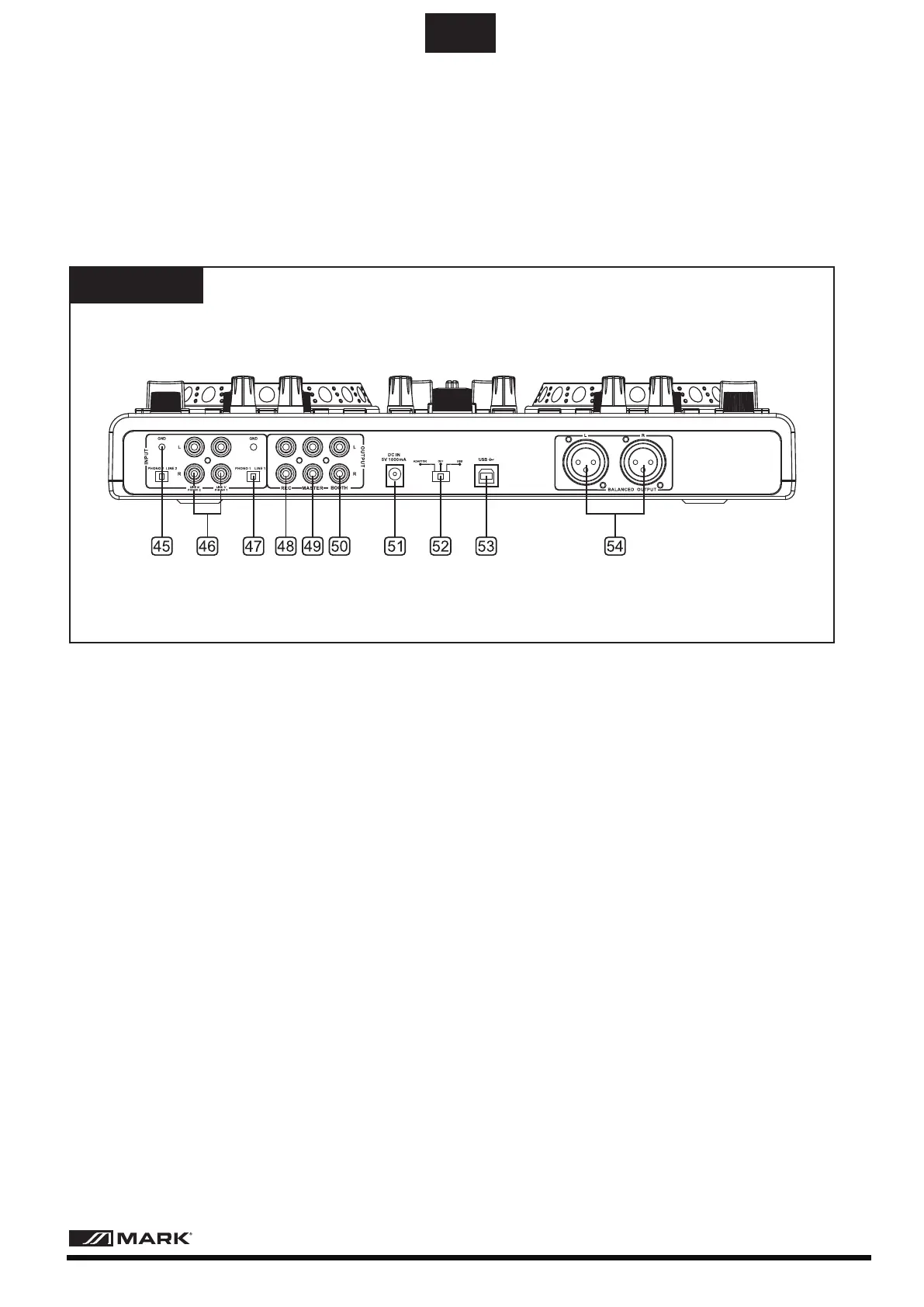
Overview
Rear panel
45.Grounding screw
If you intend to use a turntable,you will
need to ground the RCA cable(s) by car-
ewing in the grounding fork(s) to the gro-
unding screw located on the rear panel
of the mixer.
46.Convertible line/phono RCA input
The unit has a convertible line/phono
RCA input that accepts a standard dual
L&R RCA connection.
47.Phono/Line switch
This small switch allow you to connect the
RCA input connection between a phono
(turntable) input or a Line Level(MP3,CD,
cassette deck,etc...)input.The unit has a
convertible Line/phono RCA.
48.Recording output REC
Stereo output(RCA) for connecting a rec-
ording unit.The recording level is indepe-
ndent of the output controls master cont-
rol,master level and booth volume.
49.Master output,unbalanced
Unbalanced stereo output(RCA) for con-
necting an amplifier or other units with
line level inputs.The output supplies an
audio signal coming from the computer
or the signal of an extermal source at the
line input-depending on the position of
the selector switch PC/Line.
50.Output booth
Stereo output(RCA) for connecting a futh-
er amplifier,e.g. for the monitoring system
or PA application in a secondary roo.The
output supplies an audio signal coming
from the computer or the signal of an ext-
ernal source at the line input-depending
on the position of the selector switch
PC/Line.
51.Power input
For connecting the included power unit
alternatively to power supply via the usb
connection.
- 6 -
User Manual/Manual de Instrucciones MMC 2000
EN



 To Next Page