10. DE-ACTIVATING THE BUILT-IN
MOTION SENSOR:
If you prefer to operate the HomeGuard only by
means of the external alarm contact rather than the
built-in motion sensor, you can de-activate the PIR:
1. Enter your PIN (Personal Identification Number).
Factory default is [0000]: You will hear three
high tones and one low tone as confirmation.
The green indicator starts flashing.
2. Press 6 on the keyboard of the HomeGuard: One
low tone is given for confirmation.
3. Press [ * ] for activating the PIR or # for de-acti-
vating the PIR: One tone is given for confirma-
tion and the INDICATOR stops flashing.
11. OPERATING INSTRUCTIONS:
Arm-Disarm
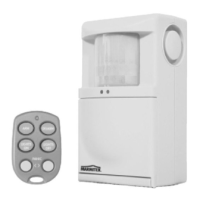
The HomeGuard may be armed and disarmed by
the remote control (option) or keyboard.
To activate the security system from the key-
board (always delayed):
Enter your PIN (Personal Identification Number).
Factory default is [0000]: You will hear three high
tones and one low tone as confirmation. The green
indicator starts flashing.
Press # in the keyboard: You will hear one low tone
as confirmation and the RED indicator lights up, the
GREEN indicator will flash during the delay (30 sec-
onds).
After 30 seconds the HomeGuard is armed and will
generate one low tone for confirmation.
To disarm the HomeGuard via the keyboard:
1. Enter your PIN code: 4 short tones will be gener-
ated as confirmation.
2. Press [ * ] : One short tone will be generated and
the RED indicator will go out.
To arm and disarm the HomeGuard with the
remote control (option):
1. Press ARM to activate the alarm.
2. Press DISARM to de-activate the HomeGuard.
If you use the remote, the arming and disarming
may be instant of delayed, depending on the set-
tings of the HomeGuard.
To generate a panic call: press both PANIC
buttons at the same time (option).
To reset the alarm:
If an alarm has occurred it can be reset by:
1. The person called pressing 0 on the telephone
dialler just after the beep(s) in the message.
2. Disarming the system on the keyboard by
entering your PIN followed by [ * ]
3. Pressing DISARM on the remote control (option).
Alarm message:
During an alarm the telephone dialler will dial
the first number. It will start transmitting the
pre-recorder message as soon as the last digit
has been dialled. The message lasts 9 seconds
and will be repeated twice. The pre-recorded
message is followed by a beep. After this beep
the system will wait for call confirmation which
can be given by pressing 0 on a DTMF (touch tone)
telephone.
In case the confirmation is not received, the
HomeGuard will start dialling the second number
and follow the same procedure. If the second per-
son does not give confirmation, the third number
will be dialled.
6 MARMITEK


 To Next Page
 Loading...