SETTING FILTRATION CYCLES
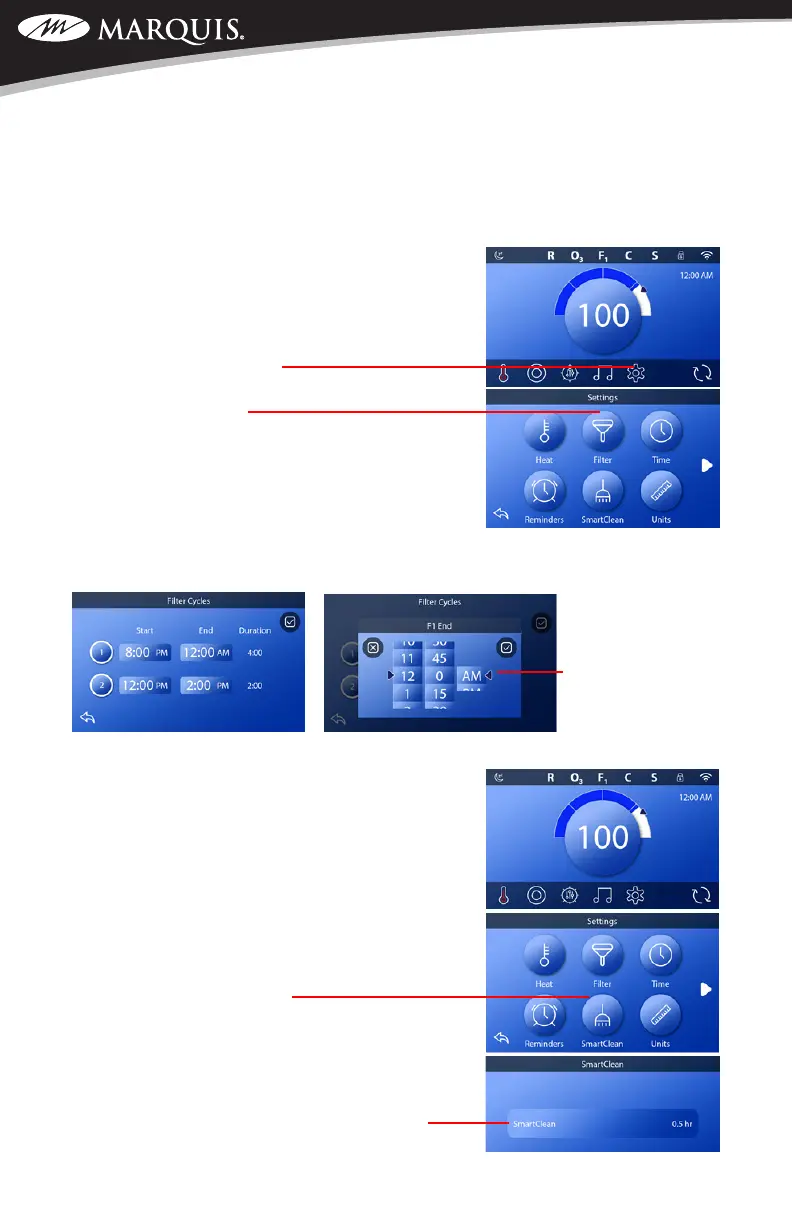
Should you want to change your factory default ltration settings, see the instructions below. The
factory default settings are for two ltration cycles per day for 1.0 hour per cycle. The rst cycle
with start at 8:00 PM and the second cycle will start at 8:00 AM.
NOTE: If you need to go back to a previous screen, touch the
back arrow.
1. On the home screen, touch the Settings icon located on
the bottom of the display
2. Touch the Filter icon
3. To adjust the lter time, touch within the frame of the
desired time box that you want to change. That will
bring up the adjustment screen.
NOTE: If you do not want the second ltration time to run,
touching the “2” will turn it off, followed by pressing the
“check”. It will be active when the white ring illuminates around the number.
4. Use your nger to
slide the scale up or
down to the desired
hours, minutes
and AM/PM. Once
selected, press the
“check” mark to lock
the time in. Should you decide to cancel the selection, touch the “X” to cancel.
SETTING SMARTCLEAN RUN TIMES
Smart Clean is a clean-up cycle that will automatically activate
30 minutes after the last press of any button was made. This
is helpful feature to keep water clean shortly after use. The run
time choices range from 0 hours up to 4 hours in 30 minute
increments. The factory default is 0.5 hrs.
Access the screen to change the length of run time:
1. On the home screen, touch the Settings icon located on
the bottom of the display
2. Touch the SmartClean icon
3. To adjust run time, touch SmartClean button and it will
open up another screen with the run-time selections.
Use your nger to slide the scale up and down. Once
you have chosen the desired run time, press the
“check” mark to lock the time in. Should you decide to
cancel the selection, touch the “X” to cancel.
SWIM SPA CONTROLS: V174S & V174K



 To Next Page