Master Audio
Xcellence Line Array Series 208.Ver 1.2 Sep 12
16
I) AC INPUT/OVERVOLTAGE PROTECTION: These leds show the status of the AC
mains supply.
ON: (Blue) When lit, the equipment is ON and the AC input level is within the
permitted range (200 to 250 VAC).
STANDBY: (Orange) This led is lit when the equipment is sensing the AC
voltage at the input. At power-up this led will lit for a second while the systems
checks for the input voltage.
>250V OVERVOLTAGE PROTECTION: (Red) When activated, the AC
voltage is permanently out of the permitted range of the equipment, so it will
remain under protection until this condition is solved. Revise your connections
and mains power installation and consider that other equipment connected to
this line may have been damaged.
J) AC MAINS INPUT/LINK: Mains supply connection via PowerCon.
Blue connector for AC in.
Grey connector to feed other units in parallel. Linking up to 4 units of X-208A is
possible, provided that a quality cable of a minimum section of 3x2.5mm
2
is
used. Connecting more than 4 units in parallel may lead to a voltage drop in the
cable that will reduce the equipment performance.
Always use mains power cable supplied by manufacturer.
Never connect the Xcellence Line Array cabinets to an unearthed mains
supply or by using an unearthed mains cable.
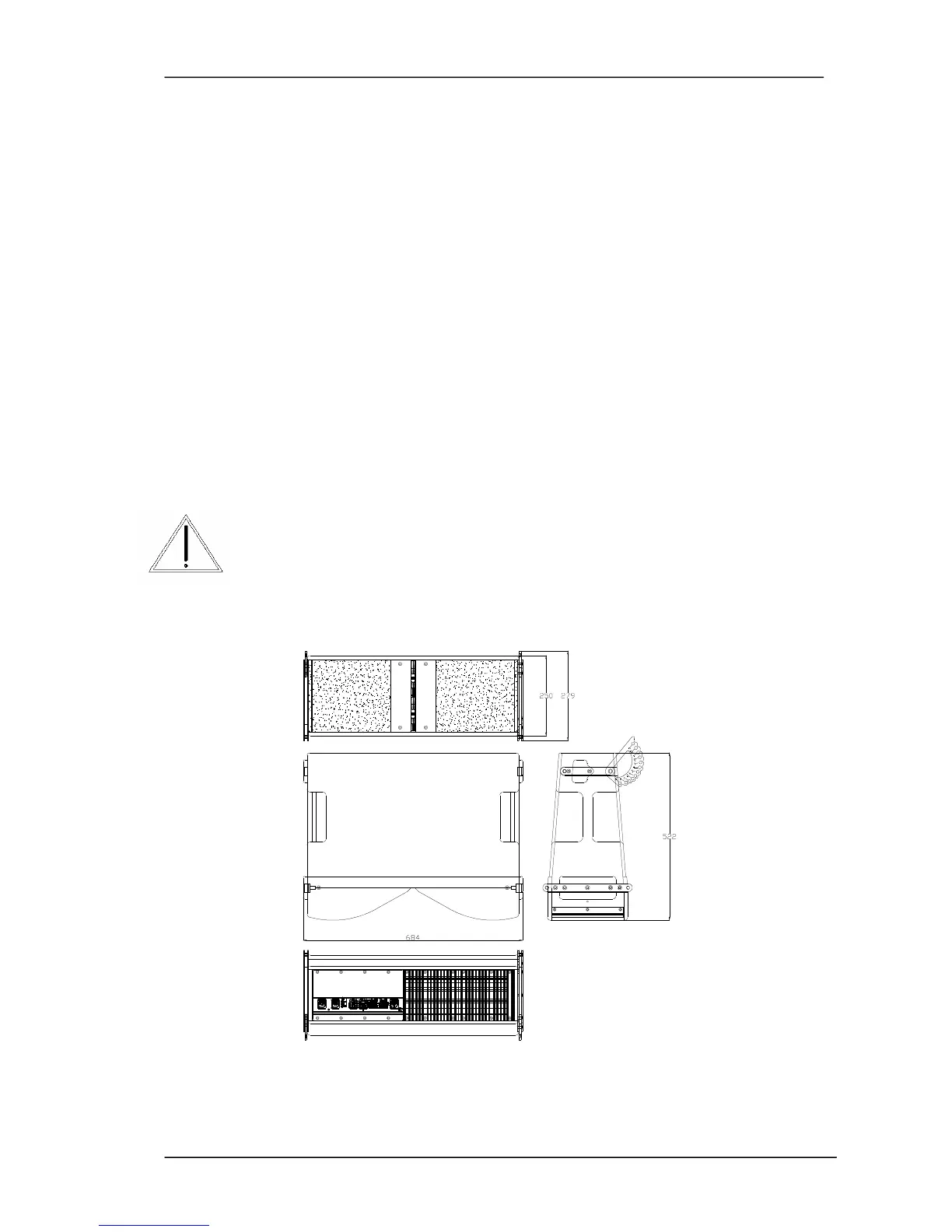
2.4. Dimensions
Fig.10. X-208 cabinet. External dimensions



 To Next Page