Master Audio
Xcellence Line Array Series 208.Ver 1.2 Sep 12
21
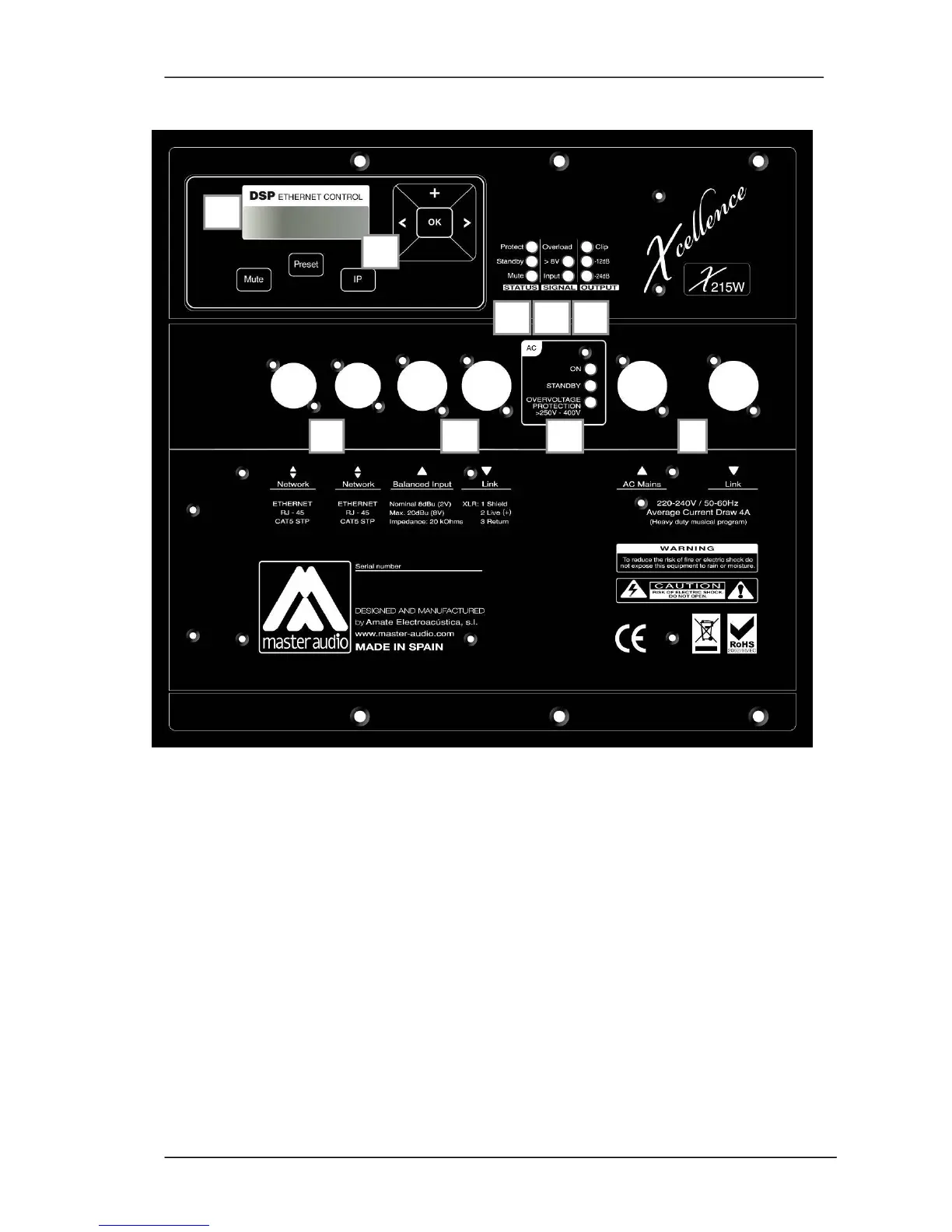
3.3. Control and connection panel
Fig.13.
X-215W control and connection panel
The X-215W control panel contains the following elements:
A) LCD: Displays basic information about the DSP Status
B) KEYPAD: Allows the user to perform basic operations on the DSP such as IP
address setting, Preset selection, etc.
C) STATUS LEDS: Report a special event happening in the system
Protect: (Red) A fault condition is being reported by the amplifier. If this LED is
constantly lit even after resetting the device, please contact the technical
service.
Standby: (Orange) This led is lit when the equipment is set in Low Power
Consumption mode. This mode can only be set through the PC connection.
Mute: (Orange) The system is muted (amplifiers are disabled). The system
can be muted from the PC remote control or from the keypad.



 To Next Page