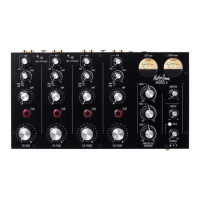
CH1-CH4!ROTARY!FADER!-!Each!channel!has!a!large!ROTARY!FADER!for!
precision!control!of!its!level!when!mixing.!The!rotary!ranges!from!fully!off!when!
anti-clockwise!to!unity!gain!(0dB)!when!clockwise.!For!best!performance!
operate!these!controls!near!to!their!fully!clockwise!position!for!normal!music!
level.!
VU!METERS!–!The!Radius!4!features!four!high!quality!analogue!VU!(Volume!
Unit)!meters,!which!accurately!measure!the!left!and!right!audio!signals.!The!
meters!show!the!post!EQ!sound!level.!An!added!feature!of!the!VU!Meters!is!that!
when!driven!over!+6VU!the!meter!will!illuminate!RED!to!warn!against!clipping.!
In!SPLIT!MODE!the!LEFT!VU!Meter!indicates!the!cue!signal!level,!and!the!RIGHT!
VU!Meter!indicates!the!MIX!level,!(see!SPLIT!below).!
!
MASTER!EQ/ISOLATOR!-!The!MASTER!EQ/ISOLATOR!functions!as!a!normal!
isolator!using!12dB/octave!filters,!with!crossover!frequencies!at!350Hz!and!
3.5kHz!making!for!a!very!musical!isolator.!We!have!positioned!the!layout!of!the!
pots!so!it!easily!works!as!a!Master!EQ!(the!hi-pass!filters!on!each!channel!are!
used!instead!of!a!conventional!3!or!4!band!EQ).!
!
MASTER!–!The!MASTER!rotary!pot!adjusts!the!signal!level!sent!to!the!Main!
Output!XLRs!(House!Mix)!ranging!from!off!to!+10dBu!of!gain.!Set!the!control!to!
approximately!1!o’clock!for!unity.!
!
BOOTH!–!The!BOOTH!rotary!pot!adjusts!the!signal!level!sent!to!the!Booth!Output!
TRS!Jacks!(Monitor!Mix)!ranging!from!off!to!+10dBu!of!gain.!Set!the!control!to!
approximately!1!o’clock!for!unity.!
!
SPLIT!–!The!SPLIT!CUE!button!illuminates!RED!when!activated!and!links!to!the!
CUE!buttons!and!VU!Meters.!!When!the!SPLIT!CUE!is!active!and!a!channel!CUE!is!
pressed,!the!Mix!Buss!Level!will!be!shown!on!the!Right!Meter,!and!the!channel!
Pre-Fade!signal!(CUE)!shown!on!the!Left!Meter,!enabling!you!t o!balance!the!two!
levels!for!smoother!mixing.!The!Split!button!also!sends!the!cued!source!to!the!
Left!headphone!and!the!mix!source!to!the!Right!headphone,!which!is!very!useful!
if!mixing!in!a!quiet!environment.!SPLIT!CUE!is!automatically!disabled!when!the!
Channel!CUEs!are!off,!and!the!Meters!and!Headphones!revert!to!monitoring!the!
Stereo!Master!Mix!Signal.!
!
PHONES!–!Use!the!headphone!pot!to!control!the!sound!level!sent!to!your!
headphones.!Please!take!care!when!monitoring!with!headphones!as!excessive!
sound!volumes!can!cause!premature!deafness.!The!¼”!jack!headphone!input!is!
located!on!the!front!of!the!mixer!as!shown!on!the!headphone!graphic.!
!
!
!
!
!


 To Next Page
 Loading...