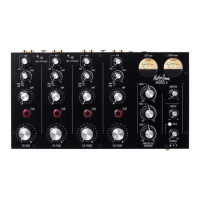
MIC!ON!–!Two!MIC!ON!buttons!enable!a!pair!of!microphones!to!be!used!on!CH1!
&!CH2!by!pressing!each!MIC!ON!button.!The!microphone!signal!is!attenuated!in!
the!same!way!as!a!Phono!or!Line!source,!(see!TRIM!&!CH1-CH4!ROTARY!
FADER!paragraphs!shown!in!the!FRONT!PANEL!CONTROLS!section).!To!switch!
off!a!MIC!input!press!the!MIC!ON!button.!
!
!
!
USING!THE!EXTERNAL!SEND!&!RETURN!SYSTEM!
Connect!the!Mixer!Aux!Send!outputs!to!the!FX!unit!inputs!and!connect!the!FX!
units!outputs!to!the!mixer!Aux!Returns.!Set!the!FX!unit!to!unity!gain.!
!
Turning!up!the!mixer!channel!send!control!feeds!the!channel!signal!to!the!FX!
unit.!This!signal!is!processed!by!the!FX!unit!and!its!output!is!fed!back!into!the!
mix,!adding!an!echo,!delay,!reverb!etc.!to!the!track!that’s!playing.!Turning!down!
the!mixer!channel!send!stops!the!channel!signal!feeding!to!the!FX!unit!and!so!
also!stops!the!effect.!Turning!up!the!mixer!channel!send!increases!the!level!of!FX.!
!
Normally!the!feed!to!the!channel!AUX!send!is!also!controlled!by!the!channel!
fader,!so!turning!down!the!fader!also!turns!down!the!level!of!FX,!but!if!the!AUX!
send!PRE!button!is!pressed!the!AUX!send!takes!its!signal!before!the!Channel!
Fader!so!even!if!the!fader!is!off!you!can!still!send!the!channel!signal!to!the!FX!
Unit.!This!can!be!quite!a!cool!way!to!mix!into!a!new!track,!just!by!introducing!a!
low!level!delay!(for!instance)!of!the!track!you!are!about!to!mix!into,!before!
actually!mixing!in!the!new!track!by!bringing!up!the!channel!fader.!
!
Mix!Insert!
The!Radius!4!incorporates!a!unique!feature!that!allows!the!Aux!Return!Jack!
Sockets!to!be!reconfigured!as!a!Mix!Buss!Insert!point,!just!by!pressing!the!
INSERT!ON!button.!!This!allows!you!to!run!the!entire!mix!though!an!external!FX!
processor!or!other!devices,!such!as!a!compressor,!limiter!or!graphic!equaliser.!
With!the!button!pressed!the!two!¼”!TRS!Jacks!become!a!conventional!mixer!
Insert,!with!the!Tip!being!the!SEND,!and!the!Ring!being!the!Return.!
!
! !


 To Next Page
 Loading...