Need help?
Do you have a question about the Matco Tools MDMAXCRPROA and is the answer not in the manual?
The Matco Tools Maximus Code Reader PROA (MDMAXCRPROA) is a diagnostic tool designed for professional technicians and DIYers. Its primary function is to read and interpret vehicle diagnostic trouble codes.
The Maximus Code Reader PROA serves as a code reader, allowing users to access and understand diagnostic information from passenger cars with 12V voltage systems. It is designed to help identify issues within a vehicle's system by reading diagnostic trouble codes. The tool is intended to be used for diagnostic purposes and should not be used for any application other than its designed intent. Users are cautioned against altering or modifying the tool in any way, as improper operation or modification could lead to serious injury or death. Repairs should only be initiated after ensuring the vehicle is in a secure position and will not move.
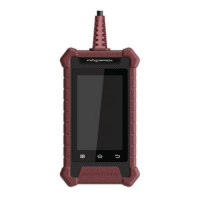
The device features a slim design with a 4-inch color screen, providing a clear and intuitive display for diagnostic information. It operates on an Android platform, which allows for a user-friendly interface and potential for future software enhancements. The tool is specifically compatible with passenger cars that utilize a 12V voltage system. It includes multilingual support, making it accessible to a wider range of users, and supports wireless updates, ensuring the software remains current with the latest diagnostic information and features. The device is manufactured in China to Matco specifications.
The MDMAXCRPROA complies with part 15 of the FCC Rules, indicating that it has been tested and found to comply with the limits for a Class B digital device. This compliance ensures that the device operates within acceptable electromagnetic interference levels. Users are advised that any changes or modifications not expressly approved by the responsible party could void their authority to operate the equipment. The device is designed to accept any interference received and not cause harmful interference. If interference occurs, users are encouraged to reorient or relocate the receiving antenna, increase separation between equipment and receiver, connect the equipment to a different circuit, or consult a dealer or experienced technician. The FCC ID for this device is 2AUKMMAXCRPROA, and it has been evaluated to meet general RF exposure requirements.
The tool offers a straightforward setup process. Upon first use, users are guided through initial system settings, including selecting the system language, setting the time zone, and configuring WLAN (Wi-Fi) settings. The WLAN setup is crucial for enabling wireless updates and ensuring the system automatically obtains the correct network date and time. Users can also configure workshop information, which will be appended to every successfully generated report. Before use, users must sign a user agreement. Once these initial steps are completed, the "Job Menu" appears, and users are prompted to tap "Upgrade" to ensure the diagnostic software is updated to the latest version. Regular updates are strongly recommended to maximize the tool's capabilities and service quality.
The tool can be powered in two ways:
The device features a touch screen for navigation, along with physical buttons for "Setting," "Home," and "Return." It also includes a charging port and a memory card slot (reserved for future use).
The Maximus Code Reader PROA supports wireless updates, which is a key maintenance feature. This allows users to easily keep the diagnostic software current with the latest vehicle data and functionalities without needing a physical connection to a computer for updates. Regular updates are emphasized as essential for enjoying more capabilities and better service. The Android platform also suggests potential for ongoing software improvements and bug fixes. For any operational questions or product information, users can contact Matco customer service or visit the Matco Tools website.
 General
| Brand | Matco Tools |
|---|---|
| Model | MDMAXCRPROA |
| Category | Barcode Reader |
| Language | English |

 To Next Page