1.
2.
2.
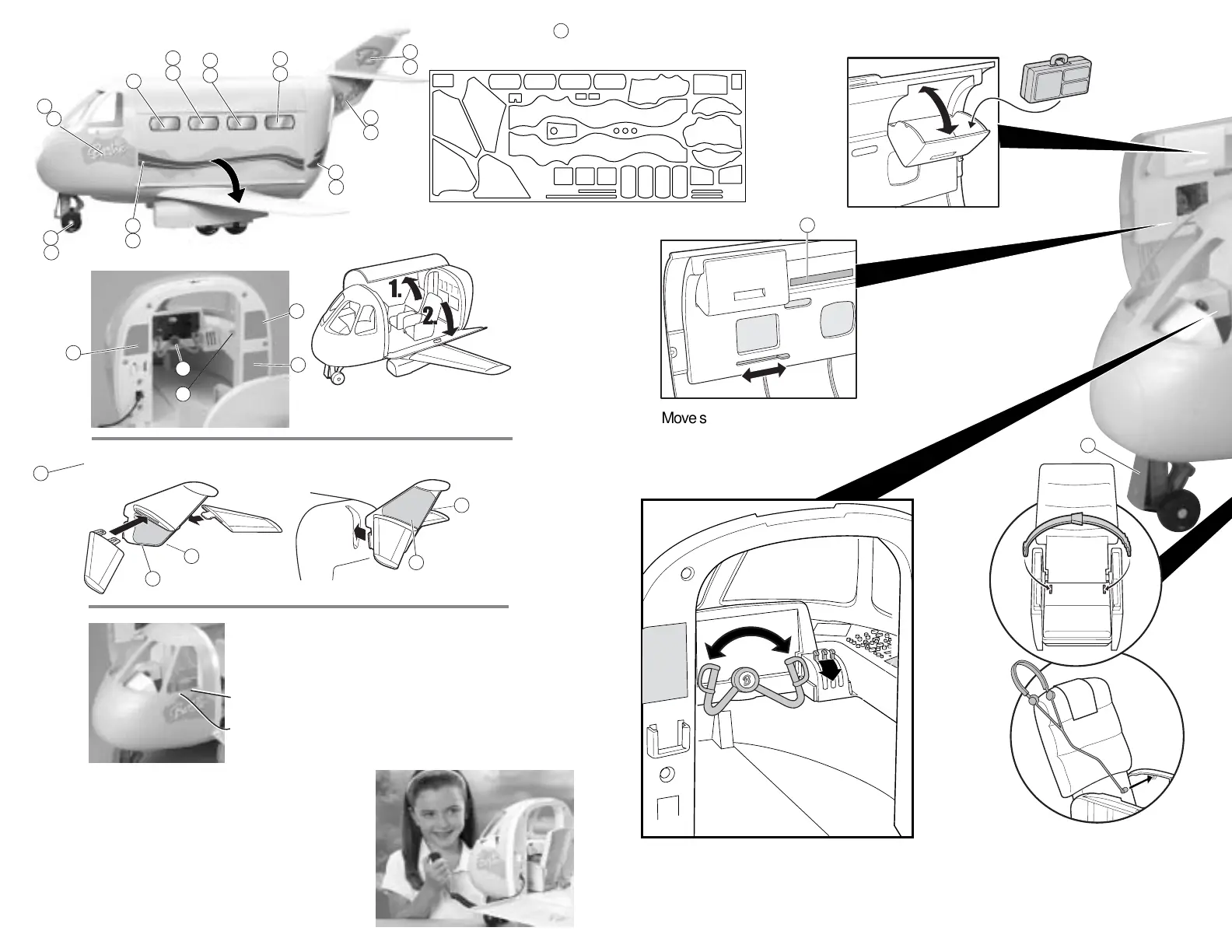
Move slider to change TV,
window and seat belt images
on side of cabin.
Opposite
side
Opposite
side
Push switch forward to on position.
Press button to hear Take-Off sound.
Press once more for Landing sound.
Hold microphone close to mouth to make
your own announcements. Power will go into
sleep mode if toy is idle for over a minute.
Press sound button to wake up. Turn switch
off when play is finished.
Assemble Tail
Announcements/Sound
Open Airplane & Apply Labels
Play Activity
NOTE: Change batteries when sound becomes weak,
distorted, or voice becomes unintelligible.
Apply labels by number as shown.
NOTE: Bottom numbers on opposite side.
1
12
13
10
11
27
26
24
14
27
15
18
23
23
16
19
5
6
7
8
2
3
4
17
24
26
27
28
28
16
14
19
15
23
2323
18
1
29
30
31
32
31
31
3
5
7
22007-1310
© Mattel, Inc.
All Rights Reserved.
Tous Droits Réservés.
20
21 22
17
24 6 8
9
10
12
13
11
25
10
11
12
13
30
32
23
25




 To Next Page