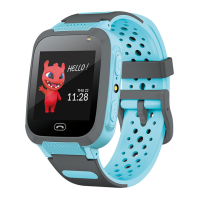
The Maxlife MXKW-300 Smartwatch for Kids is a children's smartwatch designed with a focus on communication, safety, and basic entertainment. It features a 1.44-inch, 128x128 pixel touchscreen display and a durable blue strap.
Important Technical Specifications:
- Display: 1.44 inches, 128x128 pixels, touchscreen
- Standby Time: Up to 2-3 days
- Charging Time: Approximately 2 hours
- Strap Length: 230 mm
- Battery: 400mAh (lithium-polymer)
- Audio: Built-in microphone and speaker
- SIM Card: Micro-SIM
- Supported OS: iOS 8.0 and above, Android 5.0 and above
Function Description and Usage Features:
The smartwatch is equipped with several physical buttons and a touch interface for navigation.
- Camera (1): Located at the top of the watch face, this button activates the built-in camera, allowing the child to take photos.
- Answer a call/Turn on the flashlight (2): This button serves a dual purpose, allowing the user to answer incoming calls and activate the flashlight.
- Flashlight (3): A dedicated flashlight feature is available.
- Power on/SOS button/Return to the main screen (4): This multi-functional button powers the device on/off, acts as an SOS trigger, and returns the user to the main screen.
- Answer a call (5): Another button specifically for answering calls.
- SIM card slot (6): Located on the side, this slot accommodates a micro-SIM card for cellular connectivity.
- MicroUSB charging port (7): Found on the side, this port is used for charging the device.
Charging and SIM Card Installation:
To charge the watch, it is recommended to use a 5V 1A charger. The total charging time is approximately 2 hours. The microUSB cable, included with the watch, connects to the microUSB port.
For SIM card installation, the watch must be turned off. The back cover is gently pried open, and the battery is carefully removed, noting its position and avoiding damage to the cables. The micro SIM card cover is then slid slightly to the right to open. The SIM card is inserted with the chip facing upwards towards the watch screen. After insertion, the lock is closed by sliding to the left. Finally, the battery is placed back in its original position, and the back cover is pressed to secure the latches.
Home Screen and Main Menu Icons:
The home screen (1) displays the current date, time, and battery level, along with an icon indicating mobile network connectivity. The main menu provides access to various functions:
- Dialer (2): Enables making phone calls by manually entering a number.
- Phone Book (3): Provides access to up to 10 contacts, which are defined through the companion application.
- Camera (4): Allows taking photos that are saved in the album.
- Album (5): Grants access to the last photo taken. Users can preview, send, or delete photos. Each new photo overwrites the previous one.
- Math Game (6): A simple math game with three difficulty levels.
- Chat (7): Facilitates sending and receiving voice messages, as well as receiving text messages.
- Flashlight (8): Activates the built-in flashlight.
- QR Code (9): Displays the registration QR code for the device and the application QR code.
SeTracker App Integration:
The Maxlife MXKW-300 Smartwatch is designed to work with the "SeTracker" app, available on Google Play and the App Store. After installation, users register by entering their email, password, and the watch's area of use, then scanning or entering the watch's REG CODE found on the box and the watch itself.
The app offers a range of features to enhance safety and communication:
- Chat: Send text or voice messages to the watch and listen to voicemails from the watch.
- Route: View the watch's traveled route for a selected date and time slot.
- Map: See the watch's current location.
- Safety Zone: Designate a geographical safety zone. Notifications are sent when the watch leaves this zone.
- Reward: Send virtual rewards to the child, with information about the award sent to the watch.
- Alarm Clock: Set alarm clock times and frequencies.
- Find Watch: Make the watch ring to locate it when nearby.
- Notifications: View and preview all notifications and alarms from the watch.
- Remote Camera: Take a photo using the watch's camera and receive it on the phone. The image appears after a waiting time, depending on cellular network strength.
- My Profile: Manage account settings, device list (add, edit, remove devices), and change password.
- SOS Numbers: Define three contacts for automatic emergency calls when the SOS button is pressed and held.
- Voice Monitoring: Enter a phone number to listen to the watch's surroundings without the watch user's knowledge.
- Do Not Disturb: Set times when the watch will not receive phone calls.
- Location Mode: Choose between "normal mode" (location refresh every ten minutes), "power saving" (every hour), and "tracking" (every minute).
- SMS Notifications: Enter a number to receive SMS notifications for events like low battery levels or SOS alarm triggers.
- Phone Book: Define up to ten contacts for the watch's phone book.
- Time Zone: Set the time zone for correct date and time display.
- Language: Choose the device's language.
- Settings Switch: Enable or disable various watch functions.
- LBS Location: Enable or disable location tracking using network operator's antennas.
- Turn Off the Watch Remotely: Remotely power off the watch.
Maintenance Features:
The device's lithium-polymer battery requires approximately 2 hours for a full charge, providing 2-3 days of standby time. Proper SIM card installation involves turning off the device and carefully handling the battery and back cover. The companion app allows for remote management and monitoring, contributing to the device's overall upkeep and safety features.

 Need help?

 To Next Page
 General