EasyManua.ls Logo

Maxview Roam User Manual

Maxview Roam
12 pages
To Next Page IconTo Next Page
Page #1 background imageLoading...
Page #1 background image
Installation Instructions
MXL050/KIT1
UK contact:
Helpline: +44 (0)1553 811000
Email: support@maxview.co.uk
Web: www.maxview.co.uk
Maxview reserve the right to change specifications without prior notice
9111432 Iss 1
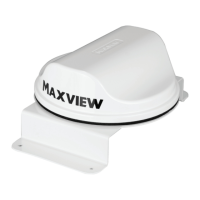
Bracket Fixing Kit/Dachhalterung
DE Kontakt:
Tel: 08145 / 996 998 - 0
Email: info@maxview.de
Web: www.maxview.de
Technische Änderungen vorbehalten
Anbauanleitung
Roam
Question and Answer IconNeed help?

Do you have a question about the Maxview Roam and is the answer not in the manual?

Maxview Roam Specifications

General IconGeneral
BrandMaxview
ModelRoam
CategoryTV Mount
LanguageEnglish

Summary

Introduction and Safety

Safety Warnings

General safety warnings and precautions for installation and operation.

Kit Contents and Tools

Kit Contents

Lists all components included in the bracket fixing kit.

Tools Required

Specifies the necessary tools for the installation process.

Mounting Bracket on Roof

Flat Roof Installation

Instructions for mounting the bracket on a flat roof surface.

Ridge Roof Installation

Guidance on installing the bracket across raised ridges on a roof.

Roof Installation Variations

Sloped Roof Installation

Advice for installing the bracket on an inclined or sloped roof.

Uneven Roof Installation

Tips for securing the bracket on uneven or textured roof surfaces.

Bracket Fixing Methods

Screw Fixing Method

Securing the bracket using screws and sealant for waterproofing.

Flexible Adhesive Method

Attaching the bracket using flexible adhesive sealant.

Cable Connections and Routing

Extension Cables

Guidelines for connecting and waterproofing extension cables.

Cable Routing

Instructions for routing cables along the roof using clips.

Cable Entry and Final Installation

Install Cable Entry Cover

Steps to install the cable entry cover and seal the entry point.

Complete Installation

Final steps for connecting cables to the router.
General Safety Warnings

Related product manuals