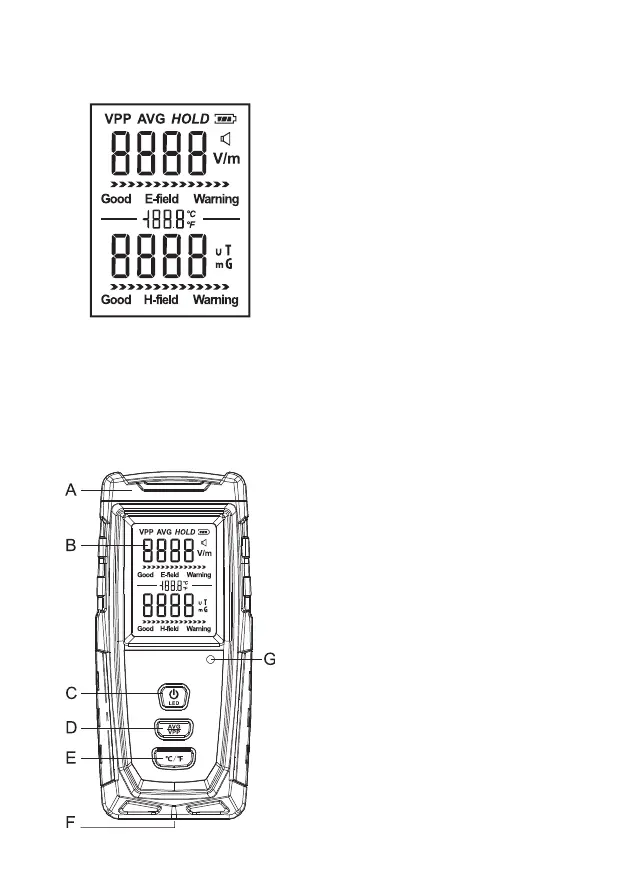
v. lcd display and naMe oF
parts oF tHe iteM
1. Full screen LCD display:
A: Front sensing area
B: LCD display
C: On/OFF / LED button
D: Button to select between average and peak
values mode
E: Measuring unit selection button
F: Charging port
G: Indicator light
vi. User GUide
1. Switching on / o
Turn on the device by briey pressing the on/
o button, the measured value of the electric
and magnetic eld will appear on the display
after about 1 second, you can turn o the
device by pressing the on/o button for a long
time. The device switches o automatically
within 5 minutes from the last button press.
Note: Due to possible electromagnetic interference
in the environment, the instrument may display
measurement values when switched on, which has
nothing to do with the instrument’s fault.
2. Measuring
Hold the instrument by hand so that the
front sensing area slowly approaches the
electromagnetic radiation source to be tested.
If the actual radiation value is within the
specication range, the value is displayed; if
the instrument does not have a reading, the
electromagnetic radiation value of the radiation
source is lower than the minimum measurement
value of the device, i.e. 1 V/m or 0.01 µT.
Note: Please measure high-pressure equipment
from a distance for safety.
3. Locking the measured value
After switching on the device, press the on/o
button briey, and the measured value will be
locked and „HOLD” icon appears on the display;
press the button again for returning to the
normal measuring mode and the „HOLD” icon
does not appear anymore.
4. Average / peak value mode
After switching on the device, press the AVG/
VPP button briey to switch between average
and peak value mode; average value mode
is displayed with „AVG”, peak value mode is
displayed with „VPP” icon.
5. Sound signal button
on the device long press the AVG/VPP button
to turn on/o the sound signal. If the sound
signal is on, icon will appear on the screen.


 To Next Page