Page 3Item 80694
Installation Instructions
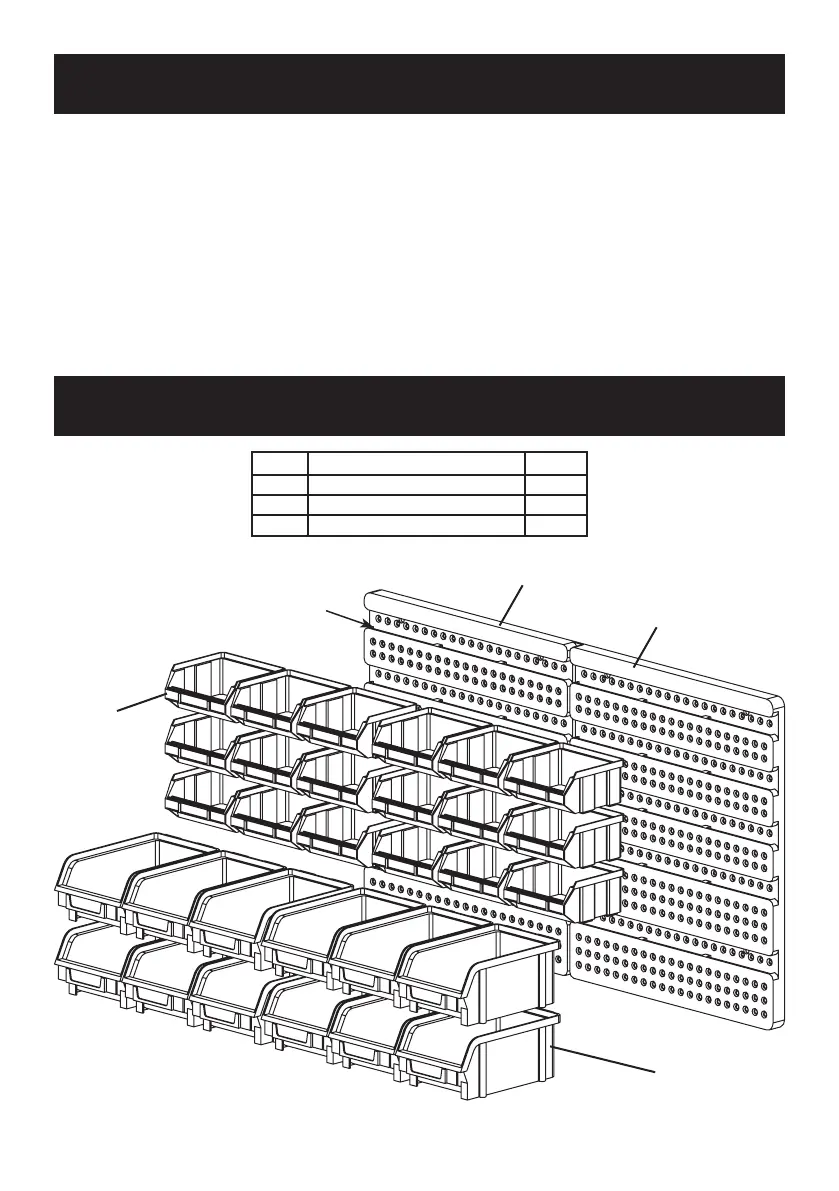
1. Orient each Panel Board (1) so that
the bin slots open on top, as shown.
2. Place each Panel Board (1) against
the mounting surface and line up
with a level (sold separately). Mark 4
mounting holes, each board.
3. After checking the mounting area for
hidden wiring, drill 4 holes each board to
hold 1/8" wood screws, at least 2" long.
4. Mount each Panel Board (1) using
4 wood screws (sold separately.)
5. Mount Bins onto the Panel Board by
hanging the back lip of the Bins on
the Board’s slots. The smaller Bins (2)
mount in the upper 3 rows and the
larger Bins (3) in the lower 2 rows.
Parts List and Diagram
Part Description Qty.
1 Panel Board 2
2 Red Bin 18
3 Blue Bin 12
1
2
3
Slots open
on top
1


 To Next Page