EasyManua.ls Logo

MayBesta AN151 - User Manual

MayBesta AN151
9 pages
Print Icon
To Next Page IconTo Next Page
Loading...
MayBesta User Manual
Quick Operation Guide
V3 1 2 3 4
5 6 7 8
Thank you for purchasing a microphone from
MayBesta. Customer satisfaction is our
priority. If you have questions or problems,
please feel free to contact to us.
We highly recommend you register at our site
to receive an extended warranty (18 months),
to verify the product authentication, and to
have better customer service. Registration is
free.
1. Get transmitter and receiver connected
2. Pause recording
3. Reverb Mode
1) Unlock your phone, connect the receiver to
your phone
2) Press power button for 3 seconds, green
light on the transmitter is on. That means the
microphone and the receiver is connected
3) If your phone is iPhone or iPad, please
check as the picture shows. DOCK means the
device is paired to your phone. Android phone
requires OTG in the setting of phone
1) Press power button for 1 second lightly,
Green Light on microphone flashes. The
recording is paused.
1. Cannot get this microphone connected
2. Both receiver and transmitter need
charged?
3. How to get a replacement if it’s not working?
2) Press power button for 1 second lightly
again, Green Light on microphone becomes
steady on. The recording starts again.
Press power button lightly for 3 times
1 year warranty and 18 months for MayBesta
VIP.
Register VIP: https://maybesta.com/vip-register/
or email: support@maybesta.com to register
VIP and receive an extended 18 Month Product
Warranty.
- Register as a VIP and receive an extended
18 month warranty:
https://maybesta.com/vip-register/
- Our customer support email:
If your phone is locked, the transmitter and
the receiver may disconnect. If this happens,
the green and red light on microphone will
flash. You can keep the microphone on,
unplug the receiver and then reconnected to
you phone. If you can see the “DOCK” or
“OTG” on your phone, the device is working.
4. Does it not work with iPhone 13?
5. Does this mic require video recording on
the phone, or can I use it for audio only
through a different app?
This microphone works with the apps like
recorder, camera on phone. It also works with
apps TikTok, YouTube, phone camera for video
Microphone for iPhone, iPad works with
iPhone 13. It works with iPhone 8, iPhone
X/XR/XS/XS Max, 11/11 Pro/11 Pro Max, 12/12
Pro, 13/13 Pro and iPad 2/3/4, iPad Air series,
iPad Pro series (NOTE: the latest version of 11
inch and 12.9 inch iPad Pro with type-C port
not supported). Microphone for android with
works with android system above 6.0.
7. Can it be used for Zoom meeting or chat
recording or live streaming.
6. How to reduce noise in the background?
with people?
This microphone is unilateral audio input. If
you want to hear what others saying, you’ll
need an extra earphone.
Note: In order to ensure the effective use of the
connection, there should be no obstacles
between the microphone and the receiver.
When wearing the microphone for recording or
live video broadcasting, it is recommended to
face the receiver, otherwise the signal may be
interrupted.
If you hold the head of the microphone, this
may affect audio recording to cause noise.
Please clip the microphone on the collar of
your cloth or hold the body of the microphone.
This will help.
Only the transmitter(the microphone) need
charging. The receiver doesn’t need. If your
phone need charging during recording, your
can use your own charging cable connect to
the receiver.
We have 12 Months Warranty. (18 months for
VIP). If you have any questions during
operation, please feel free to contact us via
support e-mail support@maybesta.com.
- Our web site: https://maybesta.com/
Product Warranty
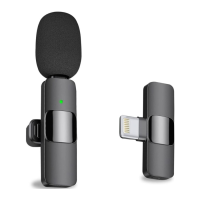
Outline picture (Note: The outline picture is subject to the actual product!)
continuously to enter reverb mode
This product supports listening while recording.
With AI noise reduction, it will enter noise
reduction mode when the recording begins.
Indicator Light Description
Trouble Shooting
Technical specifications
Basic Operation Guide
support@maybesta.com
- Keep this booklet for future reference.
MayBesta, may you best!
To Ensure Product Warranty
Confirm the package contains an authentic,
new device from MayBesta.
The original package comes film wrapped and
has bar code information.
Package List
2 x Transmitter with Back Clip
1 x Receiver
1 x USB A to Type C Charging Cable
1 x User Manual
1
2
3
4
5
7
8
6
1
2
3
4
5
6
7
8
Function Description
Windbreak
Microphone Clip
Power Button
USB Charging Port
Receiver Indicator
USB Plug
Phone Charging Port
Microphone Indicator
Mode Transmitter Receiver
Pause recording
Power off
Low Battery
Green light flashes
Light off
Charging
Green light on
Red light on transmitter(microphone) flashes
Red light off on transmitter when fully
charged
Light off
Power on Connected Green light steady on Green light steady on
Power on Disconnected
Green and red light flashes
L
ight off
Dimensions
USB
Transmitter 57×15×23MM(With back clip)
Receiver 44×26×7.5MM(With USB plug)
TYPE C or Lightning Selectable
Battery
3.7V/65MAH Lithium Ion Battery
Bluetooth
Buletooth4.0
Phone
system
Android 6.0 or above (Type c interface)
or IOS 8.0 or above
Working
Distance
Operating
temperature
Effective distance 15 meters
(no obstacles in the middle)
-5 to 40C°
Weight 20g
Charging
time
2 Hours

Question and Answer IconNeed help?

Do you have a question about the MayBesta AN151 and is the answer not in the manual?

Overview

The MayBesta User Manual provides a quick operation guide for a wireless microphone system, likely designed for mobile devices. The system consists of two main components: a transmitter (microphone) and a receiver.

Function Description

The device is a wireless microphone system primarily used for recording audio and video on smartphones and tablets. It supports various applications such as phone recorders, cameras, TikTok, and YouTube for video recording and live streaming.

Transmitter (Microphone) Features:

  • Windbreak: Helps reduce wind noise for clearer audio.
  • Microphone Clip: Allows the microphone to be easily attached to clothing, such as a collar.
  • Power Button: Used for turning the device on/off, connecting to the receiver, pausing/resuming recording, and entering reverb mode.
  • USB Charging Port: For charging the transmitter's internal battery.
  • Microphone Indicator: An LED light that indicates the microphone's status (connected, disconnected, recording paused, low battery, charging).

Receiver Features:

  • USB Plug: Connects directly to the smartphone or tablet. Available in Type C or Lightning selectable versions.
  • Phone Charging Port: Allows the phone to be charged while the receiver is connected and recording, using the user's own charging cable.
  • Receiver Indicator: An LED light that indicates the receiver's status (connected, disconnected).

Operational Modes:

  • Connection: To connect, unlock the phone, plug in the receiver, and press the transmitter's power button for 3 seconds. A steady green light on the transmitter indicates a successful connection. For iPhones/iPads, "DOCK" appearing in settings confirms pairing. Android phones require OTG to be enabled.
  • Pause Recording: A single light press of the power button for 1 second will pause recording, indicated by the green light on the microphone flashing.
  • Resume Recording: Pressing the power button again for 1 second will resume recording, with the green light becoming steady.
  • Reverb Mode: Pressing the power button lightly three times continuously activates reverb mode.
  • AI Noise Reduction: The product features AI noise reduction, which automatically activates when recording begins.
  • Listening while Recording: The device supports listening to audio while recording.

Important Technical Specifications

  • Dimensions:
    • Transmitter: 57 × 15 × 23 mm (with back clip)
    • Receiver: 44 × 26 × 7.5 mm (with USB plug)
  • USB Interface: TYPE C or Lightning (selectable, depending on the model).
  • Battery: 3.7V/65MAH Lithium Ion Battery (for the transmitter).
  • Bluetooth: Bluetooth 4.0.
  • Charging Time: 2 Hours (for the transmitter).
  • Phone System Compatibility:
    • Android: Version 6.0 or above (Type C interface).
    • iOS: Version 8.0 or above.
    • Specific iPhone/iPad compatibility: iPhone 8, X/XR/XS/XS Max, 11/11 Pro/11 Pro Max, 12/12 Pro, 13/13 Pro, iPad 2/3/4, iPad Air series, iPad Pro series (NOTE: The latest versions of 11-inch and 12.9-inch iPad Pro with Type-C port are not supported).
  • Working Distance: Effective distance of 15 meters (without obstacles in the middle).
  • Operating Temperature: -5 to 40°C.
  • Weight: 20g.

Usage Features

  • Ease of Connection: Simple plug-and-play operation for both iOS and Android devices, with clear indicator lights for connection status.
  • Recording Control: Convenient power button for starting, pausing, and resuming recordings.
  • Audio Enhancement: Built-in windbreak and AI noise reduction for improved audio quality. Reverb mode offers additional audio effects.
  • Simultaneous Charging: The receiver includes a pass-through charging port, allowing the user to charge their phone while recording, which is crucial for extended use.
  • Versatile Application: Compatible with a wide range of recording and streaming apps, making it suitable for various content creation needs.
  • Unilateral Audio Input: The microphone provides unilateral audio input. For interactive communication (e.g., Zoom meetings where you need to hear others), an additional earphone is required.
  • Optimal Microphone Placement: To minimize background noise, it is recommended to clip the microphone to clothing or hold its body, avoiding holding the head of the microphone.
  • Signal Integrity: For optimal connection, ensure no obstacles are between the microphone and the receiver, and it's recommended to face the receiver when recording or live broadcasting.

Maintenance Features

  • Product Warranty: MayBesta offers a 1-year warranty, extended to 18 months for VIP members.
  • VIP Registration: Users are encouraged to register as VIPs on the MayBesta website (https://maybesta.com/vip-register/) or via email (support@maybesta.com) to receive the extended warranty and better customer service. Registration is free.
  • Troubleshooting Support: The manual provides common troubleshooting tips, such as re-connecting the receiver if the phone is locked or if the device disconnects, and verifying "DOCK" or "OTG" status.
  • Customer Support: Users can contact MayBesta customer support via email (support@maybesta.com) for questions, problems, or replacement inquiries.
  • Authenticity Check: To ensure product warranty, users should confirm the package contains an authentic, new device from MayBesta, which comes film-wrapped with barcode information.
  • Charging: Only the transmitter (microphone) requires charging. The receiver does not have its own battery and draws power from the connected phone.

MayBesta AN151 Specifications

General IconGeneral
BrandMayBesta
ModelAN151
CategoryMicrophone
LanguageEnglish