Controls at a Glance
Step _1_
Select Temperature
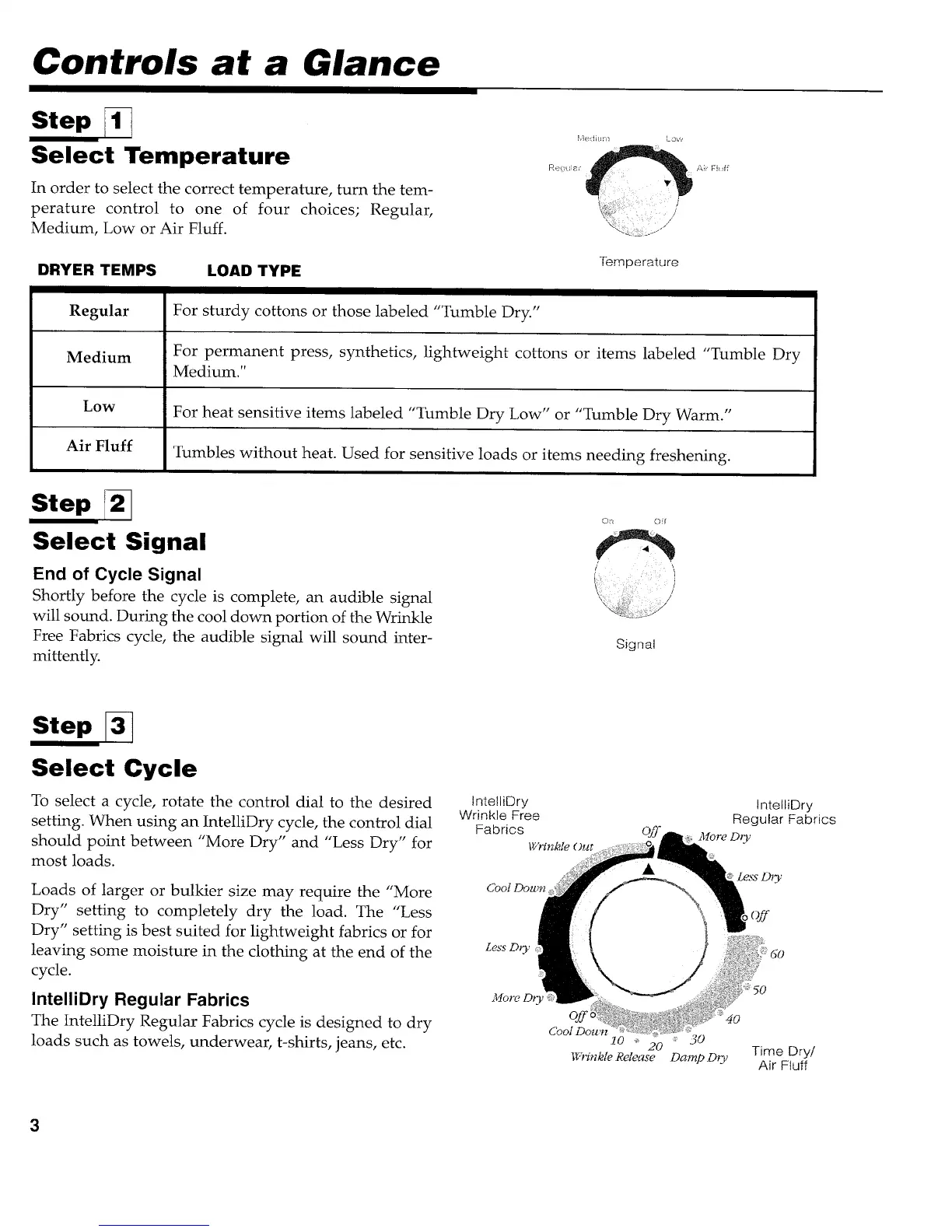
In order to select the correct temperature, turn the tem-
perature control to one of four choices; Regular,
Medium, Low or Air Fluff.
A;i Fbdf
DRYER TEMPS
Regular
LOAD TYPE
Forsturdycottonsorthoselabeled"Tumble Dry"
Temperature
Medium For permanent press, synthetics, lightweight cottons or items labeled "Tumble Dry
Medium."
Low For heat sensitive items labeled "Tumble Dry Low" or "Tumble Dry Warm."
Air Fluff Tumbles without heat. Used for sensitive loads or items needing freshening.
Step r2_
Select Signal
End of Cycle Signal
Shortly before the cycle is complete, an audible signal
will sound. During the cool down portion of the Wrinkle
Free Fabrics cycle, the audible signal will sound inter-
mittently.
On Off
Signal
Step _3_
Select Cycle
To select a cycle, rotate the control dial to the desired
setting. When using an IntelliDry cycle, the control dial
should point between "More Dry" and "Less Dry" for
most loads.
Loads of larger or bulkier size may require the "More
Dry" setting to completely dry the load. The "Less
Dry" setting is best suited for lightweight fabrics or for
leaving some moisture in the clothing at the end of the
cycle.
IntelliDry Regular Fabrics
The IntelliDry Regular Fabrics cycle is designed to dry
loads such as towels, underwear, t-shirts, jeans, etc.
IntelliDry
Wrinkle Free
Fabrics
Wrinkle Out
Cool Dow,_
IntelliDry
Regular Fabrics
More D_y
Less DL_'
...._ 30
DampD_y Time Dry/
Air Fluff



 To Next Page