20
Routing
Address
Book
Getting started
Navigation Set Up
Before Steps
select
select
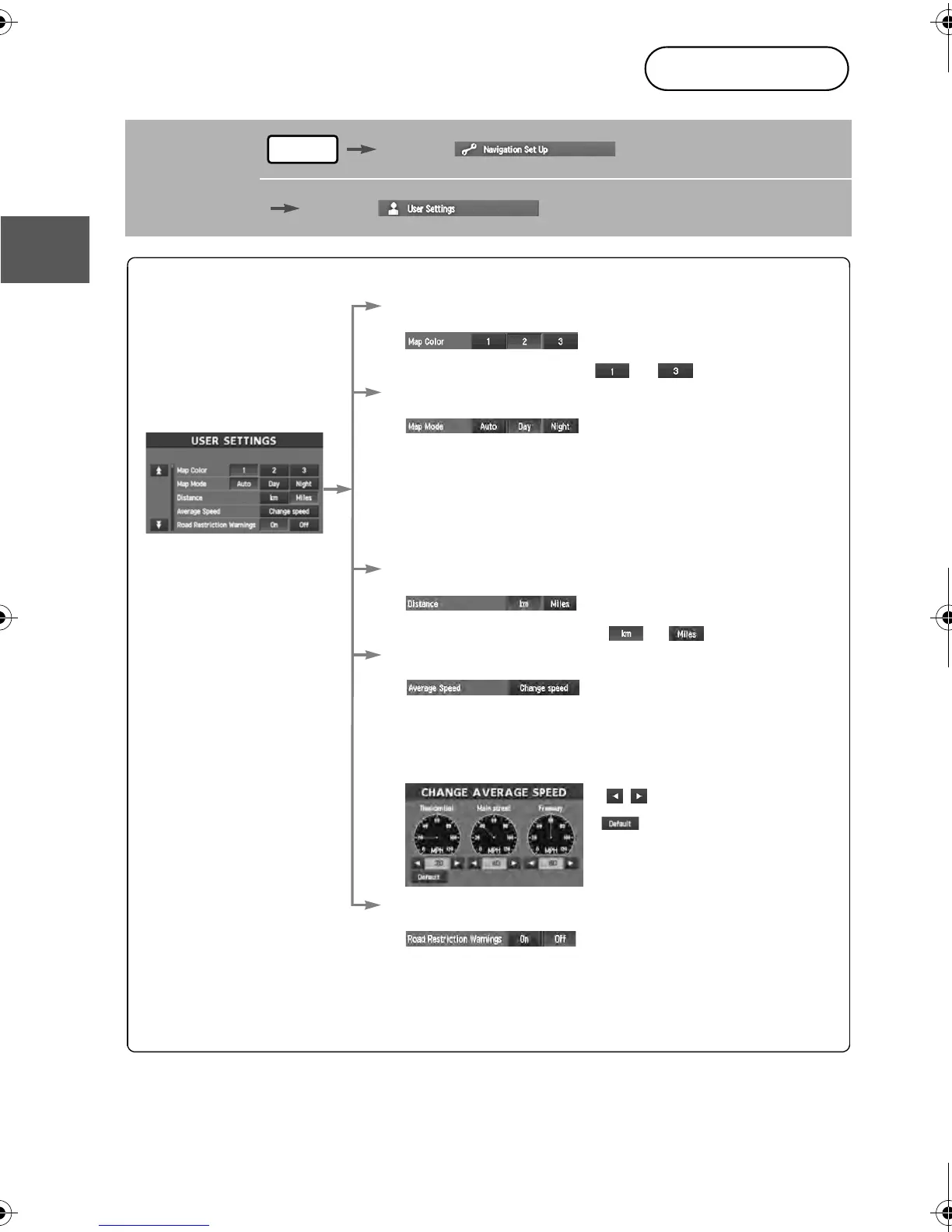
User Setting
MENU
Open the
[USER SETTINGS]
screen
n Map Color
Select a screen color from to options.
n Map Mode
lAuto : The display will automatically switch between Day
and Night illumination mode when the headlights are
turned off and on respectively.
lDay :
The display will be presented in Day illumination mode
regardless of whether the headlights are on or off.
l
Night : The display will be presented in Night illumination mode
regardless of whether the headlights are on or off.
n Distance
Select the distance unit from or .
n Average Speed
Set the average speed for each road to be driven.
(This function sets the standard speed (average vehicle speed
for each route) used for calculating the estimated arrival time
when calculating the route time.)
: Average speed setting
:Changes back to default
n Road Restriction Warnings
The display of warnings during route guidance when passing
through areas with traffic restrictions can be turned on or off.
'<C)%FSSO4EKI8LYVWHE]1EVGL41



 To Next Page
 Loading...







