4
–
151
When Driving
i-ACTIVSENSE
NOTE
If a vehicle ahead is detected while travelling at a constant speed, the vehicle-ahead
indication is displayed and headway control is performed. Additionally, when a vehicle
ahead is no longer detected, the vehicle-ahead indication turns off and the system
switches back to travel at constant speed.
Headway control is not possible if the vehicle ahead is driving faster than the set
speed. Adjust the system to the desired vehicle speed using the accelerator pedal.
(European models)
When switching to a passing lane and operating the direction indicator, the system
provides more acceleration automatically if it determines that more acceleration is
required. Drive while being careful of the road ahead because you could approach the
vehicle ahead too closely.
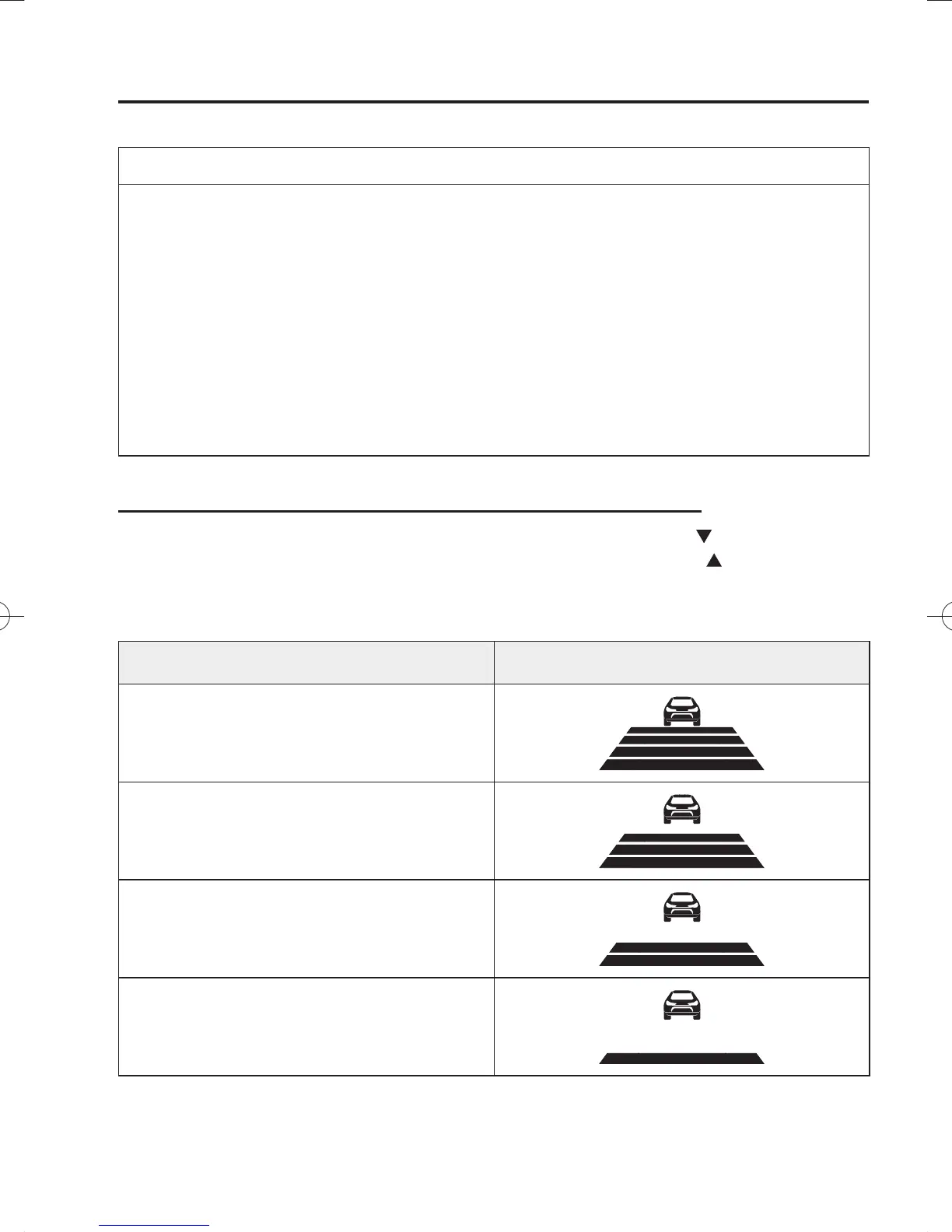
How to Set the Distance Between Vehicles During Headway Control
The distance between vehicles is set to a shorter distance each time the
switch is pressed.
The distance between vehicles is set to a longer distance by pressing the
switch. The
distance-between-vehicles can be set to 4 levels; Long, medium, short, and extremely short
distance.
Distance-between-vehicles guideline
(at 80 km/h (50 mph) vehicle speed)
Display
Long (about 50 m (164 ft))
Medium (about 40 m (131 ft))
Short (about 30 m (98 ft))
Extremely short (about 25 m (82 ft))
/C\FCA(,'''A'FKVKQPKPFD/C\FCA(,'''A'FKVKQPKPFD



 To Next Page