5
–
32
Interior Features
Audio System
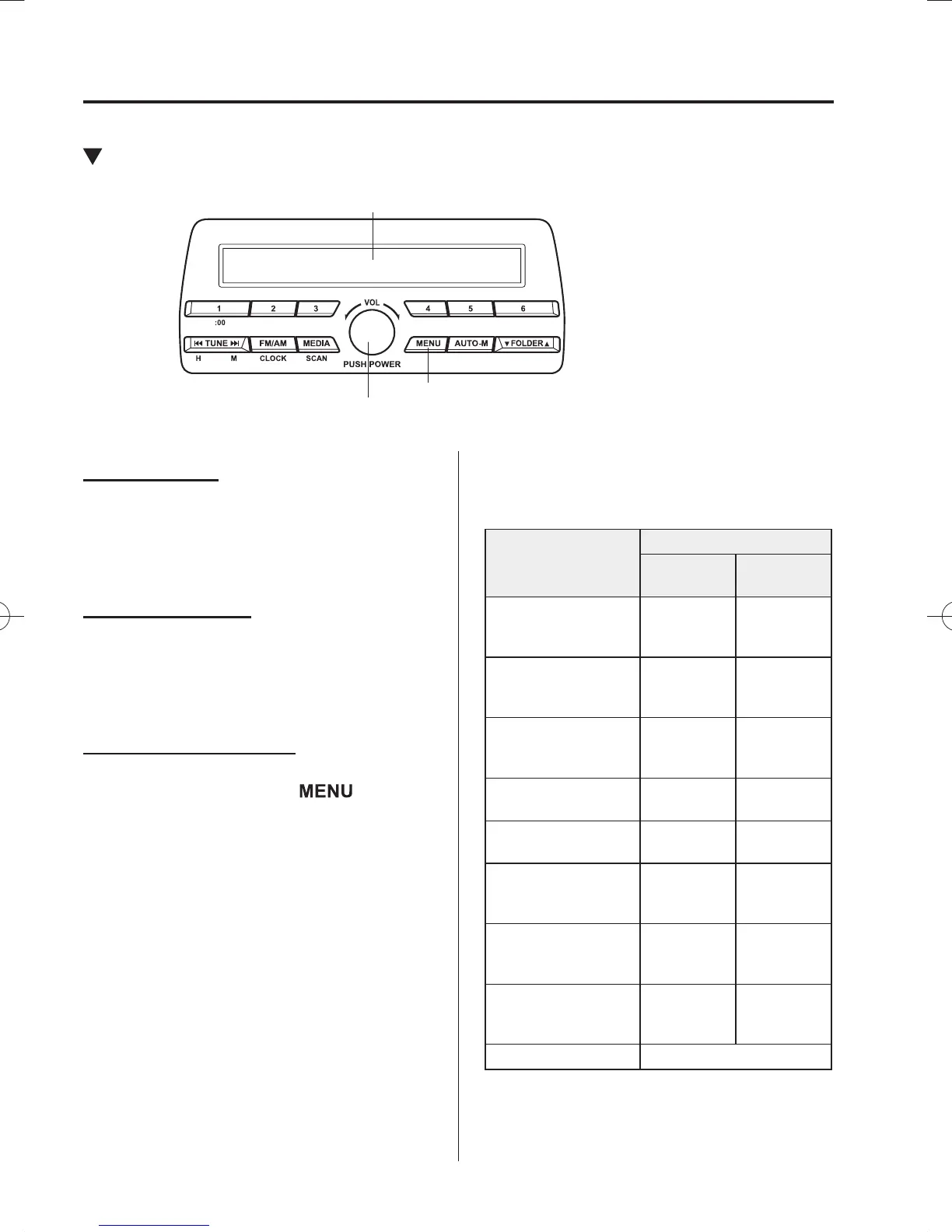
Power/Volume/Sound Controls
Power/Volume/Audio control dial
The figure is an example showing the type A unit.
Menu button
Audio display
Power ON/OFF
Switch the ignition to ACC or ON. Press
the power/volume dial to turn the audio
system on. Press the power/volume dial
again to turn the audio system off.
Volume adjustment
To adjust the volume, turn the power/
volume dial. Turn the power/volume
dial clockwise to increase volume,
anticlockwise to decrease it.
Audio sound adjustment
1. Press the menu button (
) to select
the function. The selected function will
be indicated.
2. Turn the audio control dial to adjust the
selected functions as follows:
Indication
Setting value
Turn
Anticlockwise
Turn
Clockwise
AF
*1
(Setting Alternative
Frequency (AF))
Off On
R E G
*1
(Setting Regional
Programme (REG))
Off On
A L C
(Automatic volume
adjustment)
Level
decrease
Level
increase
BASS
(Low pitch sound)
Decrease
bass
Increase
bass
T R E B
(Treble sound)
Decrease
treble
Increase
treble
FADE
(Front/back volume
balance)
Shift the
sound to the
front
Shift the
sound to the
rear
B A L
(Left/right volume
balance)
Shift the
sound to the
left
Shift the
sound to the
right
BEEP
(Audio operation
sound)
Off On
BT SETUP
*2
Select mode
/C\FCA(,'''A'FKVKQPKPFD/C\FCA(,'''A'FKVKQPKPFD



 To Next Page