Black plate (260,1)
Bose
®
Sound System-equipped model
Indication Turn Left Turn Right
OFF ON
OFF ON
Decrease
bass
Increase
bass
Decrease
treble
Increase
treble
Shift the
sound to the
front
Shift the
sound to the
rear
Shift the
sound to the
left
Shift the
sound to the
right
OFF ON
OFF ON
OFF ON
Select mode
NOTE
About 5 seconds after selecting any mode, the
volume function will be automatically selected.
To reset bass, treble, fade, and balance, press
the audio control dial for 2 seconds. The unit
will beep and “CLEAR” will be displayed.
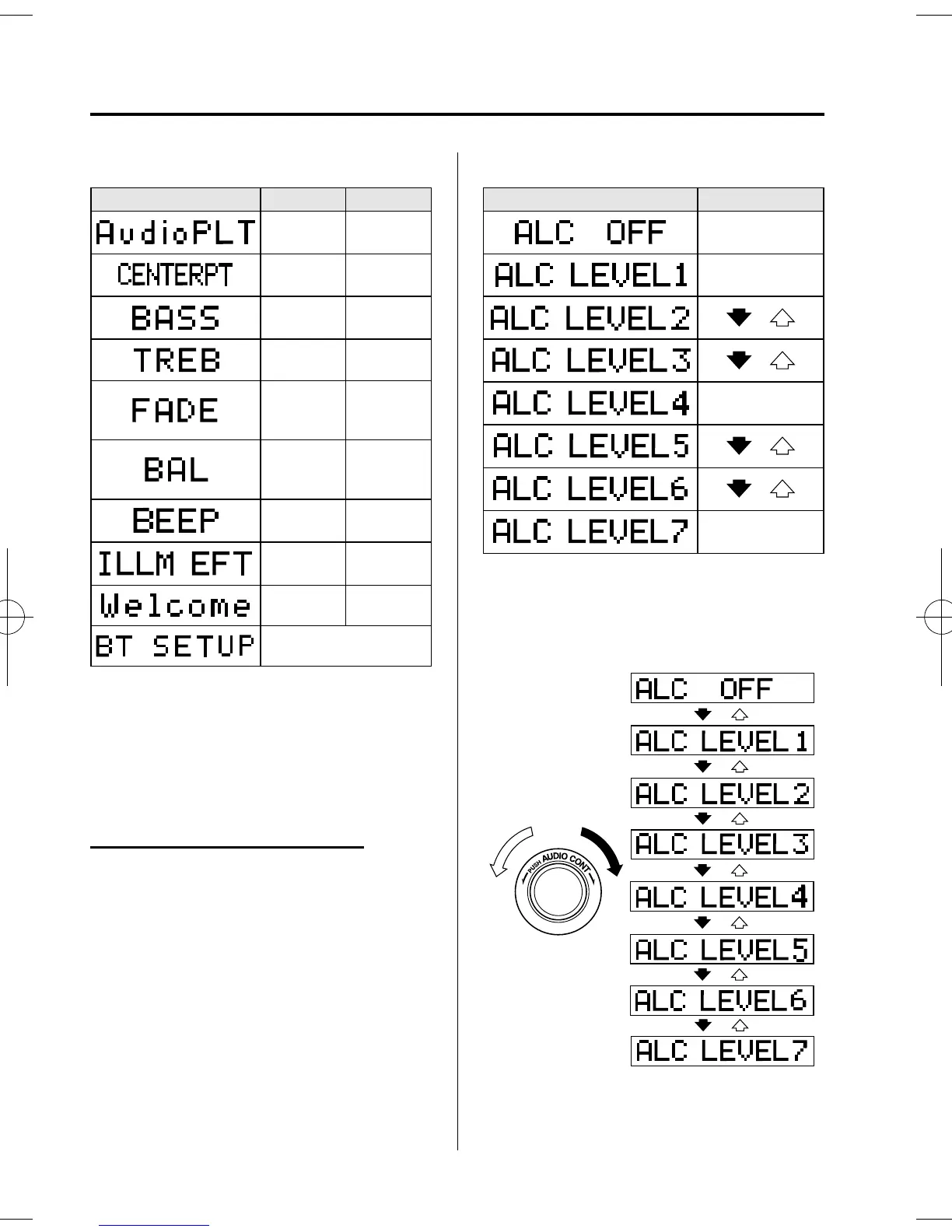
Automatic Level Control (ALC)
The autom atic level control is a feature
that automatically adjusts audio volume
and sound quality according to the vehicle
speed.
The volum e increases in accordance with
the increase in vehicle speed, and
decreases as vehicle speed decreases.
Select the desired ALC mode.
Mode Volume change
No change
Minimum
Medium
Maximum
Turn the audio control dial to select ALC
OFF or ALC LEVEL1―7 modes. The
selected mode will be indicated.
6-30
Interior Comfort
Audio System
Mazda3_8AR2-EC-09E_Edition1 Page260
Thursday, April 9 2009 4:9 PM
Form No.8AR2-EC-09E











 To Next Page