Black plate (330,1)
qAudio Display
Press the INFO switch until the AUDIO
screen is displayed. The audio operation
status is displayed.
To operate the audio system, refer to
“Audio System” (page 6-16).
qTrip Computer
The trip computer can display the
following:
l
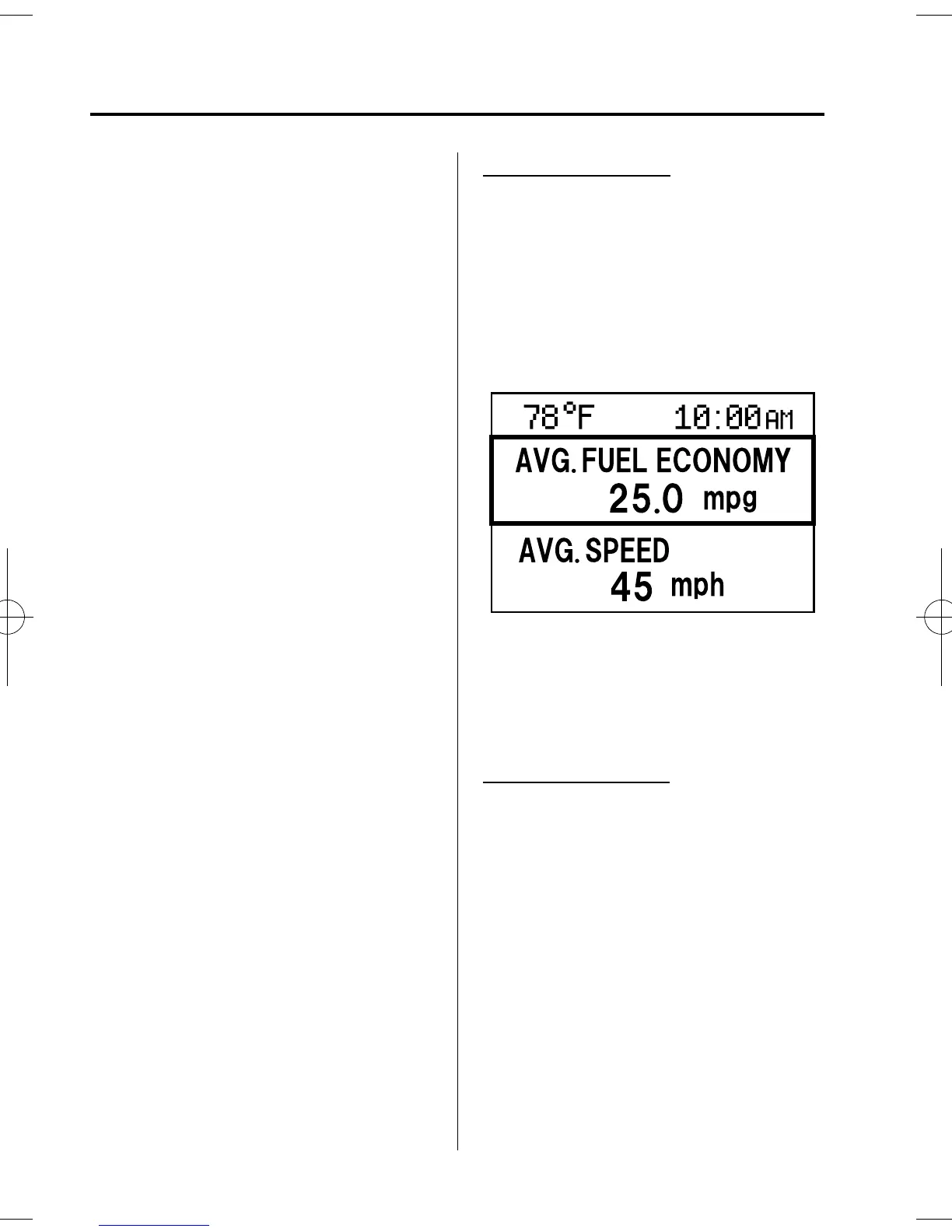
The average fuel economy.
l
The average vehicle speed.
l
The current fuel economy.
l
The approxi mate distance you can
travel on the available fuel.
1. Switch the ignition ON.
2. Press the INFO switch unti l the trip
computer screen is displayed.
If you have any problems with your trip
computer, consult an Authorized Mazda
Dealer.
Average fuel economy
This mode displays the average fuel
economy by calculati ng the total fuel
consumption and the total traveled
distance since purchasing the vehicle, re-
connecting the battery after disconnection,
or resetting the data. The average fuel
economy is calculated and displayed
every minute.
To erase the displayed data, Refer to
Settings on page 6-106.
After erasing, the calculated average fuel
economy in - - - L/100 km (- - - mpg) is
displayed after 1 minute has elapsed.
Average vehicle speed
This mode displays the average vehicle
speed by calculating the d istance and the
time traveled since connecting the battery
or resetting the data.
6-100
Interior Comfort
Interior Equipment
Mazda3_8AR2-EC-09E_Edition1 Page330
Thursday, April 9 2009 4:10 PM
Form No.8AR2-EC-09E










 To Next Page