5
–
81
Interior Features
Bluetooth
®
12. Say: [Beep] “Yes”
13. Prompt: “New name saved.”
Bluetooth
®
Audio Preparation
Bluetooth
®
audio device set-up
Bluetooth
®
audio pairing, changes,
deletions, and display of paired device
information can be performed.
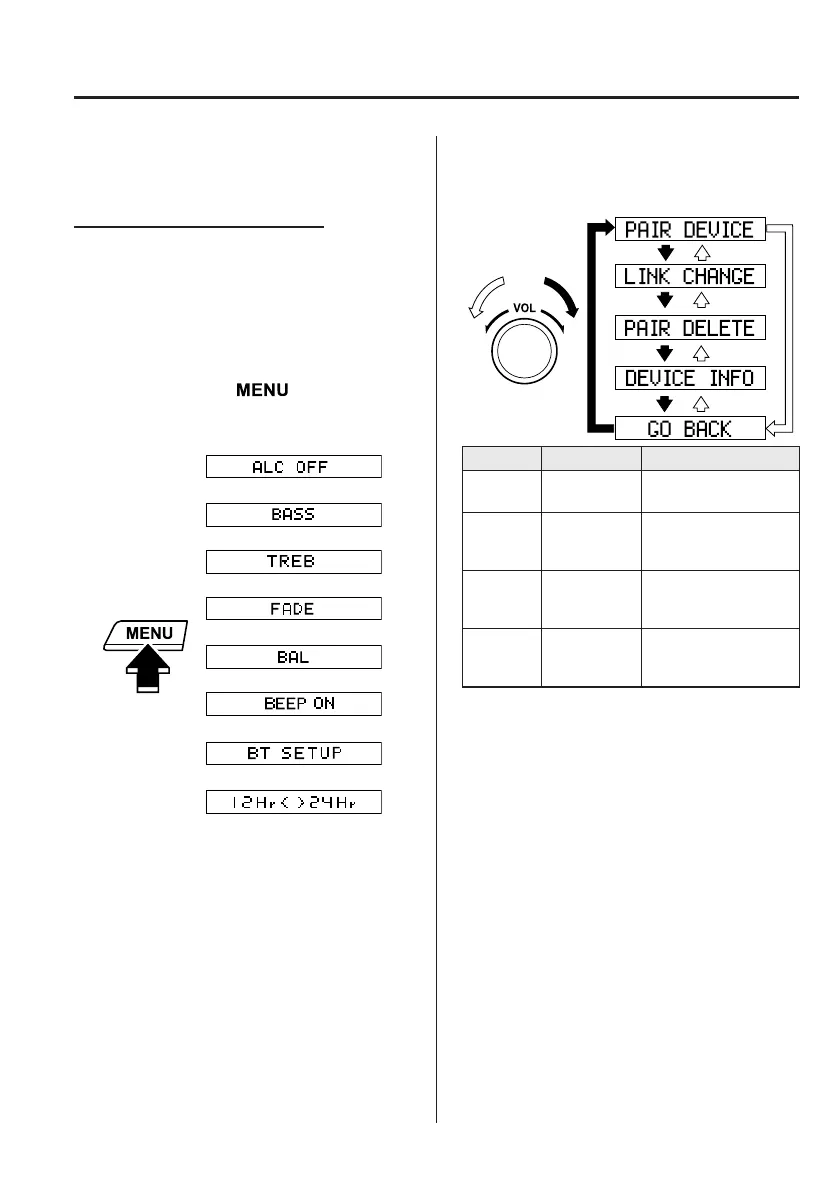
1. The mode changes as follows each time
the menu button ( ) is pressed.
Select “BT SETUP”.
*
*
* Depending on the mode selected, the
indication changes.
2. Turn the audio control dial and select a
desired mode.
Display Mode Function
PAIR
DEVICE
Pairing mode
Bluetooth
®
audio
device pairing
LINK
CHANGE
Link change
mode
Changing link to
Bluetooth
®
audio
device
PAIR
DELETE
Pairing
deletion
mode
Deleting link to
Bluetooth
®
audio
device
DEVICE
INFO
Device
information
display mode
Displaying vehicle's
Bluetooth
®
unit
information
3. Press the audio control dial to
determine the mode.
MX-5_8FR4-EA-16J_Edition1.indb 81 2016/08/11 20:29:23













 To Next Page