5
–
93
Interior Features
Bluetooth
®
NOTE
The following functions can be used for
the Hands-free or audio.
Hands-free: Phone calls and E-mail/
SMS
Audio: Bluetooth
®
audio, Pandora
®
,
Aha™, Stitcher™ radio
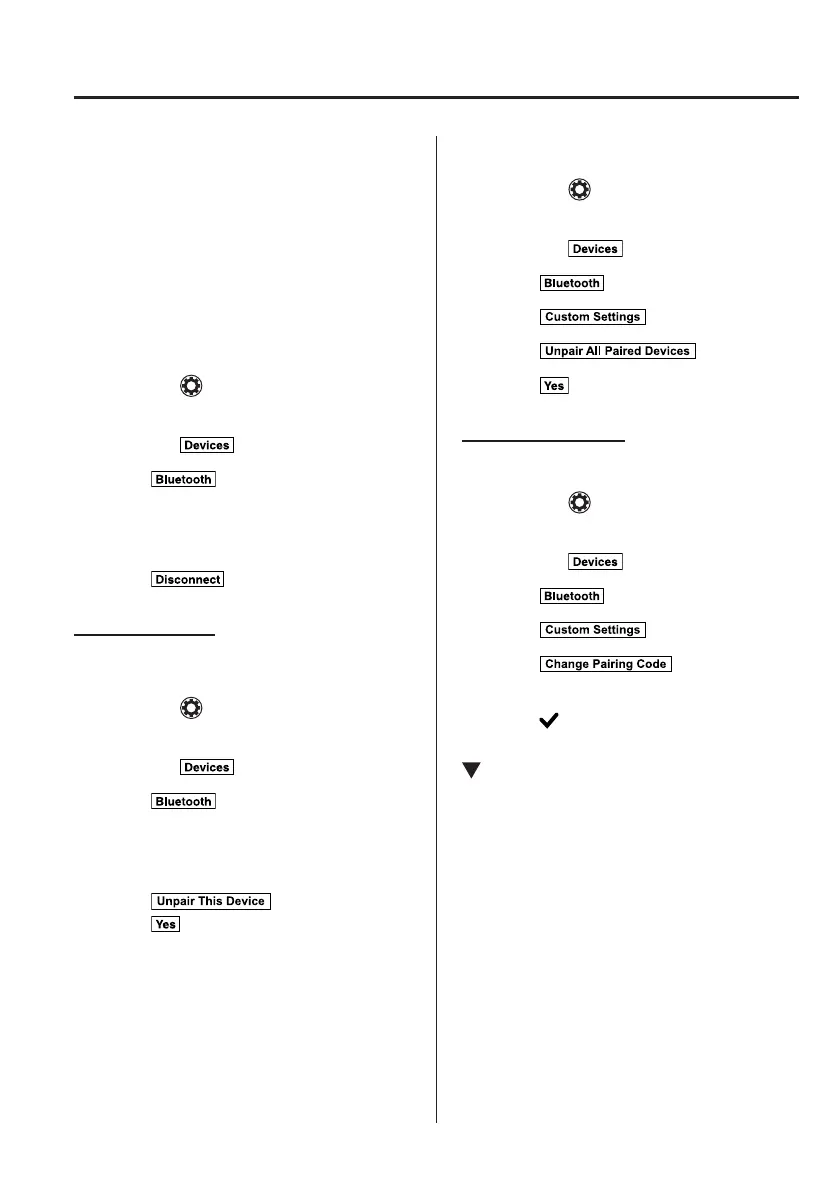
Disconnecting a device
1. Select the icon on the home screen
to display the Settings screen.
2. Select the tab.
3. Select .
4. Turn the Bluetooth
®
setting on.
5. Select the device name which is
currently connected.
6. Select .
Deleting a device
Selecting and deleting devices
1. Select the icon on the home screen
to display the Settings screen.
2. Select the tab.
3. Select .
4. Turn the Bluetooth
®
setting on.
5. Select the device name which you
would like to delete.
6. Select .
7. Select .
Deleting all devices
1. Select the icon on the home screen
to display the Settings screen.
2. Select the tab.
3. Select .
4. Select .
5. Select .
6. Select .
Changing PIN code
PIN code (4 digits) can be changed.
1. Select the icon on the home screen
to display the Settings screen.
2. Select the tab.
3. Select .
4. Select .
5. Select .
6. Input the new PIN code to be set.
7. Select .
Available Language (Type B)
The Bluetooth
®
Hands-Free System
applies to the following languages:
English
Spanish
French
Refer to Settings on page 5-53.
MX-5_8FR4-EA-16J_Edition1.indb 93 2016/08/11 20:29:25













 To Next Page